Isilon:FQDN 驗證失敗,錯誤「KRB5KRB_AP_ERR_MODIFIED」
Summary: 嘗試存取 Isilon 共用 FQDN 時發生問題。能夠通過IP訪問相同的內容。使用 FQDN 時,Kerberos 驗證會失敗,但使用 IP 位址時,NTLM 驗證會成功。「在 Kerberos 資料庫中找不到伺服器」
This article applies to
This article does not apply to
This article is not tied to any specific product.
Not all product versions are identified in this article.
Symptoms
FQDN 驗證失敗,並出現下列錯誤訊息 lsassd.log:
cluster-2: 2019-06-11T08:15:02-07:00 <30.4> cluster-2 lsass[4680]: [LwKrb5InitializeUserLoginCredentialsS4U /b/mnt/src/isilon/fsp/lwadvapi/threaded/lwkrb5.c:1394] KRB5 Error code: -1765328377 (Message: Server not found in Kerberos database)
此訊息指出;Isilon 無法辨識要求 Isilon 必須提供的其中一項服務的客戶。這會導致驗證容錯移轉 Kerberos,因為用戶端將無法獲得 Isilon 可辨識並解密的有效工單。
當您看到 Isilon [10.17.0.154] 針對工作階段設定要求向用戶端 [10.106.12.162] 傳送「KRB5KRB_AP_ERR_MODIFIED」封包時,可透過網路追蹤解釋相同的訊息:
Cause
發生這種情況可能有多種原因,但最常見的原因如下所列:
- 林中有一個具有相同SPN的帳戶。有時 KDC 會給出 KRB_S_PRINCIPAL_UNKNOWN 的錯誤,但在某些情況下,它會給出服務 [在我們的例子中是 Isilon] 無法解密的 Kerberos 票證,從而獲得KRB5KRB_AP_ERR_MODIFIED。
- 服務主體名稱位於錯誤的 Active Directory 帳戶 (電腦或使用者) 上。這又是重複SPN的情況。
- 執行此服務的 Active Directory 帳戶已更新/變更其密碼,而您因為 Active Directory 複寫延遲或 Active Directory 複寫問題而遇到此問題。
用戶端在這裡嘗試使用 FQDN 存取 Isilon 共用」mixed.isilon.com".
現在讓我們看一下此嘗試的網路跟蹤。
1.我們可以看到「mixed.isilon.com」的正確名稱解析,以及 DNS 伺服器的回應,IP 位址為 10.17.0.156 (幀 5042 &; 5049)
2。然後,計算機從域控制器獲取 TGT(請參閱 AS-REQ 和 AS-REP)(幀 5082 和 5093)
3。然後,機器請求並獲取“mixed.isilon.com”(幀 5101 和 5104)的服務票證。如您在下方所見,機器要求的 Kerberos 工單為「mixed.isilon.com」
CName 代表用戶端名稱,而 SName 代表服務名稱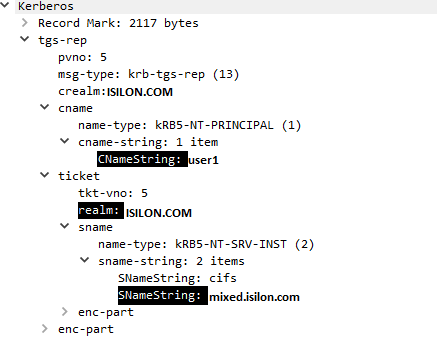
4。 接著機器會返回 Isilon,並嘗試使用剛從網域控制站取得的 Kerberos 票證 (第 5107 與 5111 幀) 進行驗證。在驗證期間,Isilon 會以KRB5KRB_AP_ERR_MODIFIED回傳 (訊框 5111)。
如果您在步驟 3 中看到用戶端從領域「ISILON.COM」取得 Kerberos 票證,而叢集在此情境中已加入其受信任網域以「CORP.COM」。這意味著 在 ISILON.COM 中註冊了重複的 SPN,Isilon 無法解密用戶端提供的票證,因為群集使用 CORP.COM 進行身份驗證;這會導致身份驗證失敗。
存在重複的 SPN:
SPN 的範例分別列在 ISILON.COM 和 CORP.COM 中
/usr/bin/isi --timeout=15 auth ads spn list ISILON.COM

     SPN

     --------------------------------------

     nfs/mixed.isilon.com

     HOST/mixed.isilon.com <===========================

     nfs/synciq.isilon.com

     HOST/synciq.isilon.com

     nfs/cifs.isilon.com

     HOST/cifs.isilon.com

     --------------------------------------

     Total: 6


     /usr/bin/isi --timeout=15 auth ads spn list CORP.COM

     SPN

     --------------------------------------

     nfs/mixed.isilon.com

     HOST/mixed.isilon.com <===========================

     nfs/synciq.isilon.com

     HOST/synciq.isilon.com

     nfs/cifs.isilon.com

     HOST/cifs.isilon.com

     --------------------------------------

     Total: 6
Resolution
在 Isilon 加入的網域和受信任網域上檢查受信任網域和重複的 SPN:
- 若要檢查受信任網域:
# isi auth ads trusts list --provider-name=<Domain name cluster is joined to>
- 列出域中存在的 SPN:
# isi auth ads spn list --provider-name=<Domain name>
如果存在重複的 SPN,且只有主要網域用於驗證,請刪除 KB OneFS 之後的 SPN:如何在 Active Directory 中找到重複的服務主體名稱 (SPN),導致 SMB 用戶端無法驗證至叢集。
Additional Information
Affected Products
IsilonProducts
IsilonArticle Properties
Article Number: 000055610
Article Type: Solution
Last Modified: 22 May 2025
Version: 3
Find answers to your questions from other Dell users
Support Services
Check if your device is covered by Support Services.