IDPA: DP4400 DIMM in memory slot is disabled or missing
Summary: The DP4400 may report a missing DIMM (Dual Inline Memory Module) during boot. Uncorrectable memory errors may also be reported on the affected slot/DIMM.
This article applies to
This article does not apply to
This article is not tied to any specific product.
Not all product versions are identified in this article.
Symptoms
Applies to:
The DP4400 may report a missing or faulty DIMM (Dual Inline Memory Module) during boot.
Uncorrectable memory errors may also be reported on the affected slot/DIMM.
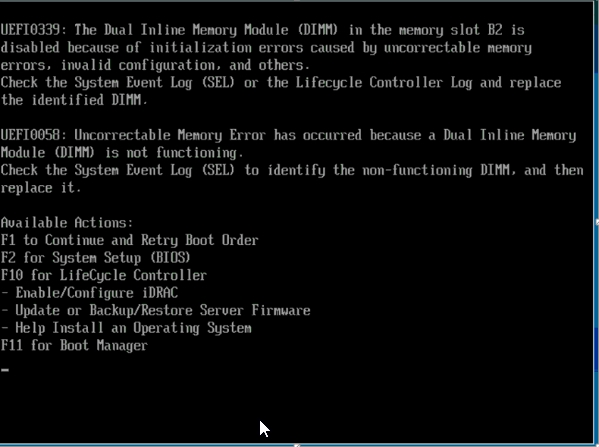
Example of Errors seen during Boot:
UEFI0339: The Dual Inline Memory Module (DIMM) in the memory slot <XX> is disabled because of initialization errors caused by uncorrectable memory errors, invalid configuration, and others.
UEFI0058: Uncorrectable Memory Error has occurred because a Dual Inline Memory Module (DIMM) is not functioning.
- DP4400 (14G Dell PowerEdge Platform - R740XD)
- All Software versions
The DP4400 may report a missing or faulty DIMM (Dual Inline Memory Module) during boot.
Uncorrectable memory errors may also be reported on the affected slot/DIMM.
Example of Errors seen during Boot:
UEFI0339: The Dual Inline Memory Module (DIMM) in the memory slot <XX> is disabled because of initialization errors caused by uncorrectable memory errors, invalid configuration, and others.
UEFI0058: Uncorrectable Memory Error has occurred because a Dual Inline Memory Module (DIMM) is not functioning.
Cause
During the power cycle of the underlying Hardware platform, the system performs a Power on Self-Test (POST).
When power is turned on, POST is the diagnostic testing sequence that a computer's basic input/output system (BIOS) runs. It is used to determine if the computer keyboard, random access memory (RAM, i.e., DIMMs), disk drives, and other hardware are working correctly.
An error found in the POST is fatal and cancels the boot process. Since the hardware checked is essential for the computer's functions.
Possible faults related to DIMM errors are:
When power is turned on, POST is the diagnostic testing sequence that a computer's basic input/output system (BIOS) runs. It is used to determine if the computer keyboard, random access memory (RAM, i.e., DIMMs), disk drives, and other hardware are working correctly.
An error found in the POST is fatal and cancels the boot process. Since the hardware checked is essential for the computer's functions.
Possible faults related to DIMM errors are:
- The DIMM may need to be reseated
- The DIMM may be faulty
- The memory slot may be faulty
Resolution
Troubleshooting Steps:
Suitably qualified personnel may attempt the following:
Contact Dell Tech Support to report this issue and a Field Engineer will be dispatched to test or replace the faulty DIMM, if needed.
Suitably qualified personnel may attempt the following:
- Reseat the affected DIMM
- Remove the faulty DIMM and swap it into another DIMM slot to see whether the fault follows the DIMM or remains on the slot.
- If the DIMM is confirmed to be faulty then it should be replaced.
- If the slot is faulty, then the motherboard (chassis) must be dispatched.
Contact Dell Tech Support to report this issue and a Field Engineer will be dispatched to test or replace the faulty DIMM, if needed.
Additional Information
DP4400 expected Memory Slot pairs are as follows:
A1+B1
A2+B2
A4+B4
A5+B5
This example of ACM showfru dimm output shows that DIMM in slot B2 is missing.
idpaacm:/usr/local/dpatools/bin # ./showfru dimm
Collecting Data............
_______________________________________________________________________
| ID| Status| Manufacturer | Part# | Serial# | Size |
|======================================================================|
| A1| OK | xxxxxxxxxxxxxxxxxxx| xxxxxxxxxxxxxxx| xxxxxxxx| 32768 MB|
| A2| OK | xxxxxxxxxxxxxxxxxxx| xxxxxxxxxxxxxxx| xxxxxxxx| 32768 MB|
| A4| OK | xxxxxxxxxxxxxxxxxxxr| xxxxxxxxxxxxxx| xxxxxxxx| 32768 MB|
| A5| OK | xxxxxxxxxxxxxxxxxxx| xxxxxxxxxxxxxxx| xxxxxxxx| 32768 MB|
| B1| OK | xxxxxxxxxxxxxxxxxxx| xxxxxxxxxxxxxxx| xxxxxxxx| 32768 MB| <<<<-----
| B4| OK | xxxxxxxxxxxxxxxxxxx| xxxxxxxxxxxxxx| xxxxxxxx| 32768 MB| <<<<----- DIMM B2 is missing.
| B5| OK | xxxxxxxxxxxxxxxxxxx| xxxxxxxxxxxxxx| xxxxxxxx| 32768 MB|
A1+B1
A2+B2
A4+B4
A5+B5
This example of ACM showfru dimm output shows that DIMM in slot B2 is missing.
idpaacm:/usr/local/dpatools/bin # ./showfru dimm
Collecting Data............
_______________________________________________________________________
| ID| Status| Manufacturer | Part# | Serial# | Size |
|======================================================================|
| A1| OK | xxxxxxxxxxxxxxxxxxx| xxxxxxxxxxxxxxx| xxxxxxxx| 32768 MB|
| A2| OK | xxxxxxxxxxxxxxxxxxx| xxxxxxxxxxxxxxx| xxxxxxxx| 32768 MB|
| A4| OK | xxxxxxxxxxxxxxxxxxxr| xxxxxxxxxxxxxx| xxxxxxxx| 32768 MB|
| A5| OK | xxxxxxxxxxxxxxxxxxx| xxxxxxxxxxxxxxx| xxxxxxxx| 32768 MB|
| B1| OK | xxxxxxxxxxxxxxxxxxx| xxxxxxxxxxxxxxx| xxxxxxxx| 32768 MB| <<<<-----
| B4| OK | xxxxxxxxxxxxxxxxxxx| xxxxxxxxxxxxxx| xxxxxxxx| 32768 MB| <<<<----- DIMM B2 is missing.
| B5| OK | xxxxxxxxxxxxxxxxxxx| xxxxxxxxxxxxxx| xxxxxxxx| 32768 MB|
Affected Products
PowerProtect DP4400, Integrated Data Protection Appliance FamilyArticle Properties
Article Number: 000056286
Article Type: Solution
Last Modified: 16 Jun 2025
Version: 7
Find answers to your questions from other Dell users
Support Services
Check if your device is covered by Support Services.