Avamar: 19.1 VM backups jobs displays smaller bytes value than VM provisioned size
Summary: Avamar 19.1 Activity 'Progress bytes' column for Virtual Machine (VM) backups jobs displays a smaller bytes value than the VM provisioned size.
This article applies to
This article does not apply to
This article is not tied to any specific product.
Not all product versions are identified in this article.
Symptoms
In Avamar 19.1 completed VM backups report only for the sections of virtual disks scanned.
In previous Avamar releases the backup reported size would be the same as the virtual disk-provisioned size.
For example, the below VM has:
- Disk 1 which is a 256 MB thick disk with lazy zeroed provisioning
- Disk 2 which is a 1 TB disk using thin provisioning.
In VMware's HTML5 client the total storage usages size is 260.5 MB in vSphere, which most of the storage usage coming from the first disk. 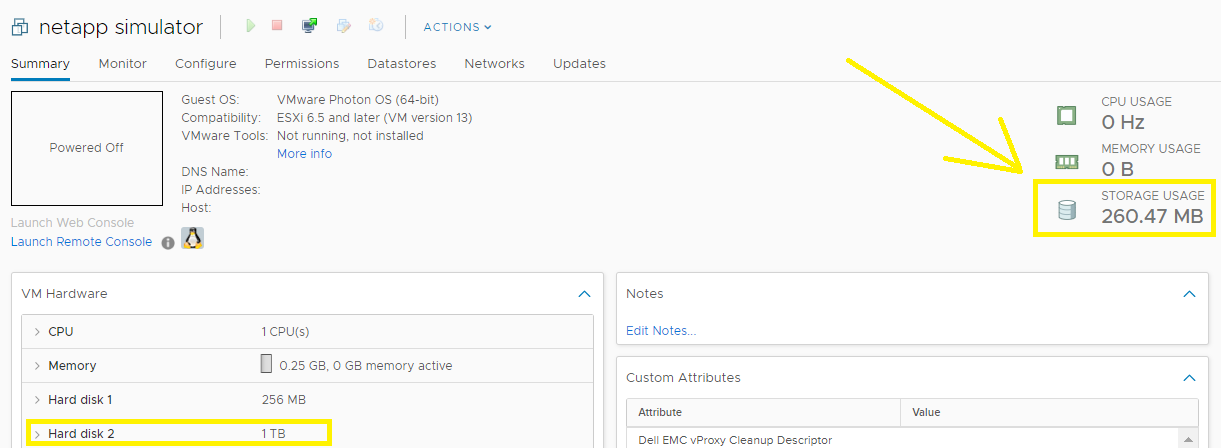
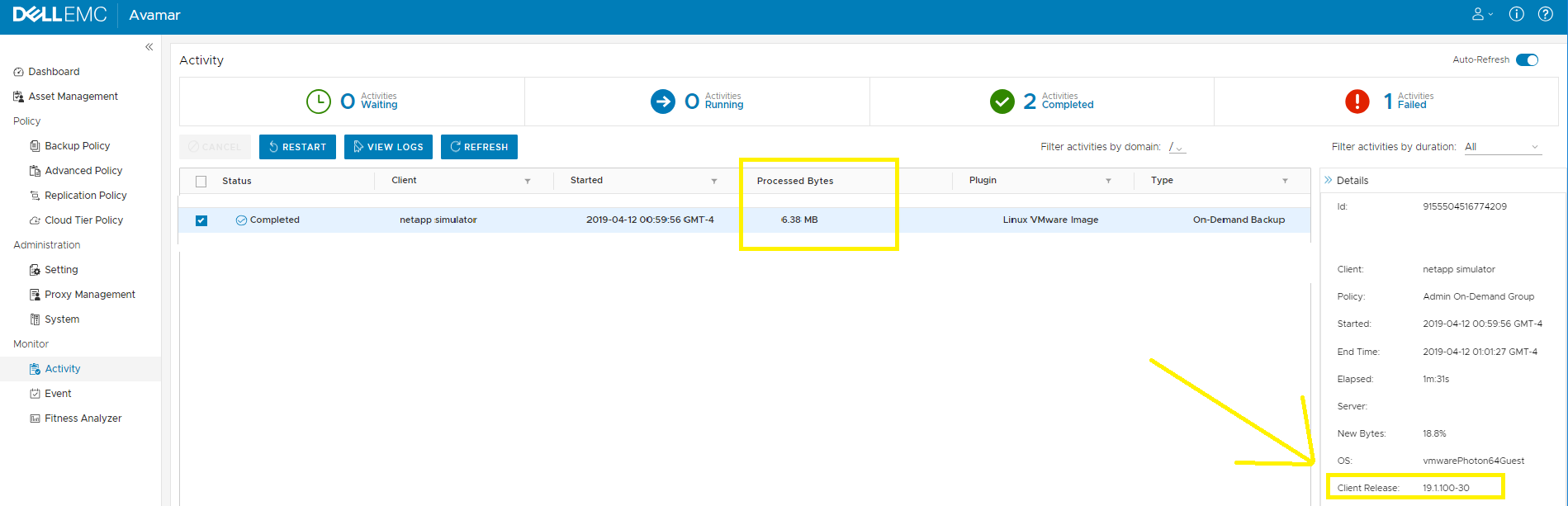
When Avamar 19.1+ proxy backup completes, the 'Bytes Progress' is even only 6.38 MB.
The same VM backed up later using older proxy release shows as 1 TB.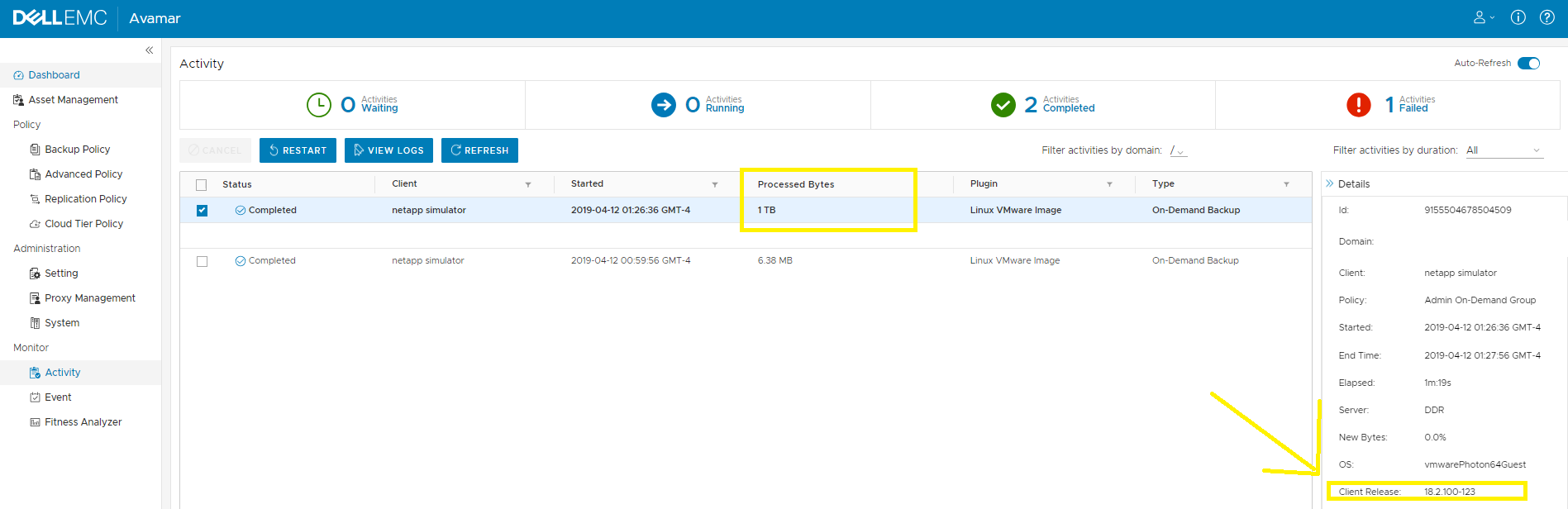
Cause
Avamar version 19.1 added new Front-End Total Bytes (FETB) feature that removes any white spaces in a virtual disk from being reported and in capacity reports. This will allow the Avamar administrator to forecast more accurately what capacity will be needed in the future.
During image backup
- When Change Block Tracking (CBT) is enabled (during initial level 0 backup)
- The avamar image plug-in asks VMware which blocks for a given virtual disk are in use.
- Or which blocks have changed since the last backup (level 1) and only scanned those parts of the virtual disk.
- This call works for any thin disk or thick disk with a lazy zeroed method (default option).
Avamar Software version 7.5.x and VM exclude feature is enabled.
- If the VM exclude features is enabled (exclude page files, deleted files, or user specified files) the parts of the virtual disk containing those files can also be skipped.
Avamar Software version 19.1 behaves the following way:
- At the end of a backup job, the proxy sends 'wrap up' message indicating the jobs is completed along with a new value called "totalfilebytes." This new totalfilebytes does not include any CBT white spaces or excluded contents, and avamar uses this value to report on instead of legacy totalprotectedbytes.
In the image plug-in log, a line info like this is displayed.
<log-name-avvcbimagew.log>:
avvcbimage Info <44008>: totalfilebytes is '6684672'
The workover summary file shows
<log-name.alg>
<SUMMARY totalprotectedbytes="1099780077247"  ...  totalfilebytes="6684672" totalfilecount="0" affectExcludeSetting="" filebytes_excluded="0">
In mcserver.log.0
<timestampe> [pool-9-thread-30#726] com.avamar.mc.cr.bcConnection.readClientMessage
FINE: Cl->MC <proxyhostname>:42620<workorder exitcode="20" pid="vmimagel" numbytes="0" ack="yes" type="wrapup" startUTC="<timestamp>" " ...  totalprotectedbytes="1099780077247" .... totalfilebytes="6684672"
Resolution
The new lower 'bytes progress' for image backup is not a defect and can be safely ignored.
To avoid confusion with the same VM reporting different backup sizes between jobs. Dell Technologies recommends against running mixed proxy client releases since the bytes display different depending on which proxy accepts the backup job.
Affected Products
AvamarProducts
Avamar, Avamar Client for VMwareArticle Properties
Article Number: 000057047
Article Type: Solution
Last Modified: 03 Sep 2025
Version: 5
Find answers to your questions from other Dell users
Support Services
Check if your device is covered by Support Services.