Dell EMC Unity: L'espansione di un datastore VMware con una macchina virtuale in esecuzione ha esito negativo (correggibile dall'utente)
Summary: L'espansione di un datastore VMware in Unity con una macchina virtuale in esecuzione genera un errore: Failed: Il server di storage ha rilevato un errore interno nell hypervisor VMware. Please review the event logs on the VMware hypervisor side. (Codice errore: 0x5c0000c) ...
This article applies to
This article does not apply to
This article is not tied to any specific product.
Not all product versions are identified in this article.
Symptoms
Quando si espande un datastore VMware in Unity, mentre una VM è in esecuzione sul datastore, si verificano i seguenti errori:
Stato generale: Completato con problemi.
...
Gestione del file system host utilizzando blocchi: Fallito.
Dettagli:
Fallito: Il server di storage ha rilevato un errore interno nell hypervisor VMware. Please review the event logs on the VMware hypervisor side. (codice errore: 0x5c0000c).
Fallito: Lo storage server non è riuscito a trovare la LUN specificata nell hypervisor VMware. (Codice errore: 0x5c00009).
Risultato rollback: Task was rolled back and marked as failed. This is because some tasks failed or SP rebooted during task execution. (Error Code: 0x100a).


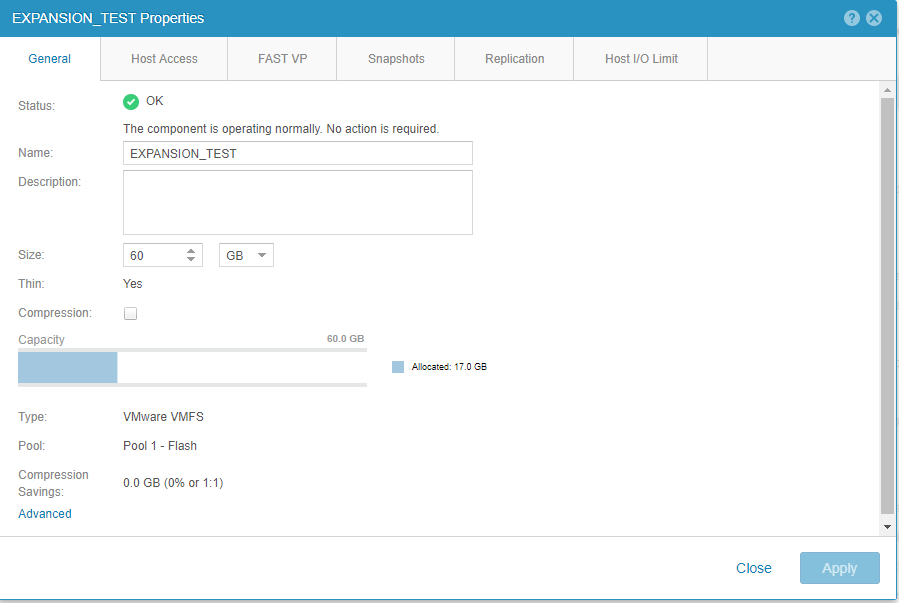
La nuova capacità del datastore si riflette in Unisphere,
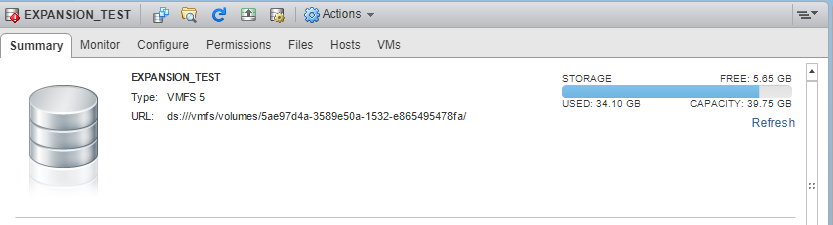
ma non in vSphere:
Cause
Modifica della logica da vSphere 6.0 a vSphere 6.5.
L'operazione di espansione è diventata asincrona in vSphere 6.5 e vSphere osserva le nuove dimensioni della LUN troppo tardi (dopo un tentativo di ridimensionamento del file system).
L'operazione di espansione è diventata asincrona in vSphere 6.5 e vSphere osserva le nuove dimensioni della LUN troppo tardi (dopo un tentativo di ridimensionamento del file system).
Resolution
L'errore si verifica solo quando si espande DS con VM in esecuzione. Per riflettere l'aumento di capacità sul lato vSphere, aumentare manualmente utilizzando la funzione "Increase Datastore Capacity" in vSphere
Questo problema è stato risolto in Dell EMC Unity 4.4.X OE e versioni successive.
Questo problema è stato risolto in Dell EMC Unity 4.4.X OE e versioni successive.
Affected Products
Dell EMC Unity FamilyProducts
Dell Unity 300, Dell EMC Unity 300F, Dell EMC Unity 350F, Dell EMC Unity XT 380, Dell EMC Unity XT 380F, Dell EMC Unity 400, Dell EMC Unity 400F, Dell EMC Unity 450F, Dell EMC Unity XT 480, Dell EMC Unity XT 480F, Dell EMC Unity 500
, Dell EMC Unity 500F, Dell EMC Unity 550F, Dell EMC Unity 600, Dell EMC Unity 600F, Dell EMC Unity 650F, Dell EMC Unity XT 680, Dell EMC Unity XT 680F, Dell EMC Unity XT 880, Dell EMC Unity XT 880F, Dell EMC Unity Family |Dell EMC Unity All Flash, Dell EMC Unity Family, Dell EMC Unity Hybrid
...
Article Properties
Article Number: 000057325
Article Type: Solution
Last Modified: 11 Dec 2025
Version: 3
Find answers to your questions from other Dell users
Support Services
Check if your device is covered by Support Services.