Dell Unity:無法驗證登入資料「請檢查您的網路設定」和「需要支援登入資料以取得合約資訊」
Summary: 無法驗證認證。「請檢查您的網路設定」和「需要支援登入資料以取得合約資訊」(使用者可修正)
This article applies to
This article does not apply to
This article is not tied to any specific product.
Not all product versions are identified in this article.
Symptoms
Unisphere UI 會顯示下列警示: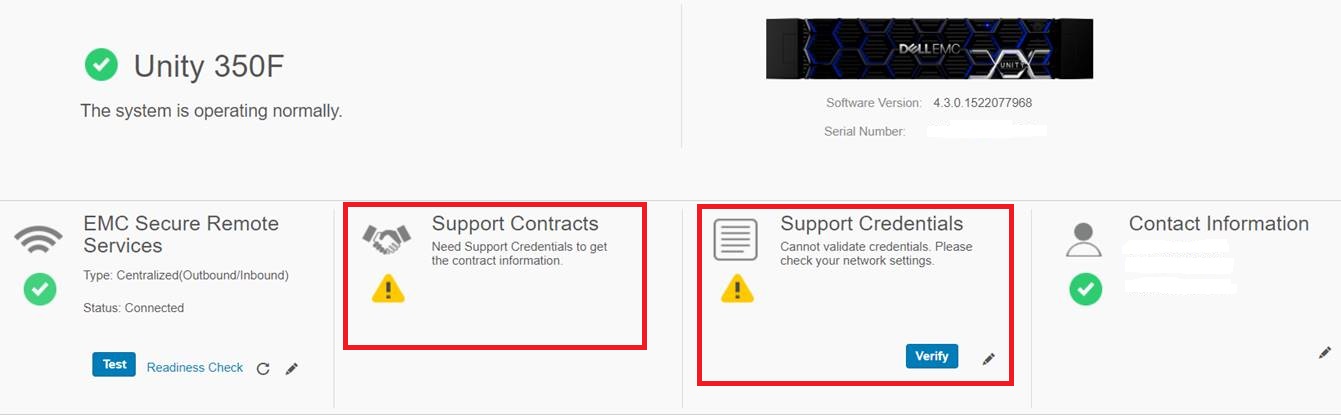
支援認證
Cannot validate credentials. Please check your network settings.
支援合約
Need Support Credentials to get the contract information.
嘗試檢查支援登入資料時會顯示下列警示:
The support credentials have been saved, but cannot be validated because the
SSO server is unreachable. Check your network setting like DNS, proxy, firewall
and etc. Click Verify to check your credentials again after network problem is solved.
You could still atttempt configuring ESRS even not validated.

我們也已檢查下列 Dell Unity 網路文章:
Dell Unity:ESRS 主要知識文章 (使用者可修正) (需要 Dell 支援帳戶才能檢視此文章)
Dell Unity:網路連接埠完整清單。(使用者可修正)
Cause
陣列上的 DNS 設定不正確
Resolution
設定陣列的 DNS 伺服器。
這可以從 Unisphere UI > 設定 > 管理 > DNS 伺服器完成。
範例:
Additional Information
若要從 UEMCLI 設定陣列管理 DNS 伺服器,請使用 /net/dns/config。
範例
service@(none) spa:~> uemcli /net/dns/config --help
Storage system address: 127.0.0.1
Storage system port: 443
HTTPS connection
指定預設的 DNS 伺服器位址。
動作:
[Set]
/net/dns/config set { -nameServer <value> | -auto | -noNameServer }

[Show]
/net/dns/config show [ -output { nvp | csv | table [ -wrap ] } ] [ { -brief | -detail | -filter <value> } ]
service@(none) spa:~>

service@(none) spa:~>uemcli /net/dns/config set -nameServer 192.168.xxx.12
注意:若要從命令行配置多個 DNS 伺服器,請在名稱伺服器之間使用逗號。
service@(none) spa:~>uemcli /net/dns/config set -nameServer 192.168.xxx.12,192.168.xxx.13
為變更建立的 Unity 工作在 uemcli 檢視中的標題為「修改 DNS 設定」,在 UI 檢視中的標題為「
修改 DNS 伺服器」。
Affected Products
Dell EMC Unity 350FProducts
Dell EMC Unity 350F, Dell EMC Unity Family |Dell EMC Unity All Flash, Dell EMC Unity Family, Dell EMC Unity HybridArticle Properties
Article Number: 000057354
Article Type: Solution
Last Modified: 14 Oct 2025
Version: 5
Find answers to your questions from other Dell users
Support Services
Check if your device is covered by Support Services.