Dell Unity:无法验证凭据“请检查您的网络设置”和“需要支持凭据以获取合同信息”
Summary: 无法验证凭据。“请检查您的网络设置”和“需要支持凭据以获取合同信息”(用户可纠正)
This article applies to
This article does not apply to
This article is not tied to any specific product.
Not all product versions are identified in this article.
Symptoms
Unisphere UI 显示以下警报:
支持凭据
Cannot validate credentials. Please check your network settings.
支持合同
Need Support Credentials to get the contract information.
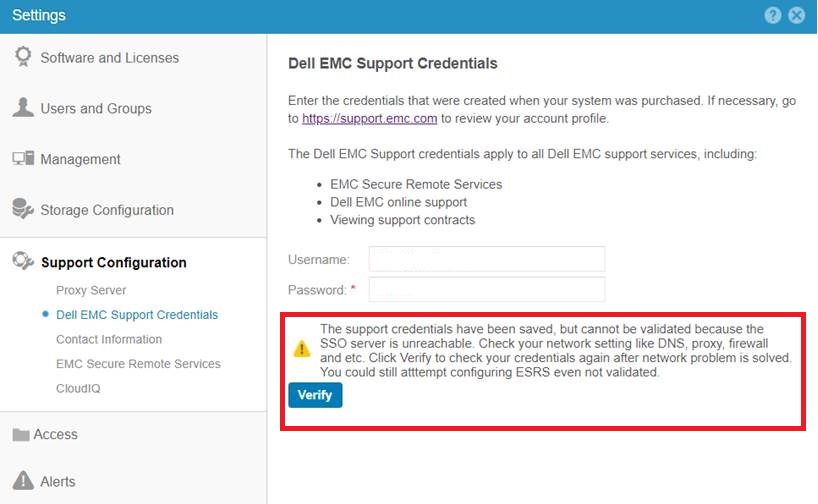
尝试检查支持凭据时显示以下警报:
The support credentials have been saved, but cannot be validated because the
SSO server is unreachable. Check your network setting like DNS, proxy, firewall
and etc. Click Verify to check your credentials again after network problem is solved.
You could still atttempt configuring ESRS even not validated.
还检查了以下 Dell Unity 网络文章:
Dell Unity:ESRS Master 知识库文章(用户可纠正)(需要戴尔支持帐户才能查看本文)
Dell Unity:网络端口完整列表。(用户可纠正)
Cause
在阵列上未正确配置 DNS
Resolution
为阵列配置 DNS 服务器。
这可以从 Unisphere UI > Settings > Management > DNS Servers中完成。
示例:
Additional Information
要从 UEMCLI 配置阵列管理 DNS 服务器,请使用 /net/dns/config。
示例
service@(none) spa:~> uemcli /net/dns/config --help
Storage system address: 127.0.0.1
Storage system port: 443
HTTPS connection
指定默认 DNS 服务器地址。
行动:
[Set]
/net/dns/config set { -nameServer <value> | -auto | -noNameServer }

[Show]
/net/dns/config show [ -output { nvp | csv | table [ -wrap ] } ] [ { -brief | -detail | -filter <value> } ]
service@(none) spa:~>

service@(none) spa:~>uemcli /net/dns/config set -nameServer 192.168.xxx.12
注意:要从命令行配置多个 DNS 服务器,请在名称服务器之间使用逗号。
service@(none) spa:~>uemcli /net/dns/config set -nameServer 192.168.xxx.12,192.168.xxx.13
为更改创建的 Unity 作业任务在 uemcli 视图中的标题为“Modifying DNS Settings”,在 UI 视图中的标题为“
Modify DNS Server”。
Affected Products
Dell EMC Unity 350FProducts
Dell EMC Unity 350F, Dell EMC Unity Family |Dell EMC Unity All Flash, Dell EMC Unity Family, Dell EMC Unity HybridArticle Properties
Article Number: 000057354
Article Type: Solution
Last Modified: 14 Oct 2025
Version: 5
Find answers to your questions from other Dell users
Support Services
Check if your device is covered by Support Services.