Dell EMC VNX File : Async Replication Management is broken following a TLSv1 Disablement (Dell EMC Correctable)
Summary: Async Replication might be broken when TLSv1 is disabled on a control station
This article applies to
This article does not apply to
This article is not tied to any specific product.
Not all product versions are identified in this article.
Symptoms
TLSv1 disablement can potentially impact NAS CIC (control station to control station communications ,as tested in nas_cel -exec command)
TLSv1 disablement is described in the 231 release notes :
https://support.emc.com/docu88443_VNX-Operating-Environment-for-Block-05.33.009.5.231,-File-8.1.9.232,-and-EMC-Unisphere-1.3.9.1.0231-Release-Notes.pdf
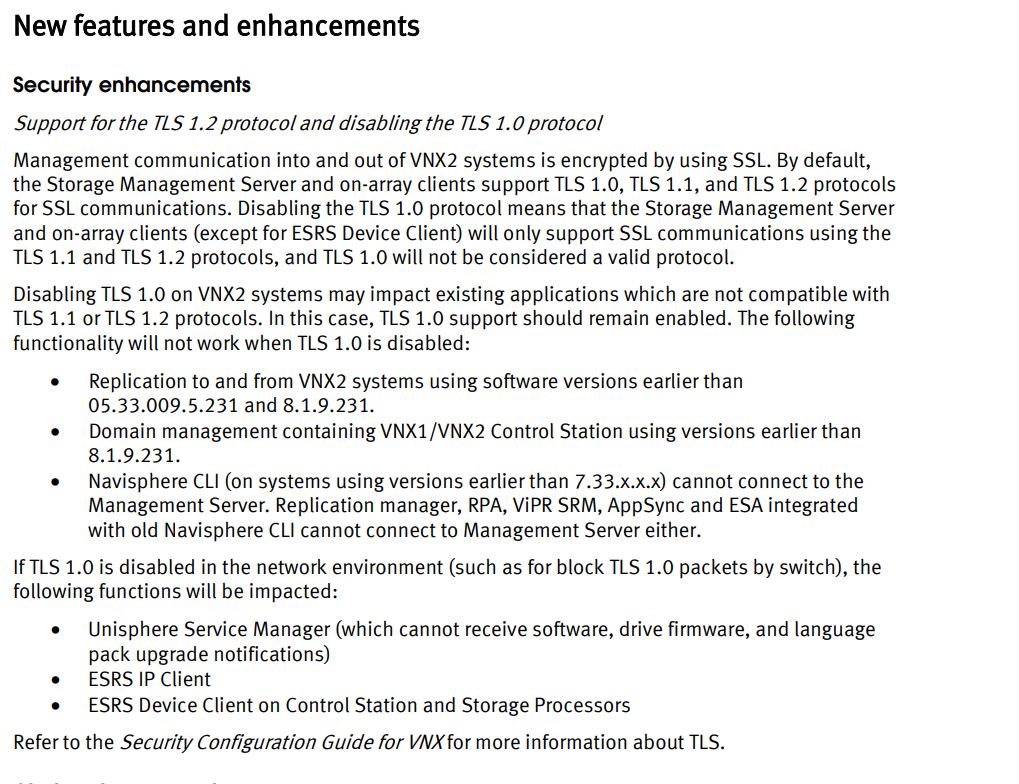
A customer who recently upgraded to VNX File OE 8.1.9.236 has also disabled TLSv1 on the control station for security measures.
This activity is described under knowledge base article VNX: TLSv1.1 and TLSv1.2 support for VNX2
Performing any management operations changes will result in error as in the following example:
[root@xxxx7001x nasadmin]# nas_replicate -create 3432_REP -source -fs 3432 -destination -fs 3432 -interconnect rut_dm2-nyc_dm2 -max_time_out_of_sync 10 -background
Error 13690601568: Cannot access any Data Mover on the remote system, xxxx7001x
As the second system was not yet upgraded , replication operations became broken as a result .
[root@SBCS nasadmin]# nas_cel -interconnect -list
id name source_server destination_system destination_server
20001 loopback server_2 SBCS server_2
...
20005 DM2-M&I_DM2 server_2 M&I unknown
....
[root@SBCS nasadmin]# nas_cel -l
id name owner mount_dev channel net_path CMU
0 SBCS 0 xxx.xxx.1.220 APM00100
...
18 M&I 0 xxx.xxx.1.90 APM001234
[root@SBCS nasadmin]# nas_cel -exec id=18 "nas_server -list"
Error 2241: Remote command failed:
remote celerra = M&I
remote exit status = 0
remote error = 4446
remote message = CURL Error code: 35, Error message: Unknown SSL protocol error in connection to xxx.xxx.1.90:443
TLSv1 disablement is described in the 231 release notes :
https://support.emc.com/docu88443_VNX-Operating-Environment-for-Block-05.33.009.5.231,-File-8.1.9.232,-and-EMC-Unisphere-1.3.9.1.0231-Release-Notes.pdf
A customer who recently upgraded to VNX File OE 8.1.9.236 has also disabled TLSv1 on the control station for security measures.
This activity is described under knowledge base article VNX: TLSv1.1 and TLSv1.2 support for VNX2
Performing any management operations changes will result in error as in the following example:
[root@xxxx7001x nasadmin]# nas_replicate -create 3432_REP -source -fs 3432 -destination -fs 3432 -interconnect rut_dm2-nyc_dm2 -max_time_out_of_sync 10 -background
Error 13690601568: Cannot access any Data Mover on the remote system, xxxx7001x
As the second system was not yet upgraded , replication operations became broken as a result .
To confirm, please use the following Commands:
[root@SBCS nasadmin]# nas_cel -interconnect -list
id name source_server destination_system destination_server
20001 loopback server_2 SBCS server_2
...
20005 DM2-M&I_DM2 server_2 M&I unknown
....
[root@SBCS nasadmin]# nas_cel -l
id name owner mount_dev channel net_path CMU
0 SBCS 0 xxx.xxx.1.220 APM00100
...
18 M&I 0 xxx.xxx.1.90 APM001234
[root@SBCS nasadmin]# nas_cel -exec id=18 "nas_server -list"
Error 2241: Remote command failed:
remote celerra = M&I
remote exit status = 0
remote error = 4446
remote message = CURL Error code: 35, Error message: Unknown SSL protocol error in connection to xxx.xxx.1.90:443
Cause
TLSv1 is completely disabled following these actions:
[root@M&I_CS0 nasadmin]# nas_tls -set tls1Disabled -Force
Configure on Block side
Reboot server_2
[root@M&I_CS0 nasadmin]# /nasmcd/getreason
10 - slot_0 primary control station
11 - slot_1 secondary control station
0 - slot_2 reset
5 - slot_3 contacted
[root@M&I_CS0 nasadmin]# /nasmcd/getreason
10 - slot_0 primary control station
11 - slot_1 secondary control station
5 - slot_2 contacted
5 - slot_3 contacted
[root@M&I_CS0 nasadmin]# openssl s_client -connect 127.0.0.1:443
CONNECTED(00000003)
15855:error:140790E5:SSL routines:SSL23_WRITE:ssl handshake failure:s23_lib.c:188:
[root@M&I_CS0 nasadmin]# grep SSLPro /nas/http/conf/httpd.conf
SSLProtocol all -SSLv2 -SSLv3 -TLSv1
[root@M&I_CS0 nasadmin]# nas_tls -set tls1Disabled -Force
Configure on Block side
Reboot server_2
[root@M&I_CS0 nasadmin]# /nasmcd/getreason
10 - slot_0 primary control station
11 - slot_1 secondary control station
0 - slot_2 reset
5 - slot_3 contacted
[root@M&I_CS0 nasadmin]# /nasmcd/getreason
10 - slot_0 primary control station
11 - slot_1 secondary control station
5 - slot_2 contacted
5 - slot_3 contacted
[root@M&I_CS0 nasadmin]# openssl s_client -connect 127.0.0.1:443
CONNECTED(00000003)
15855:error:140790E5:SSL routines:SSL23_WRITE:ssl handshake failure:s23_lib.c:188:
[root@M&I_CS0 nasadmin]# grep SSLPro /nas/http/conf/httpd.conf
SSLProtocol all -SSLv2 -SSLv3 -TLSv1
Resolution
Resolution:
Upgrade both Source and Destination VNX File to latest GA codes 8.1.9.231 or above so the code itself can support TLSV1 disablement while allowing TLS1.1/1.2 instead
Workaround:
Restore TLSv1 support using nas_tls command: (Requires DM2 reboot as seen below)
[root@M&I_CS0 nasadmin]# nas_tls -set tls1Enabled -Force
Configure on Block side
Reboot server_2
[root@M&I_CS0 nasadmin]# grep SSLPro /nas/http/conf/httpd.conf
SSLProtocol all -SSLv2 -SSLv3
[
[root@M&I_CS0 nasadmin]# openssl s_client -connect 127.0.0.1:443
CONNECTED(00000003)
depth=1 /O=VNX Certificate Authority/CN=M&I_CS0
verify error:num=19:self signed certificate in certificate chain
verify return:0
---
Certificate chain
...
Upgrade both Source and Destination VNX File to latest GA codes 8.1.9.231 or above so the code itself can support TLSV1 disablement while allowing TLS1.1/1.2 instead
Workaround:
Restore TLSv1 support using nas_tls command: (Requires DM2 reboot as seen below)
[root@M&I_CS0 nasadmin]# nas_tls -set tls1Enabled -Force
Configure on Block side
Reboot server_2
[root@M&I_CS0 nasadmin]# grep SSLPro /nas/http/conf/httpd.conf
SSLProtocol all -SSLv2 -SSLv3
[
[root@M&I_CS0 nasadmin]# openssl s_client -connect 127.0.0.1:443
CONNECTED(00000003)
depth=1 /O=VNX Certificate Authority/CN=M&I_CS0
verify error:num=19:self signed certificate in certificate chain
verify return:0
---
Certificate chain
...
Additional Information
Any VNX2 to VNX1 or other legacy may be completely broken as a result of the TLSv1 disablement.
VNX1 will not support nas_tls.
A disabled TLSv1 env. will display in nas_tls as follows:
[root@M&I_CS0 nasadmin]# nas_tls -info
TLS versions supported on Block side
ManagementServer : TLSv1.1 TLSv1.2
SP LDAP : TLSv1.1 TLSv1.2
TLS versions supported on File side
CS LDAP : TLSv1.2
Apache : TLSv1.1 TLSv1.2
ECOM : TLSv1.1 TLSv1.2
server_2 : TLSv1.1 TLSv1.2
server_3 : TLSv1.1 TLSv1.2
VNX1 will not support nas_tls.
A disabled TLSv1 env. will display in nas_tls as follows:
[root@M&I_CS0 nasadmin]# nas_tls -info
TLS versions supported on Block side
ManagementServer : TLSv1.1 TLSv1.2
SP LDAP : TLSv1.1 TLSv1.2
TLS versions supported on File side
CS LDAP : TLSv1.2
Apache : TLSv1.1 TLSv1.2
ECOM : TLSv1.1 TLSv1.2
server_2 : TLSv1.1 TLSv1.2
server_3 : TLSv1.1 TLSv1.2
Affected Products
VNX2 SeriesProducts
VNX1 Series, VNX2 SeriesArticle Properties
Article Number: 000058585
Article Type: Solution
Last Modified: 30 May 2024
Version: 3
Find answers to your questions from other Dell users
Support Services
Check if your device is covered by Support Services.