Avamar: Avamar DB2 Archivelog backups may fail with "avtar Error <42869>: Unable to determine account path" or "avtar Error <5126>: Login error 74: Account not found in the Avamar database"
Summary: Avamar DB2 Archivelog backups may fail with "avtar Error <42869>: Unable to determine account path" or "avtar Error <5126>: Login error 74: Account not found in the Avamar database"
This article applies to
This article does not apply to
This article is not tied to any specific product.
Not all product versions are identified in this article.
Symptoms
DB2 Archivelog backup fails.
Error messages in avtar logs:
avtar Error <42869>: Unable to determine account path or avtar Error <5126>: Login error 74: Account not found in the Avamar database or avtar Error <5126>: Login error 66: User not found in Avamar database
Cause
The DB2 option file is missing either --id or --path parameters or one of those parameters is set to an incorrect value.
Resolution
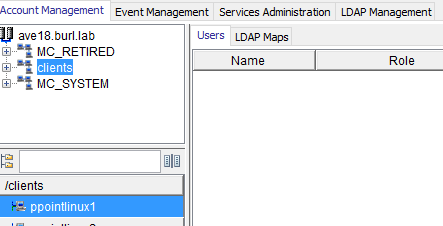
Check that the following parameters are set in the option file: --id and --path
Example:
--id=MCUser
--path=/clients/ppointlinux1
--password=Changeme_1
--sysdir=/usr/local/avamar/etc
--logfile=/tmp/cli_test/avdb2.log
--avtar-before-after-days-search=1
--vardir=/usr/local/avamar/var
--debug=true
--id=MCUser
--path=/clients/ppointlinux1
--password=Changeme_1
--sysdir=/usr/local/avamar/etc
--logfile=/tmp/cli_test/avdb2.log
--avtar-before-after-days-search=1
--vardir=/usr/local/avamar/var
--debug=true
Make sure --path matches the path seen in the Avamar GUI (the software is case sensitive):
Affected Products
AvamarProducts
Avamar, Avamar Plug-in for IBM DB2Article Properties
Article Number: 000062943
Article Type: Solution
Last Modified: 20 May 2025
Version: 3
Find answers to your questions from other Dell users
Support Services
Check if your device is covered by Support Services.