Avamar: Command-line SQL backup successful but MC GUI Activity shows "No DD"
Summary: Avamar: Command-line SQL backup successful but MC GUI Activity shows "No DD"
This article applies to
This article does not apply to
This article is not tied to any specific product.
Not all product versions are identified in this article.
Symptoms
Command-line SQL backup is successful, but the Activity Window in the Avamar Administrator GUI Activity shows "No DD."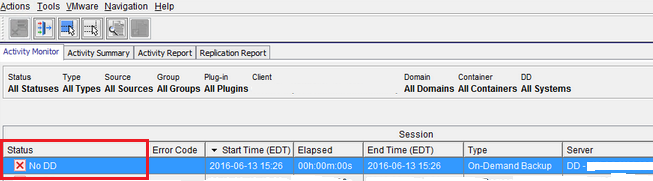
However, the backup log shows no errors and the backup is available for restore in the Avamar Administrator.
Cause
Command-line SQL backup being sent to Data Domain.
Resolution
If it is not necessary for command-line backups to show up in the Activity Window of the Avamar Administrator console, then add the --send-adhoc-request=false parameter either to the command-line syntax or to the avsql.cmd file in the avs\var directory.
Alternatively, remove the --ddr and --ddr-index flags to send the backup to Avamar.
If a permanent resolution is required, please open a new case with EMC support and reference this KB article.
Alternatively, remove the --ddr and --ddr-index flags to send the backup to Avamar.
If a permanent resolution is required, please open a new case with EMC support and reference this KB article.
Affected Products
AvamarProducts
Avamar, Avamar Plug-in for SQLArticle Properties
Article Number: 000063024
Article Type: Solution
Last Modified: 05 Mar 2025
Version: 4
Find answers to your questions from other Dell users
Support Services
Check if your device is covered by Support Services.