VxRail: VMware Tools 설치가 실패하고 SVGA 드라이버를 자동으로 설치하지 못함
Summary: VMCI(Virtual Machine Communication Interface Driver) 드라이버를 설치하는 동안 VMware Tools 설치 또는 업그레이드가 실패할 수 있습니다.
This article applies to
This article does not apply to
This article is not tied to any specific product.
Not all product versions are identified in this article.
Symptoms
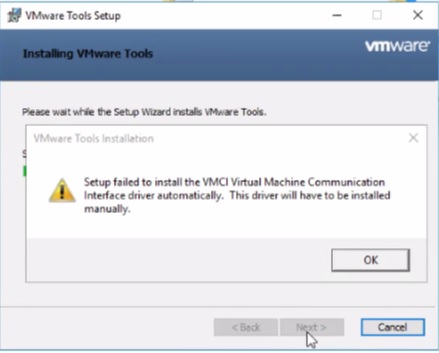
가능한 오류:
Setup failed to install the VMCI Virtual Machine Communication Interface driver automatically. This driver will have to be installed manually.
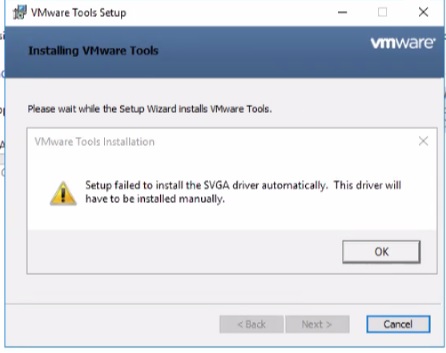
Setup failed to install the SVGA driver automatically. This driver will have to be installed manually.
Cause
- 안티바이러스가 활성화되어 있고 Device Install Server 서비스가 실행되고 있지 않으면 Windows에서 VMware Tools 설정이 실패할 수 있습니다.
- 이 문제는 Microsoft 루트 인증 기관이 신뢰할 수 있는 루트 기관 저장소에서 누락되거나 해지된 경우에 발생할 수 있습니다.
Resolution
아래에 두 가지 해결 방법이 있습니다. 위의 원인을 확인하고 아래 단계를 완료하십시오.
해결책 1:
VM에서 안티바이러스 소프트웨어를 비활성화하여 문제를 해결합니다.
해결책 2:
이 문제를 해결하려면 아래 단계를 사용하여 루트 인증서를 추가합니다.
-
VMCI 드라이버 문제로 인해 VMware Tools 설치 또는 업그레이드가 실패하는 가상 머신에서 C:\Windows\System32\drivers로 이동합니다.
-
vmci.sys 마우스 오른쪽 버튼으로 클릭하고 PropertiesDigital>SignaturesSignature>list를 선택합니다.
-
이 드라이버에 서명하는 데 사용된 인증서가 표시됩니다. 하나 이상의 인증서일 수 있습니다.
-
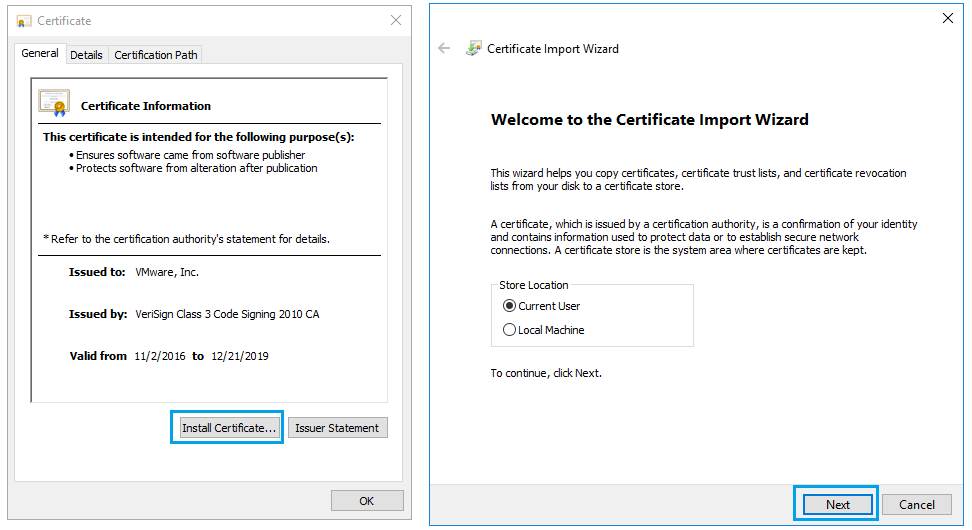
이름을 선택하고 세부 정보를 클릭한 다음 인증서 보기를 선택합니다.

-
Install Certificate>Next를 클릭하고 마법사를 완료합니다.
-
"가져오기에 성공했습니다."라는 메시지가 표시됩니다. "디지털 서명" 아래의 모든 "서명 목록"에 대해 동일한 단계를 반복합니다.
-
VMware Tools 업그레이드 또는 설치를 다시 시도합니다.
Additional Information

Affected Products
VxRail Appliance Family, VxRail Appliance Series, VxRail SoftwareArticle Properties
Article Number: 000063245
Article Type: Solution
Last Modified: 24 Dec 2024
Version: 5
Find answers to your questions from other Dell users
Support Services
Check if your device is covered by Support Services.