VxRail:VMware 工具安裝失敗,並顯示:無法自動安裝 SVGA 驅動程式
Summary: 安裝虛擬機器通訊介面驅動程式 (VMCI) 驅動程式時,VMware 工具的安裝或升級可能會失敗。
This article applies to
This article does not apply to
This article is not tied to any specific product.
Not all product versions are identified in this article.
Symptoms
可能的錯誤:
Setup failed to install the VMCI Virtual Machine Communication Interface driver automatically. This driver will have to be installed manually.

Setup failed to install the SVGA driver automatically. This driver will have to be installed manually.

Cause
- 如果已啟用防毒軟體,且裝置安裝伺服器服務未執行,則可能會導致 Windows 上的 VMware 工具設定失敗。
- 如果Microsoft根證書頒發機構從受信任的根頒發機構存儲中丟失或吊銷,則可能會發生這種情況。
Resolution
下面有兩種解決方案,請檢查上述原因並完成以下步驟。
解決方案 1:
在虛擬機器上停用防毒軟體以修正問題。
解決方案 2:
若要解決此問題,請使用下列步驟新增根憑證:
-
從 VMware 工具無法安裝或升級並出現 VMCI 驅動程式問題的虛擬機器,前往 C:\Windows\System32\drivers。
-
右鍵按下vmci.sys,然後選擇 屬性>數位簽名>清單。
-
您將看到用於為此驅動程式簽名的證書。可能是一或多個憑證。
-
選取名字,按一下詳細資料,然後選取 檢視憑證。
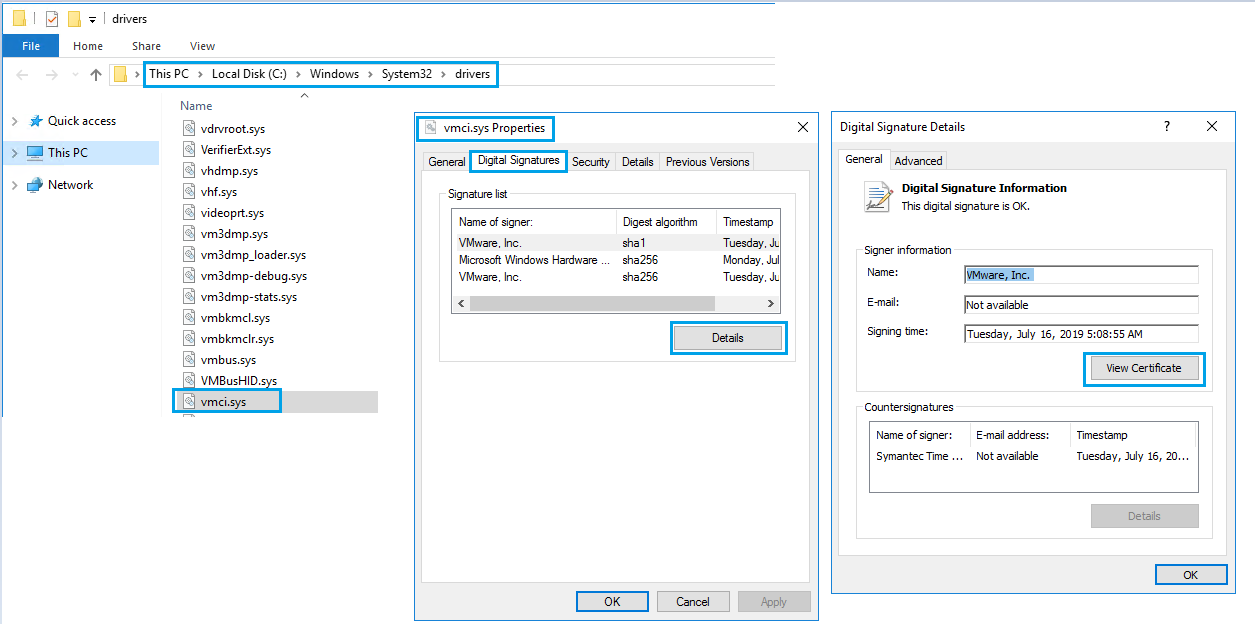
-
按一下接下來安裝憑證>,並完成精靈。

-
您會看到「導入成功」。對「數字簽名」下的所有「簽名清單」重複相同的步驟。
-
重試 VMware 工具升級或安裝。
Additional Information

Affected Products
VxRail Appliance Family, VxRail Appliance Series, VxRail SoftwareArticle Properties
Article Number: 000063245
Article Type: Solution
Last Modified: 24 Dec 2024
Version: 5
Find answers to your questions from other Dell users
Support Services
Check if your device is covered by Support Services.