VxRail:VMware Tools 安装失败,并显示: 无法自动安装 SVGA 驱动程序
Summary: 在安装虚拟机通信接口驱动程序 (VMCI) 驱动程序时,VMware Tools 安装或升级可能会失败。
This article applies to
This article does not apply to
This article is not tied to any specific product.
Not all product versions are identified in this article.
Symptoms
可能的错误:
Setup failed to install the VMCI Virtual Machine Communication Interface driver automatically. This driver will have to be installed manually.

Setup failed to install the SVGA driver automatically. This driver will have to be installed manually.

Cause
- 如果启用了防病毒功能,但设备安装服务器服务未运行,则可能会导致 Windows 上的 VMware 工具安装失败。
- 如果 Microsoft 根证书颁发机构缺失或从受信任的根颁发机构存储中吊销,则可能会发生这种情况。
Resolution
下面有两种解决方案,检查上述原因并完成以下步骤。
解决方案 1:
禁用虚拟机上的防病毒软件以修复此问题。
解决方案 2:
要解决此问题,请使用以下步骤添加根证书:
-
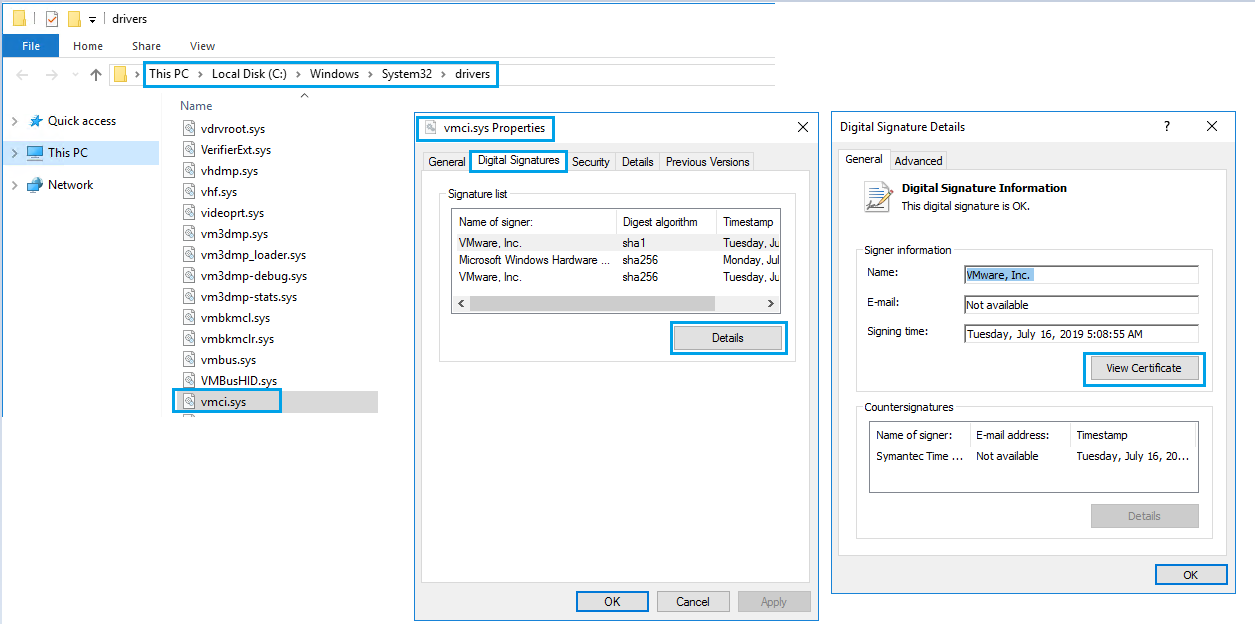
在因 VMCI 驱动程序问题导致 VMware Tools 安装或升级失败的虚拟机中,转至 C:\Windows\System32\drivers。
-
右键单击vmci.sys并选择 属性>数字签名>签名列表。
-
您会看到用于为此驱动程序签名的证书。它可能是一个或多个证书。
-
选择名字,单击详细信息,然后选择 查看证书。
-
单击 安装证书>Next 并完成向导。

-
您会看到“导入成功”。对“数字签名”下的所有“签名列表”重复相同的步骤。
-
重试 VMware Tools 升级或安装。
Additional Information

Affected Products
VxRail Appliance Family, VxRail Appliance Series, VxRail SoftwareArticle Properties
Article Number: 000063245
Article Type: Solution
Last Modified: 24 Dec 2024
Version: 5
Find answers to your questions from other Dell users
Support Services
Check if your device is covered by Support Services.