SourceOneのオフライン アクセス:サイレント インストールでSourceOne取得サーバーの詳細が入力されない
Summary: サイレント インストールでSourceOne取得サーバーの詳細が入力されない。
This article applies to
This article does not apply to
This article is not tied to any specific product.
Not all product versions are identified in this article.
Symptoms
サイレント インストールでSourceOne取得サーバーの詳細が入力されない。
次のようにオフライン アクセス サイレント インストール コマンドを実行した後(管理者権限でCMDを使用):
ES1_OfflineAccess.exe/s /v"/qn /l*v C:\EMC_OfflineAccess.log INSTALLDIR=C:\Users\s1service\Downloads EX_TCP_PRIMARY_SERVER=Retrieval_SourceOne EX_TCP_PRIMARY_PORT=8001 EX_TCP_SECONDARY_SERVER=Retrieval_SourceOne EX_TCP_SECONDARY_PORT=8002 REBOOT=ReallySuppress"
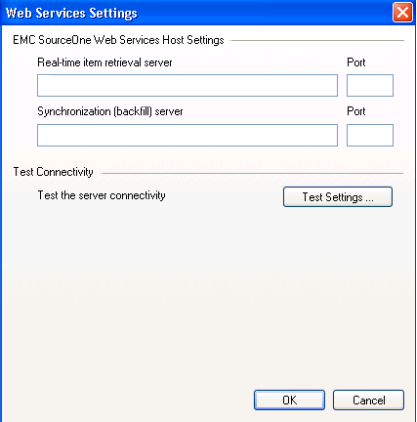
インストールは問題なく完了しますが、[Offline Access Configuration]設定を確認すると、[ Server Settings ]にSourceOne取得サーバーに関する詳細が含まれていません。
Cause
上記の状態の問題の原因は、Windowsフォルダーに対する権限がないことに関連しています。CMDを実行しているユーザーは、C:\Windowsに対する読み取り権限のみを持っていました。
ローカル管理者グループのメンバーに読み取り専用権限しかない場合
次のエントリは、Procmon トレースにあります。
RegSvr32.exe 20812 CreateFileMapping C:\Windows\System32\regsvr32.exe リーダーのみでファイルがロック されている SyncType: SyncTypeCreateSection、PageProtection: PAGE_EXECUTE|PAGE_NOCACHE
ローカル管理者グループのメンバーに読み取り専用権限しかない場合
次のエントリは、Procmon トレースにあります。
RegSvr32.exe 20812 CreateFileMapping C:\Windows\System32\regsvr32.exe リーダーのみでファイルがロック されている SyncType: SyncTypeCreateSection、PageProtection: PAGE_EXECUTE|PAGE_NOCACHE
Resolution
オフライン アクセスのサイレント インストールを実行する場合は、少なくともフォルダーC:\Windowsに対する読み取り/書き込み権限を持つアカウントを使用してCMDにログインする必要があります。
Affected Products
SourceOneProducts
SourceOne, SourceOne Email ManagementArticle Properties
Article Number: 000063458
Article Type: Solution
Last Modified: 02 Jun 2025
Version: 4
Find answers to your questions from other Dell users
Support Services
Check if your device is covered by Support Services.