Avamar: VMware gjenoppretting på filnivå – FLR – mislykkes: "VMDK-filnavnet er ugyldig eller finnes"
Summary: Følgende feil vises når du prøver å kjøre Avamar VMware File Level Restore (FLR): "VMDK-filnavnet er ikke gyldig eller til stede. Kontroller at proxyen ble riktig registrert ved hjelp av den støttede metoden i dokumentasjonen." ...
This article applies to
This article does not apply to
This article is not tied to any specific product.
Not all product versions are identified in this article.
Symptoms
Når du prøver FLR på Avamar med Data Domain, vises følgende feil:
"VMDK-filnavnet er ugyldig eller finnes. Kontroller at proxyen ble riktig registrert ved hjelp av den støttede metoden i dokumentasjonen."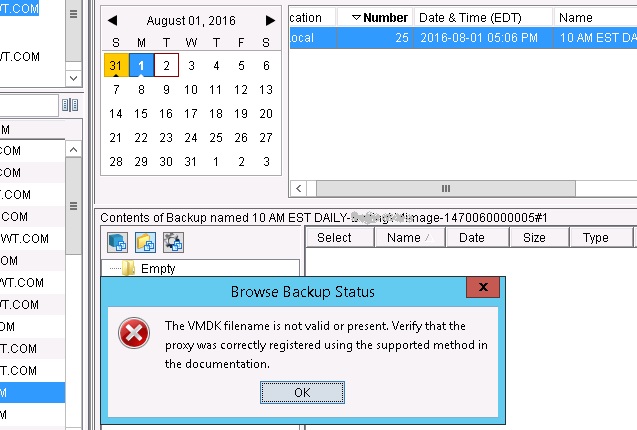
/usr/local/avamar/var/axionfs<uuuid>.log filen fra proxyen som brukes til sikkerhetskopien, viser en feil som ligner på denne:
axionfs Info <10539>: Connecting to Data Domain Server "dd01.example.com."(2)  (LSU: avamar-1399865928, User:"DDBOOST")
 axionfs Warning <18125>: Calling DDR_OPEN returned result code:5341 message:SSL library error
 axionfs Error <10542>: Data Domain server "dd01.example.com" open failed DDR result code: 5341, desc: SSL library error
 axionfs Error <10512>: Problem logging into the DDR server index:2
 axionfs Error <11014>: Could not open DDR for /, #397
 axionfs Warning <19046>: Unable to get ddr_files.xml for clientid <cid> and backupid 131129312174737330
 axionfs Warning <19047>: Unable to retrieve DDR info for 'VMConfiguration'
 axionfs Error <0000>: Cannot iterate contents of '': Unable to set location information in direlem_iter for 'VMConfiguration'
Filen /usr/local/avamarclient/bin/MountPoint/MountMgr.log viser en lignende feiltype:
Unable to find backed up VMDK images for: /mnt/dunion/vc.example/com/VirtualMachines/VM_UBNsDNRK5H3GJv7yiD7ynQ/by-number/0000001
Cause
FLR-prosessen kan kobles til Avamar for å hente metadata, men kan ikke koble til datadomenet på grunn av et SSL-problem.
Dette problemet er beskrevet i. Avamar sikkerhetskopierer eller gjenoppretter til eller fra datadomenet mislykkes eller fullføres med unntak og feilmeldinger som nevner "5341" og "SSL library error"
Resolution
I proxyen som brukes for FLR, legger du til følgende flagg i filen axionfs.cmd under banen /usr/local/avamar/var/:
--ddr-auth-enabled=false
--ddr-encrypt-strength=none
--ddr-auth-mode=3
Du kan alternativt legge til følgende alternativ i gjenopprettingsalternativene:
[avtar]ddr-auth-enabled=false
[avtar]ddr-encrypt-strength=none
Hvis du vil gjøre dette ved hjelp av Avamar-brukergrensesnittet, gjør du følgende:
Select the More Options button at the bottom right on the restore window
Select the More button near the bottom right.
Put this in Enter Attribute - [avtar]ddr-auth-enabled
Put this in Under Enter Attribute Value: false
Click the + button
Put this in Enter Attribute - [avtar]ddr-encrypt-strength
Put this in Under Enter Attribute Value: none
Click the + button
Click OK, Then OK again.
Additional Information
En lignende løsning finnes i Avamar-sikkerhetskopieringer eller -gjenopprettinger til eller fra datadomenet mislykkes eller fullføres, med unntak med feilmeldinger som nevner "5341" og "SSL library error"
Affected Products
AvamarProducts
Avamar, Data DomainArticle Properties
Article Number: 000064138
Article Type: Solution
Last Modified: 03 Oct 2025
Version: 4
Find answers to your questions from other Dell users
Support Services
Check if your device is covered by Support Services.