Avamar: VMware filnivååterställning – FLR – misslyckas: "VMDK-filnamnet är inte giltigt eller finns"
Summary: Följande fel visas när du försöker köra Avamar VMware File Level Restore (FLR): "VMDK-filnamnet är inte giltigt eller finns. Kontrollera att proxyn har registrerats korrekt med hjälp av den metod som stöds i dokumentationen." ...
This article applies to
This article does not apply to
This article is not tied to any specific product.
Not all product versions are identified in this article.
Symptoms
Vid försök med FLR på Avamar med Data Domain visas följande fel:
"VMDK-filnamnet är inte giltigt eller finns. Kontrollera att proxyn har registrerats korrekt med hjälp av den metod som stöds i dokumentationen."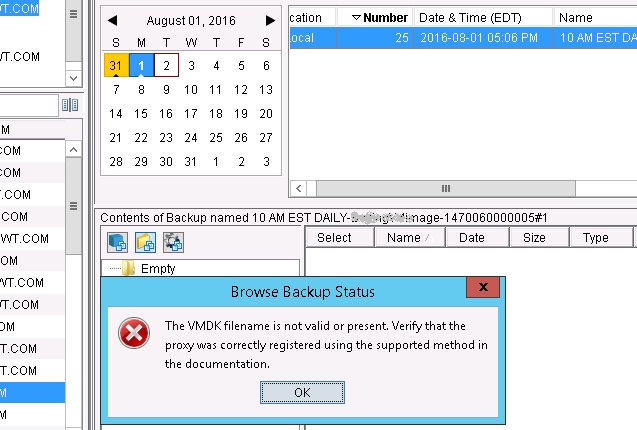
Filen /usr/local/avamar/var/axionfs<uuuid>.log från proxyn som används för säkerhetskopieringen visar ett fel som liknar detta:
axionfs Info <10539>: Connecting to Data Domain Server "dd01.example.com."(2)  (LSU: avamar-1399865928, User:"DDBOOST")
 axionfs Warning <18125>: Calling DDR_OPEN returned result code:5341 message:SSL library error
 axionfs Error <10542>: Data Domain server "dd01.example.com" open failed DDR result code: 5341, desc: SSL library error
 axionfs Error <10512>: Problem logging into the DDR server index:2
 axionfs Error <11014>: Could not open DDR for /, #397
 axionfs Warning <19046>: Unable to get ddr_files.xml for clientid <cid> and backupid 131129312174737330
 axionfs Warning <19047>: Unable to retrieve DDR info for 'VMConfiguration'
 axionfs Error <0000>: Cannot iterate contents of '': Unable to set location information in direlem_iter for 'VMConfiguration'
Filen /usr/local/avamarclient/bin/MountPoint/MountMgr.log visar en liknande feltyp:
Unable to find backed up VMDK images for: /mnt/dunion/vc.example/com/VirtualMachines/VM_UBNsDNRK5H3GJv7yiD7ynQ/by-number/0000001
Cause
FLR-processen kan ansluta till Avamar för att hämta metadata men kan inte ansluta till Data Domain på grund av ett SSL-problem.
Det här problemet beskrivs i. Avamar-säkerhetskopieringar eller -återställningar till eller från Data Domain misslyckas eller slutförs med undantag för felmeddelanden som nämner "5341" och "SSL-biblioteksfel"
Resolution
I proxyn som används för FLR lägger du till följande flaggor i axionfs.cmd filen under sökvägen /usr/local/avamar/var/:
--ddr-auth-enabled=false
--ddr-encrypt-strength=none
--ddr-auth-mode=3
Du kan också lägga till följande alternativ i återställningsalternativen:
[avtar]ddr-auth-enabled=false
[avtar]ddr-encrypt-strength=none
Om du vill göra det via Avamar-användargränssnittet följer du dessa steg:
Select the More Options button at the bottom right on the restore window
Select the More button near the bottom right.
Put this in Enter Attribute - [avtar]ddr-auth-enabled
Put this in Under Enter Attribute Value: false
Click the + button
Put this in Enter Attribute - [avtar]ddr-encrypt-strength
Put this in Under Enter Attribute Value: none
Click the + button
Click OK, Then OK again.
Additional Information
En liknande lösning finns i Avamar-säkerhetskopieringar eller -återställningar till eller från Data Domain misslyckas eller slutförs med undantag där felmeddelanden nämns "5341" och "SSL-biblioteksfel"
Affected Products
AvamarProducts
Avamar, Data DomainArticle Properties
Article Number: 000064138
Article Type: Solution
Last Modified: 03 Oct 2025
Version: 4
Find answers to your questions from other Dell users
Support Services
Check if your device is covered by Support Services.