Dell EMC Unity: The ESXi server discovered using vCenter is showing IP address instead of hostname
Summary: Dell EMC Unity: The ESXi server discovered using vCenter is showing IP address instead of hostname
This article applies to
This article does not apply to
This article is not tied to any specific product.
Not all product versions are identified in this article.
Symptoms
User has questions on why the ESXi servers discovered using vCenter are showing IP addresses instead of hostname in "ACCESS" -- " VMware" -- "ESXi Hosts" while the auto-discovered ESXi servers are showing hostname in "ACCESS" -- Hosts .
Cause
The ESXi servers in vCenter were added using IP address.
Resolution
The ESXi server discovered using vCenter shows hostname or IP address depending on how it was added in vCenter.
If the ESXi server is added in vCenter using IP address, the ESXi server discovered using vCenter in Dell EMC Unity shows the IP adress.
If the ESXi server is added in vCenter using the hostname, the ESXi server discovered using vCenter in Dell EMC Unity shows the hostname.
Below is an example that the ESXi server was added using hostname vm3.example.com.
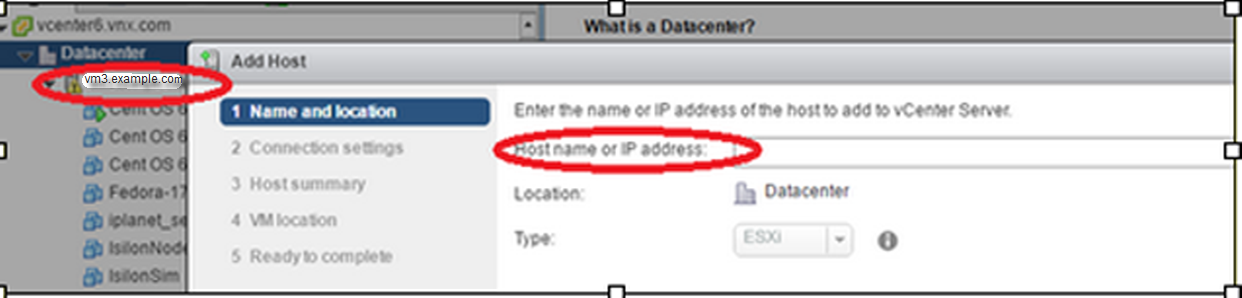
Then the ESXi server in Dell EMC Unity shows the hostname.
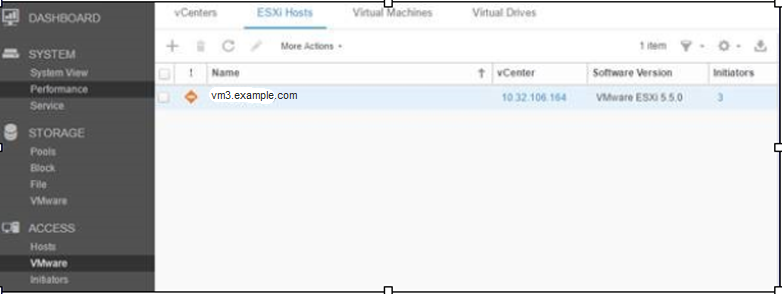
If the ESXi server is added in vCenter using IP address, the ESXi server discovered using vCenter in Dell EMC Unity shows the IP adress.
If the ESXi server is added in vCenter using the hostname, the ESXi server discovered using vCenter in Dell EMC Unity shows the hostname.
Below is an example that the ESXi server was added using hostname vm3.example.com.
Then the ESXi server in Dell EMC Unity shows the hostname.
Affected Products
Dell EMC Unity FamilyProducts
Dell EMC Unity FamilyArticle Properties
Article Number: 000064490
Article Type: Solution
Last Modified: 12 Mar 2025
Version: 4
Find answers to your questions from other Dell users
Support Services
Check if your device is covered by Support Services.