VxRail: MTU check (ping with large packet size)
Summary: This article explains the troubleshooting steps when the MTU check (ping with large packet size) shows Warning.
This article applies to
This article does not apply to
This article is not tied to any specific product.
Not all product versions are identified in this article.
Symptoms
From cluster -> monitor -> vSAN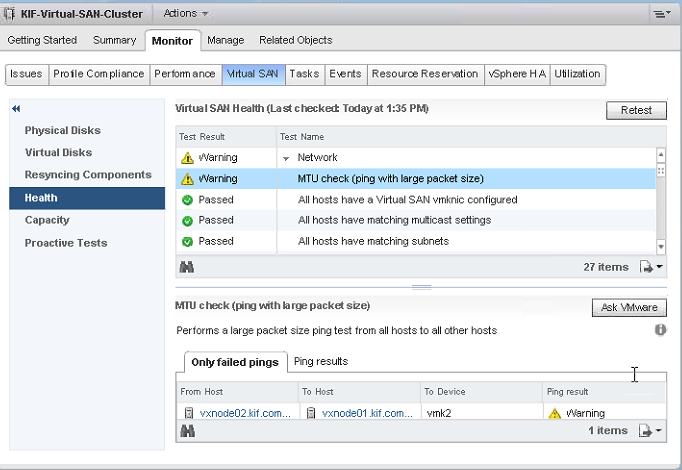
Cause
The MTU Check (ping with large packet size) warning can be from a mismatched MTU between the switch and the vSphere environment.
What can cause a failure is if the vmknic has an MTU of 9000 and then the physical switch enforces an MTU of 1500. This is because the source does not fragment the packet and the physical switch drops the packet.
Faulty network hardware (node sfp, network card, cable, switch port/sfp) has also been known to trigger the MTU Check (ping with large packet size) warning.
Resolution
Troubleshooting steps:
-
Check MTU size on top-of-rack switch, and on all vSphere components; DVS, vmks, vmnics.
If no issues found with MTU size, go to Step 2. -
Check switch ports, esxi, or both hosts for crc errors.
Reference https://knowledge.broadcom.com/external/article?legacyId=2108285for more information about this Health Check Test.
Check MTU Settings:
Check top-of-rack switch MTU settings per the switch vendor documentation.
Check vSphere MTU settings:
Check the MTU setting for the node/portgroup referenced in the MTU warning message:
[vxrail@vxnode03:~] esxcfg-vmknic -l | grep vmk2
vmk2       16384                                   IPv4      192.168.121.3                           255.255.255.0   192.168.121.255 00:50:56:6f:e3:c9 1500    65535     true    STATIC
defaultTcpipStack
vmk2       16384                                   IPv6      fe80::250:56ff:fe6f:e3c9                64                              00:50:56:6f:e3:c9 1500    65535     true    STATIC, PREFERRED
defaultTcpipStack
Check the MTU setting for the DVS:
[vxrail@vxnode03:~] esxcfg-vswitch -l
DVS Name         Num Ports   Used Ports  Configured Ports  MTU     Uplinks
VMware HCIA Distributed Switch  4352        9           512               1500    vmnic1,vmnic0

  DVPort ID           In Use      Client
  0                   1           vmnic0
  1                   1           vmnic1
  2                   0
  3                   0
  4101                1           vmk1
  8205                1           vmk0
  16400               1           vmk2
  8208                1           vmk3
Check the MTU on the vmnics:
[vxrail@vxnode03:~] esxcfg-nics -l
Name    PCI          Driver      Link Speed     Duplex MAC Address       MTU    Description
vmnic0  0000:01:00.0 ixgbe       Up   10000Mbps Full   2c:60:0c:af:ee:de 1500   Intel Corporation Ethernet Controller X540-AT2
vmnic1  0000:01:00.1 ixgbe       Up   10000Mbps Full   2c:60:0c:af:ee:df 1500   Intel Corporation Ethernet Controller X540-AT2
Check for crc errors:
If the MTU config appears to be ok, check for crc errors.
For checking crc errors on a switch, see the switch vendor documentation for the appropriate command.
For Brocade for example:
sw0# show int stats detail int Ten 2/0/34
Interface TenGigabitEthernet 2/0/34 statistics (ifindex 8993701921)
                                   RX                              TX
             Packets      7165702349                      4603884761
               Bytes   8633656075975                   2910244530614
            Unicasts      7154910149                      4565459180
          Multicasts        10782937                        24109494
          Broadcasts            9263                        14316087
              Errors               0                               0
            Discards             691                             643
            Overruns               0       Underruns               0
               Runts               0
             Jabbers               0
                 CRC               0
        64-byte pkts               0
   Over 64-byte pkts       932783488
  Over 127-byte pkts       587058087
  Over 255-byte pkts        19035776
  Over 511-byte pkts        93628206
 Over 1023-byte pkts       631386310
 Over 1518-byte pkts      4901810482
           Mbits/Sec        0.000000                        0.000456
          Packet/Sec               0                               0
           Line-rate           0.00%                           0.00%
Check for crc errors on esx host:
[vxrail@vxnode03:~] esxcli network nic stats get -n vmnic1
NIC statistics for vmnic1
   Packets received: 135817879
   Packets sent: 82253912
   Bytes received: 156239259329
   Bytes sent: 53856798358
   Receive packets dropped: 0
   Transmit packets dropped: 0
   Multicast packets received: 637031
   Broadcast packets received: 0
   Multicast packets sent: 0
   Broadcast packets sent: 0
   Total receive errors: 32614
   Receive length errors: 1866
   Receive over errors: 0
   Receive CRC errors: 32596
   Receive frame errors: 0
   Receive FIFO errors: 0
   Receive missed errors: 0
   Total transmit errors: 0
   Transmit aborted errors: 0
   Transmit carrier errors: 0
   Transmit FIFO errors: 0
   Transmit heartbeat errors: 0
   Transmit window errors: 0
If crc errors are found, refresh (rerun) the command every few seconds to see if the crc errors are incrementing.
If they are, go to troubleshoot the network hardware (node sfp, network cable, switch sfp/port, and so on) to isolate the issue to a specific component and replace the faulty component.
Once the faulty component has been replaced, run the above command every few seconds to confirm that the crc errors are no longer incrementing.
The crc error counter on esx is cleared with a reboot, so although the existing errors may still be present, the important thing is that they stop incrementing.
Once the issue has been resolved, rerun the vsan Health Check tests to confirm that the MTU Check (ping with large packet size) warning is no longer present.
Affected Products
VxRail Appliance FamilyProducts
VxRail Appliance Family, VxRail Appliance Series, VxRail D560, VxRail D560F, VxRail E Series Nodes, VxRail E460, VxRail E560, VxRail E560F, VxRail E560N, VxRail E660, VxRail E660F, VxRail E660N, VxRail E665, VxRail E665F, VxRail E665N, VxRail G560
, VxRail G560F, VxRail P470, VxRail P570, VxRail P570F, VxRail P580N, VxRail P670F, VxRail P670N, VxRail P675F, VxRail P675N, VxRail S470, VxRail S570, VxRail S670, VxRail Software, VxRail V470, VxRail V570, VxRail V570F, VXRAIL V670F, VxRail VD-4510C, VxRail VD-4520C, VxRail VE-660, VxRail VE-6615, VxRail VP-760, VxRail VP-7625, VxRail VS-760
...
Article Properties
Article Number: 000065246
Article Type: Solution
Last Modified: 14 Nov 2025
Version: 7
Find answers to your questions from other Dell users
Support Services
Check if your device is covered by Support Services.