NVP: "Failed to log in to Data Domain service" FLR 또는 인스턴트 액세스 복원이 실패함
Summary: VM(Virtual Machine) FLR 또는 인스턴트 액세스 복원, SSH를 통해 DD에 연결하지 못하고 NFS(Network File System) 내보내기를 생성하지 못합니다. 인증 오류가 보고됩니다.
This article applies to
This article does not apply to
This article is not tied to any specific product.
Not all product versions are identified in this article.
Symptoms
NVP(NetWorker VMware Protection) 통합은 vProxy 어플라이언스로 구성됩니다. 가상 머신의 FLR(File Level Recovery) 또는 IA(Instant Access) 복구가 실패하여 Data Domain으로 인증할 수 없음을 나타냅니다. NMC(NetWorker Management Console)의 복구 구성 창과 복구 로그에 다음이 표시됩니다.
Virtual machine recovery failed: vProxy recovery failed with error message: Session "efc196c5-263c-446a-94bc-72f1a62687e1" failed. Error: Unable to create NFS export at '[DATA_DOMAIN]:/data/col1/[NETWORKER_SERVER]/Recover-[VPROXY]-efc196c5-263c-446a-94bc-72f1a62687e1': Unable to run SSH command, error Unable to make ssh connection to '[DATA_DOMAIN]', error ssh: handshake failed: ssh: unable to authenticate, attempted methods [none password], no supported methods remain.
오류는 다음과 같이 나타날 수도 있습니다.
Unable to create NFS export at 'DD_NAME:/data/col1/NSR_NAME/FLR-VPRXY_NAME-SESSION-ID': Unable to create NFS export. A 'POST' method to DataDomain at 'https://DD_NAME:3009/rest/v2.0/dd-systems/0/protocols/nfs/exports' responded with code 403: Error from DataDomain: 'User not authorized to execute this command: Possible reasons are user doesn't have enough permissions, user permissions have changed or session has expired. Please relogin!, code 5321'
Unable to create NFS export at 'DD_NAME:/data/col1/NSR_NAME/FLR-VPRXY_NAME-SESSION-ID': Unable to login while creating NFS export at 'DD_NAME:/data/col1/NSR_NAME/FLR-VPRXY_NAME-SESSION-ID': Failed to login to DataDomain service at 'https://DD_NAME:3009/rest/v1.0/auth'. A 'POST' method to DataDomain at 'https://DD_NAME:3009/rest/v1.0/auth' responded with code 400: Error from DataDomain: '**** Value of "password" is empty or invalid., code 5437'
참고: 이 오류는 관련된 Data Domain OS 버전에 따라 다를 수 있습니다. 이 오류는 vProxy가 FLR 중에 NFS 내보내기를 생성하려고 할 때 인증 문제가 있음을 나타냅니다.
Cause
FLR(및 인스턴트 액세스 복원)을 사용하려면 NetWorker Data Domain 시스템 리소스에 DD 관리 자격 증명이 필요합니다. 입력한 자격 증명이 올바르지 않거나 누락되었거나 지정된 계정에 올바른 역할이 없습니다.
Resolution
관리 사용자 암호를 업데이트합니다.
- Data Domain 웹 관리 인터페이스에 접속합니다.
https://DD_HOSTNAME/ddem - 를 사용하여 로그인합니다.
sysadmin사용자 또는 기타 관리 사용자 계정입니다. - Administration ->Access ->Local Users로 이동합니다.
- NetWorker가 "관리 사용자"에 사용하는 계정에 Data Domain에 대한 "admin" 권한이 있는지 확인합니다.
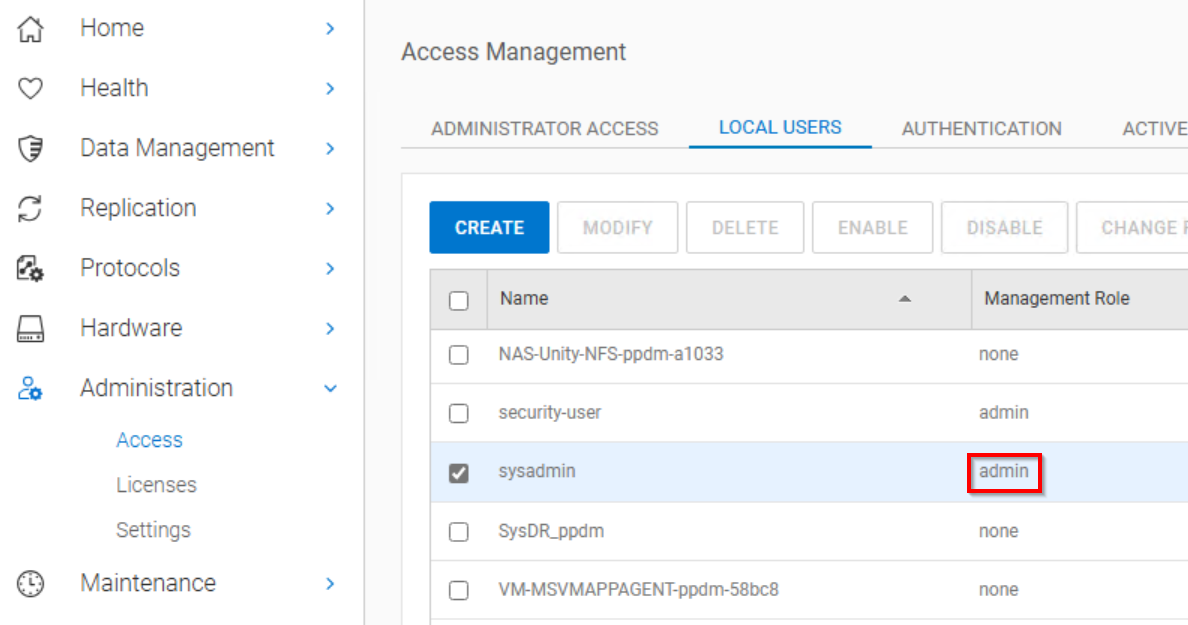
참고: sysadmin의 기본 역할은 "admin"입니다. NetWorker에서 관리 사용자로 사용할 다른 사용자 계정을 생성한 경우 해당 계정이 "admin"으로 설정되어 있는지 확인합니다.
- NMC 또는 NWUI(NetWorker Web User Interface)에서 NetWorker 관리자로 NetWorker Server에 접속합니다.
- Data Domain 시스템에 액세스합니다.
-
- NMC 크랙: 디바이스 -> Data Domain 시스템
- NWUI는 다음과 같습니다. 디바이스 및 미디어 -> Data Domain 시스템
- Data Domain 속성을 엽니다.
- 관리 사용자 및 암호를 입력합니다.
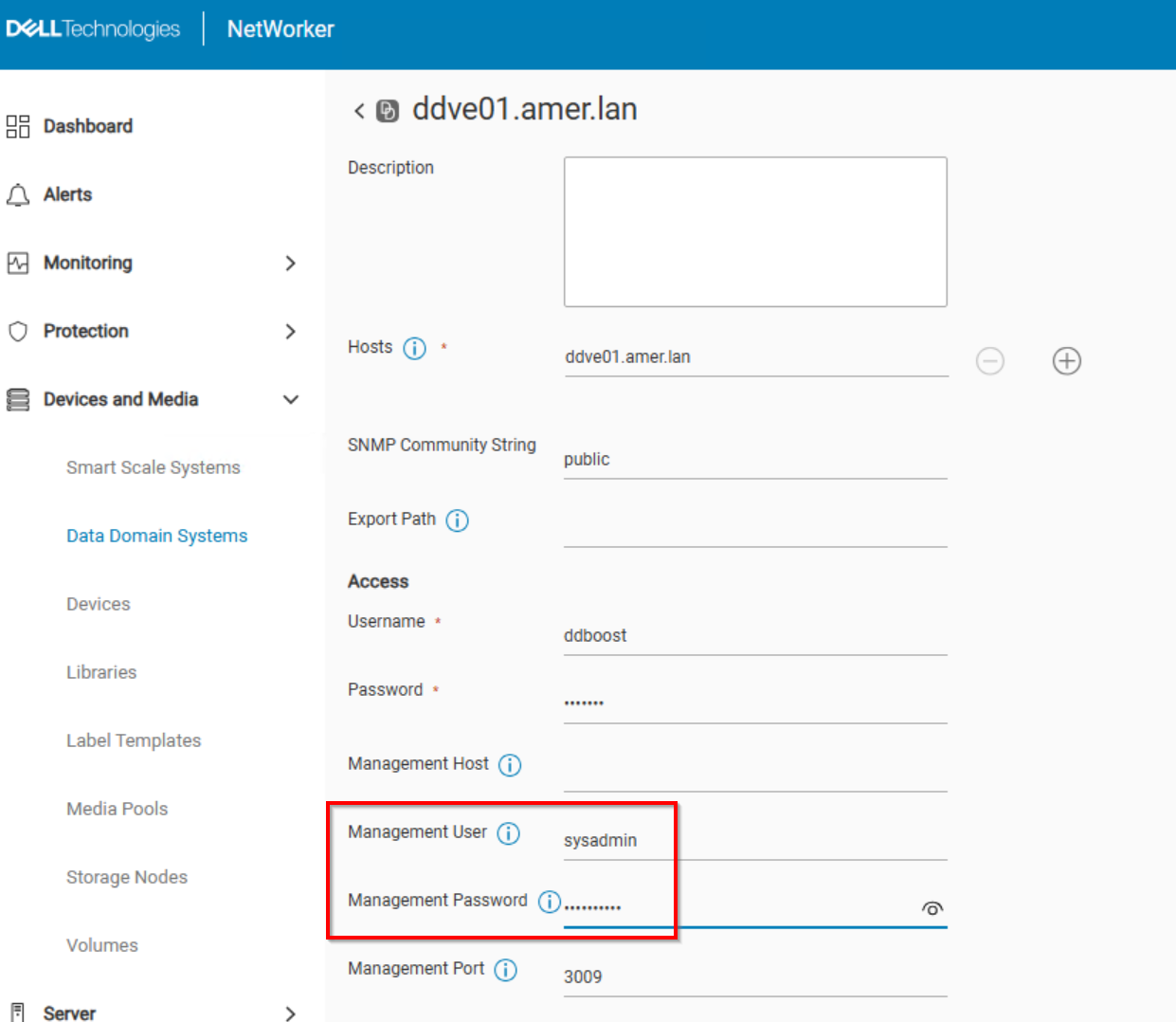
- Save를 클릭합니다.
- DD 관리 자격 증명을 설정한 후 FLR(또는 Instant Access Restore) 작업을 다시 수행합니다.
Additional Information
FLR(또는 IA 복원) 중에 vProxy는 SSH를 사용하여 DD에 연결됩니다. 지정된 "관리 사용자"가 Data Domain에서 NFS 내보내기를 생성합니다. NFS 내보내기는 VMware에 NFS 데이터 저장소로 마운트됩니다. NFS 내보내기는 VM 데이터를 복구하는 데 사용됩니다. VM 백업 및 기타 복원 방법은 동일한 방식으로 작동하지 않으므로 이 문제는 FLR 또는 IA 복원 작업 중에만 나타납니다.
Affected Products
NetWorkerArticle Properties
Article Number: 000065426
Article Type: Solution
Last Modified: 11 Jun 2025
Version: 5
Find answers to your questions from other Dell users
Support Services
Check if your device is covered by Support Services.