NVP:FLR 或即時存取還原失敗 「無法登入 Data Domain 服務」
Summary: 虛擬機器 (VM) FLR 或即時存取還原,且無法透過 SSH 連線至 DD 並建立網路檔案系統 (NFS) 匯出。報告了身份驗證錯誤。
This article applies to
This article does not apply to
This article is not tied to any specific product.
Not all product versions are identified in this article.
Symptoms
NetWorker VMware Protection (NVP) 整合是透過 vProxy 裝置進行設定。虛擬機器的檔案層級復原 (FLR) 或即時存取 (IA) 復原失敗,表示無法透過 Data Domain 進行驗證。NetWorker Management Console (NMC) 中的復原組態視窗和復原記錄顯示:
Virtual machine recovery failed: vProxy recovery failed with error message: Session "efc196c5-263c-446a-94bc-72f1a62687e1" failed. Error: Unable to create NFS export at '[DATA_DOMAIN]:/data/col1/[NETWORKER_SERVER]/Recover-[VPROXY]-efc196c5-263c-446a-94bc-72f1a62687e1': Unable to run SSH command, error Unable to make ssh connection to '[DATA_DOMAIN]', error ssh: handshake failed: ssh: unable to authenticate, attempted methods [none password], no supported methods remain.
錯誤也可能顯示為:
Unable to create NFS export at 'DD_NAME:/data/col1/NSR_NAME/FLR-VPRXY_NAME-SESSION-ID': Unable to create NFS export. A 'POST' method to DataDomain at 'https://DD_NAME:3009/rest/v2.0/dd-systems/0/protocols/nfs/exports' responded with code 403: Error from DataDomain: 'User not authorized to execute this command: Possible reasons are user doesn't have enough permissions, user permissions have changed or session has expired. Please relogin!, code 5321'
Unable to create NFS export at 'DD_NAME:/data/col1/NSR_NAME/FLR-VPRXY_NAME-SESSION-ID': Unable to login while creating NFS export at 'DD_NAME:/data/col1/NSR_NAME/FLR-VPRXY_NAME-SESSION-ID': Failed to login to DataDomain service at 'https://DD_NAME:3009/rest/v1.0/auth'. A 'POST' method to DataDomain at 'https://DD_NAME:3009/rest/v1.0/auth' responded with code 400: Error from DataDomain: '**** Value of "password" is empty or invalid., code 5437'
注意:視所涉及的 Data Domain 作業系統版本而定,錯誤可能會有所不同。此錯誤表示 vProxy 嘗試在 FLR 期間建立 NFS 匯出時發生授權問題。
Cause
FLR (和即時存取還原) 需要 NetWorker 「Data Domain 系統」資源中的 DD 管理登入資料。輸入的登入資料不正確、遺失或指定的帳戶沒有正確的角色。
Resolution
更新管理使用者密碼:
- 連線至 Data Domain Web 管理介面:
https://DD_HOSTNAME/ddem - 登入方式為
sysadmin使用者或其他管理使用者帳戶。 - 前往 管理 ->存取 ->本機使用者。
- 請確定 NetWorker 用於「管理使用者」的帳戶在 Data Domain 上具有「admin」權限:
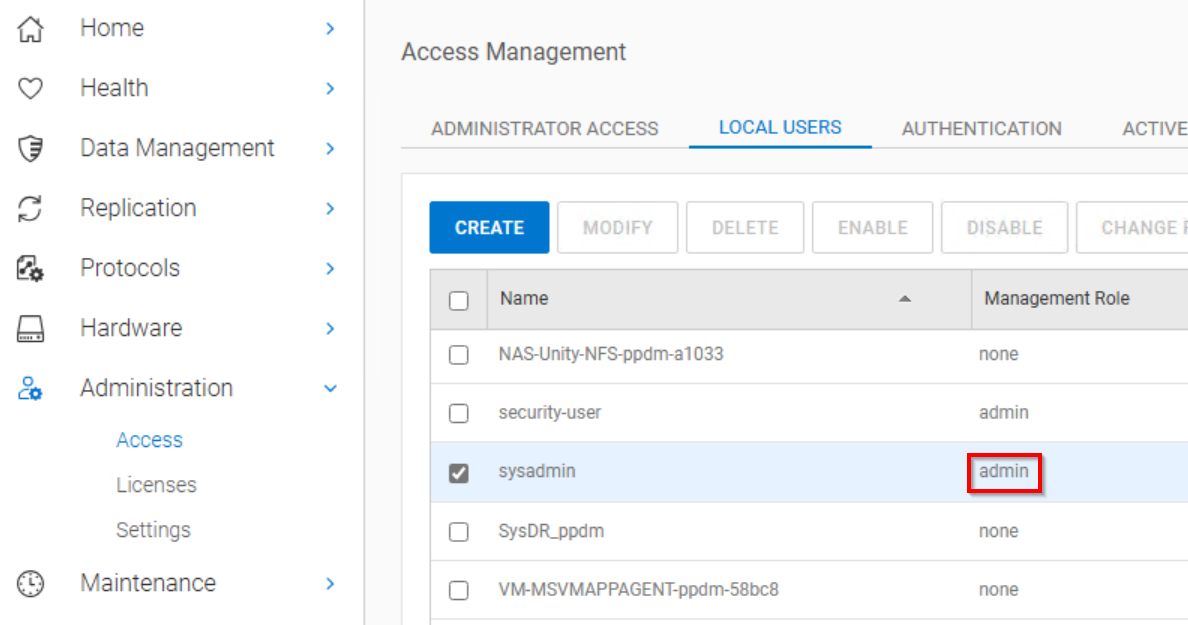
注意:sysadmin 的預設角色為「admin」。如果您已建立另一個使用者帳戶供 NetWorker 使用作為管理使用者,請確定它已設為「admin」。
- 使用 NetWorker 系統管理員,從 NMC 或 NetWorker Web 使用者介面 (NWUI) 連線至 NetWorker 伺服器。
- 存取 Data Domain 系統。
-
- NMC:裝置 -> Data Domain 系統
- NWUI:裝置和媒體 -> Data Domain 系統
- 開啟 Data Domain 內容。
- 輸入管理使用者和密碼:
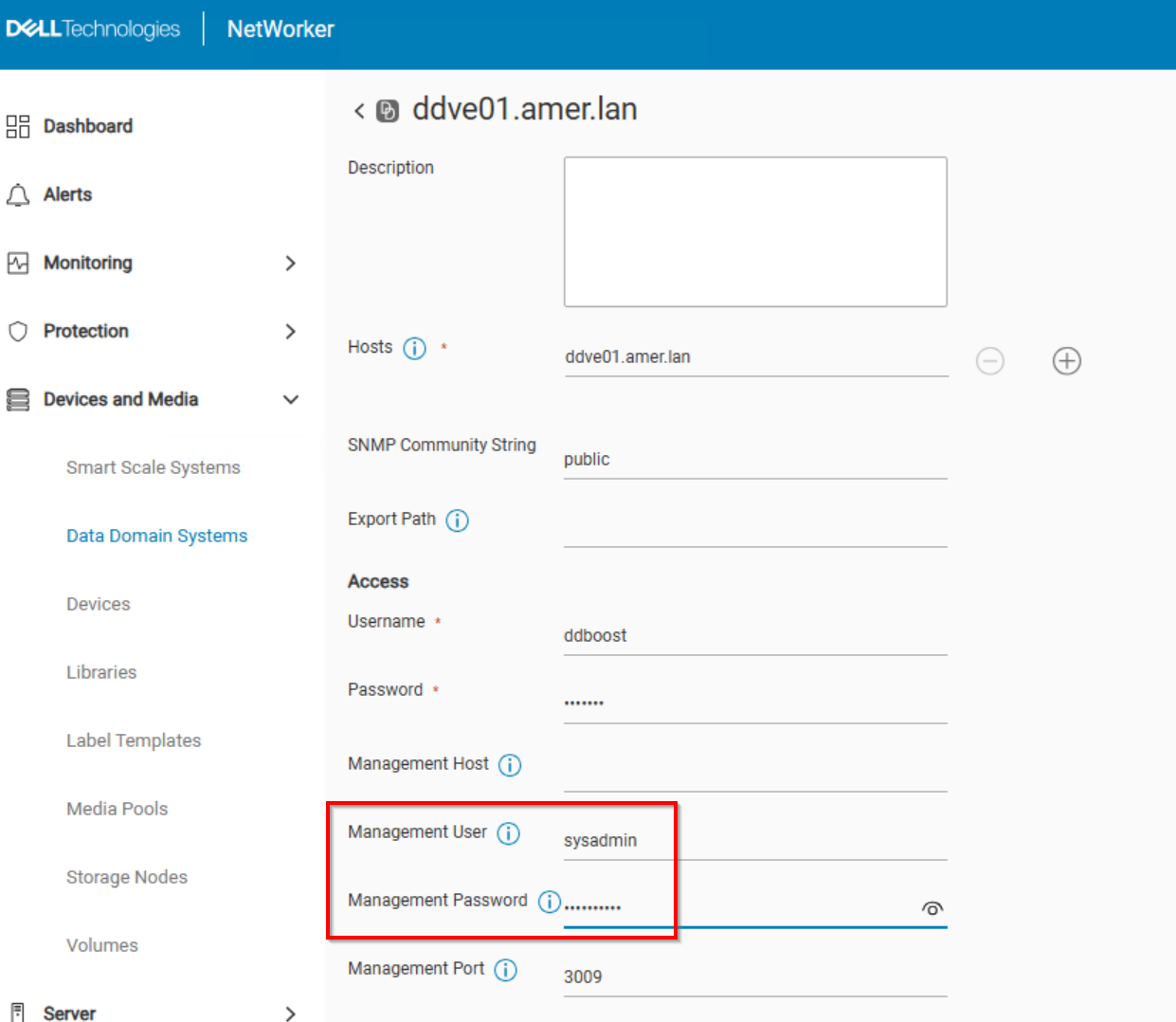
- 按一下儲存。
- 設定 DD 管理登入資料後,請再次執行 FLR (或即時存取復原) 作業。
Additional Information
在 FLR (或 IA 還原) 期間,vProxy 會使用 SSH 連接至 DD。指定的「管理使用者」會在資料網域上建立 NFS 匯出。NFS 匯出會在 VMware 中掛接為 NFS 資料存放區。NFS 匯出用於還原 VM 資料。VM 備份和其他還原方法的運作方式不同,因此此問題只會在 FLR 或 IA 還原作業期間出現。
Affected Products
NetWorkerArticle Properties
Article Number: 000065426
Article Type: Solution
Last Modified: 11 Jun 2025
Version: 5
Find answers to your questions from other Dell users
Support Services
Check if your device is covered by Support Services.