DPA:PostgreSQL 收集要求失敗並顯示錯誤:沒有提供登入資料以連線至「postgres」資料庫以在伺服器上自動探索
Summary: DPA:PostgreSQL 收集要求失敗並顯示錯誤:沒有提供登入資料以連線至「postgres」資料庫以在伺服器上自動探索
This article applies to
This article does not apply to
This article is not tied to any specific product.
Not all product versions are identified in this article.
Symptoms
DPA 資料存放區資料庫的 DPA PostgreSQL 集合要求失敗,並出現下列錯誤:
未提供任何登入資料以連線至「postgres」資料庫以在伺服器上
自動探索 檢閱 PostgreSQL 資料庫組態和狀態要求,兩者都失敗,並出現以下錯誤:
未提供任何登入資料以連線至「postgres」資料庫以在伺服器上
自動探索 在代理程式記錄中,出現下列錯誤:
ERR 1592.2584 20170601:051205 agent.mod.pgsqldb - status(): 未提供登入資料以連線至「postgres」資料庫以在伺服器上自動探索
Cause
資料存放區伺服器上的 DPA 代理程式已使用 postgresdb 組態和狀態要求進行設定,但可能未指派登入資料。
記錄中的錯誤表示未指派任何登入資料。
記錄中的錯誤表示未指派任何登入資料。
Resolution
從 DPA UI> 清查> 物件庫> 應用程式中> ,選取 DPA 資料存放區伺服器> 資料收集標籤>
編輯 DPA 資料存放區節點的 2 個要求,並將預設 Postgres 認證指派給他們。 如果此憑據不存在,您可以創建它,如下所示(密碼為空):
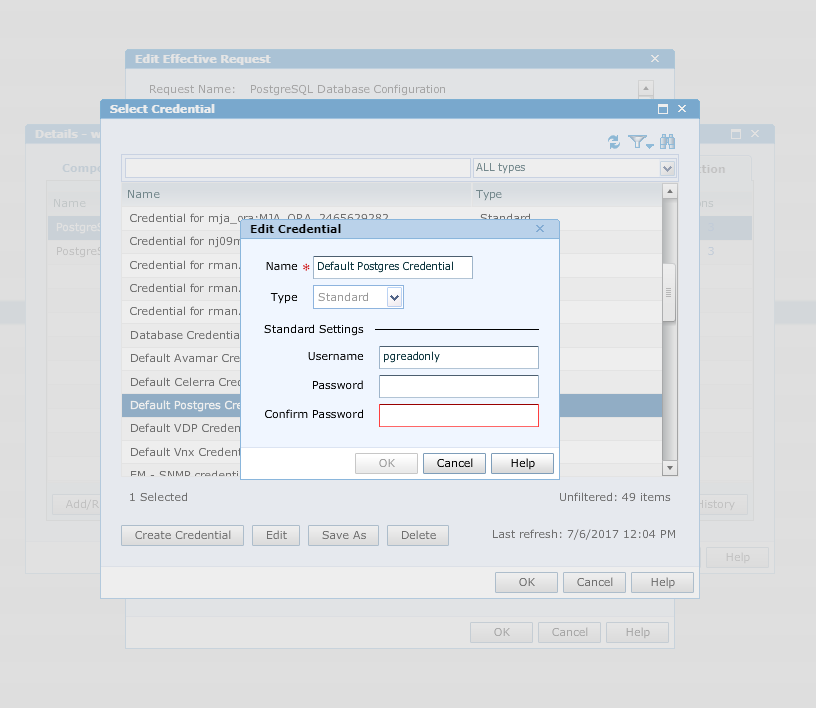 還要確保請求選項顯示以下內容:

指定每個資料庫參數/憑據請求的 XML 選項設置為:
<PARAMS><DATABASES discover=“false”<>DB use=“include”><NAME>apollo</NAME/NAME/><DB<>/DATABASES<>/PARAMS
>
按一下確定>按一下套用
錯誤應該不會再顯示在代理程式記錄中,且資料收集現在應可正常運作。
編輯 DPA 資料存放區節點的 2 個要求,並將預設 Postgres 認證指派給他們。 如果此憑據不存在,您可以創建它,如下所示(密碼為空):
還要確保請求選項顯示以下內容:
指定每個資料庫參數/憑據請求的 XML 選項設置為:
<PARAMS><DATABASES discover=“false”<>DB use=“include”><NAME>apollo</NAME/NAME/><DB<>/DATABASES<>/PARAMS
>
按一下確定>按一下套用
錯誤應該不會再顯示在代理程式記錄中,且資料收集現在應可正常運作。
Affected Products
Data Protection AdvisorProducts
Data Protection AdvisorArticle Properties
Article Number: 000065494
Article Type: Solution
Last Modified: 08 Sep 2025
Version: 4
Find answers to your questions from other Dell users
Support Services
Check if your device is covered by Support Services.