部分或所有服務無法在開機時自動啟動 (Linux 或 Windows)
Summary: 在任何 SRM 伺服器開機/重新開機期間,部分或所有服務不會啟動。
This article applies to
This article does not apply to
This article is not tied to any specific product.
Not all product versions are identified in this article.
Symptoms
在 SRM 伺服器開機|重新開機期間,部分或全部服務無法啟動。 服務可成功啟動
在 Linux SRM 伺服器上,使用啟動指令檔 /etc/init.d/apg-service 進行額外測試時,會發現 status 命令也無法正常運作:「Service AGP-Services status」不會傳回無法啟動的服務。
'manage-modules.sh|manage-modules.cmd service start <module>'.
在 Linux SRM 伺服器上,使用啟動指令檔 /etc/init.d/apg-service 進行額外測試時,會發現 status 命令也無法正常運作:「Service AGP-Services status」不會傳回無法啟動的服務。
Cause
服務啟動模式已設為手動或停用。
Resolution
在集中式管理->實體概觀-><SRM 伺服器>-><收集器-管理員模組>中,勾選「配置服務」按鈕。 確保服務啟動模式設置為自動。
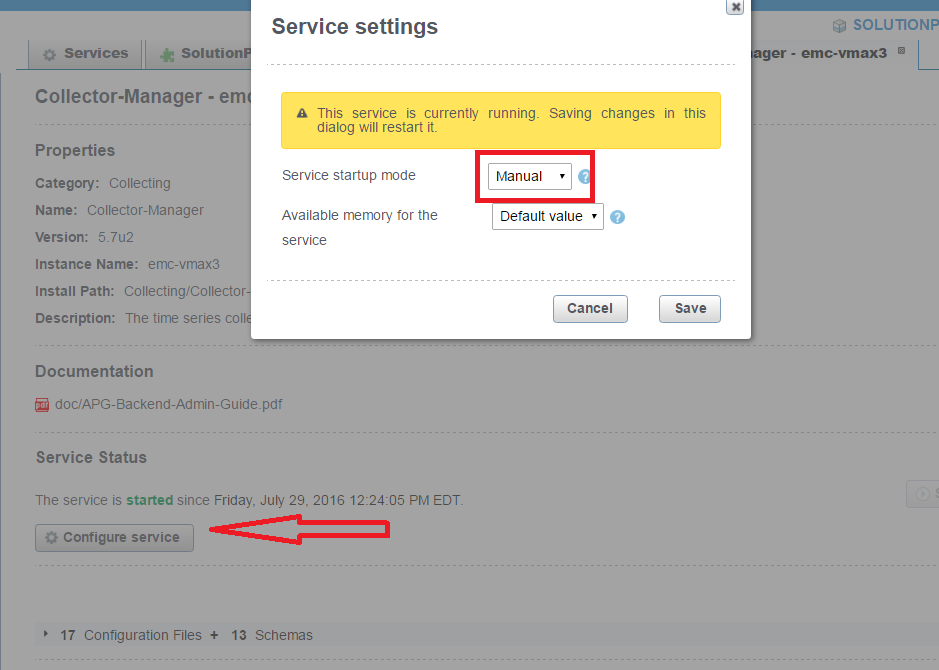
另外也會有一個 /opt/APG/Collecting/Collector-Manager/<collector-manager>/conf/service-user.properties 檔案,其中顯示了啟動模式設定:
cat service-user.properties
#This file has been automatically (re)generated.
#Fri Jul 29 12:24:02 EDT 2016
startup=manual
Additional Information
請參閱 KB 000469626,Watch4net |EMC M&R |ViPR SRM - 伺服器重新開機 (Linux) 後服務不會自動啟動,以便於 Linux SRM 伺服器上進行其他檢查。
Affected Products
SRMArticle Properties
Article Number: 000065756
Article Type: Solution
Last Modified: 29 Jul 2025
Version: 4
Find answers to your questions from other Dell users
Support Services
Check if your device is covered by Support Services.