Dell Unity: Unity Unreachable After Primary SP Reboot During Upgrade
Summary: This article explains why Unity Management Services become unreachable after the Primary SP reboot during an upgrade. (User correctable)
This article applies to
This article does not apply to
This article is not tied to any specific product.
Not all product versions are identified in this article.
Symptoms
Primary SP reboots during the upgrade process.
Unity Management Services go unreachable during the Primary SP reboot of the code upgrade process.
Unity IP is not pingable, and Unisphere does not load.
Data access is not affected.
Unity Management Services go unreachable during the Primary SP reboot of the code upgrade process.
Unity IP is not pingable, and Unisphere does not load.
Data access is not affected.
Cause
In Unity, the Primary SP handles management services (the IP address).
When the Primary SP reboots, management services are failed over to Secondary (Peer) SP.
Issue 1:
If the Secondary SP is not connected to the same management network as the Primary, the Unity IP becomes unreachable when the management service fails over.
Example:
Before upgrade:
A second issue can occur when the failover between SPs happens and we spoof the MAC address on the new SP. Some user environments may be picking up the new "duplicate" MAC address and blocking access to the switch port, causing the loss of access.
This enhancement checks for possible connectivity issues on the management ports. See Dell Unity: Pre-Upgrade Health Check completes with warning: platform::check_management_port_2 (User Correctable)
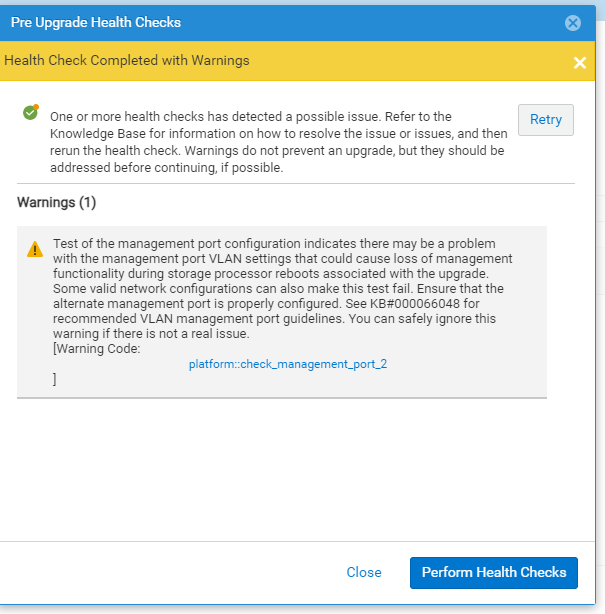
This warning message indicates that the Unity array was unable to confirm the management network connectivity of the peer Storage Processor (SP). The new Unity OE 5.3 PUHC enhancement initiates an Address Resolution Protocol (ARP) probe to the network. This is to confirm any connectivity issue on the peer SP, in the event management operations is failed over to the peer SP.
The PUHC sends out an ARP probe instead of a standard ARP ping. The management IP address is only active on the primary SP, not the peer. This is the reason that the check must be an ARP probe on the peer. The non-primary (peer) SP does not have a configured IP address for a standard ARP. Thus, the ARP request has to be sent with 0.0.0.0 populated and is an ARP probe.
The warning message occurs if a response is not received from the ARP probe.
This warning does not mean that the port link was down for one SP management port before the upgrade. If that was the issue, the Pre-Upgrade Health Check would pick it up (As covered in Dell article Dell Unity: Health check fails with [Error code: platform::check_peer_management_port_link_2] (User Correctable)
When the Primary SP reboots, management services are failed over to Secondary (Peer) SP.
Issue 1:
If the Secondary SP is not connected to the same management network as the Primary, the Unity IP becomes unreachable when the management service fails over.
Example:
Before upgrade:
- SP A is Primary, and SP B is Secondary
- SP A is connected to the management network from which Unisphere is accessed.
- SP B is not connected to the same network as SP A.
- SP B becomes Primary, and SP A becomes Secondary.
- Since management services are with SP B, the Unity management IP goes unreachable.
A second issue can occur when the failover between SPs happens and we spoof the MAC address on the new SP. Some user environments may be picking up the new "duplicate" MAC address and blocking access to the switch port, causing the loss of access.
Note: A new Pre-Upgrade Health Check (PUHC) utility enhancement has been introduced in Unity OE 5.3 and later.
This enhancement checks for possible connectivity issues on the management ports. See Dell Unity: Pre-Upgrade Health Check completes with warning: platform::check_management_port_2 (User Correctable)
Test of the management port configuration indicates there may be a problem with the management port VLAN settings that could cause loss of management functionality during storage processor reboots associated with the upgrade. Some valid network configurations can also make this test fail. Ensure that the alternate management port is properly configured. See KB#000066048 for recommended VLAN management port guidelines. You can safely ignore this warning if there is not a real issue.User interface screenshot of PUHC warning:
This warning message indicates that the Unity array was unable to confirm the management network connectivity of the peer Storage Processor (SP). The new Unity OE 5.3 PUHC enhancement initiates an Address Resolution Protocol (ARP) probe to the network. This is to confirm any connectivity issue on the peer SP, in the event management operations is failed over to the peer SP.
The PUHC sends out an ARP probe instead of a standard ARP ping. The management IP address is only active on the primary SP, not the peer. This is the reason that the check must be an ARP probe on the peer. The non-primary (peer) SP does not have a configured IP address for a standard ARP. Thus, the ARP request has to be sent with 0.0.0.0 populated and is an ARP probe.
The warning message occurs if a response is not received from the ARP probe.
This warning does not mean that the port link was down for one SP management port before the upgrade. If that was the issue, the Pre-Upgrade Health Check would pick it up (As covered in Dell article Dell Unity: Health check fails with [Error code: platform::check_peer_management_port_link_2] (User Correctable)
Resolution
During PUHC prior to upgrade:
The below warning message is a soft warning and not a failure:
An additional option for that this article is to reboot the current Primary SP to failover management operations to the peer SP. Management operations can be lost up to 10 minutes during the failover process. Once management operations are recovered, verify that the peer SP is now the primary SP. If management operations are successfully working on SPA and SPB after failover tests, this warning message can be safely ignored.
During the upgrade:
This warning can be ignored if it was not seen until the middle of the upgrade. Click the "Retry" button to proceed with the upgrade.
Contact Dell Support and quote this Knowledge Article, in the event the "Retry" button does not work.
After a successful upgrade:
The below warning
The below warning message is a soft warning and not a failure:
Warning Code: platform::check_management_port_2Use one of the options in the below article to fail management operations over to the peer SP to test if the peer SP has connectivity with the network. Dell Unity: How to perform a management services (ECOM) failover (Dell Correctable)
An additional option for that this article is to reboot the current Primary SP to failover management operations to the peer SP. Management operations can be lost up to 10 minutes during the failover process. Once management operations are recovered, verify that the peer SP is now the primary SP. If management operations are successfully working on SPA and SPB after failover tests, this warning message can be safely ignored.
During the upgrade:
This warning can be ignored if it was not seen until the middle of the upgrade. Click the "Retry" button to proceed with the upgrade.
Contact Dell Support and quote this Knowledge Article, in the event the "Retry" button does not work.
After a successful upgrade:
The below warning
Warning Code: platform::check_management_port_2Can be safely ignored if this warning message was received after a successful upgrade to Unity OE 5.3 or later.
Affected Products
Dell EMC Unity FamilyProducts
Dell EMC Unity Family |Dell EMC Unity All Flash, Dell EMC Unity Family, Dell EMC Unity HybridArticle Properties
Article Number: 000066048
Article Type: Solution
Last Modified: 18 Apr 2026
Version: 9
Find answers to your questions from other Dell users
Support Services
Check if your device is covered by Support Services.