NetWorker: SQL AAG 叢集組態的新用戶端精靈顯示錯誤:「調度員:要求逾時」
Summary: 在建立 NetWorker 用戶端資源期間,使用 SQL Server AlwaysOn 可用性群組 (AAG) 叢集組態的新增用戶端精靈時,會出現以下錯誤:「調度員:要求逾時」
This article applies to
This article does not apply to
This article is not tied to any specific product.
Not all product versions are identified in this article.
Symptoms
此問題的症狀包括:
- 在建立 NetWorker 用戶端資源期間,使用 SQL Server AlwaysOn 可用性群組 (AAG) 叢集組態的新增用戶端精靈時,會出現以下錯誤:「調度員:要求逾時」
該環境包括:
- NetWorker 伺服器:執行 Red Hat Linux 7.7,NetWorker 版本 19.1.1 或更新版本
- 適用於 Microsoft (NMM) 和用戶端的 NetWorker 模組:19.2.0.2 或更新版本
- SQL 伺服器是在多子網路組態中設定。
- SQL Server AAG 接聽程式或叢集名稱物件的 NetWorker 新用戶端精靈失敗,並顯示錯誤「
Dispatcher: Request timed out".錯誤會顯示在新視窗中。
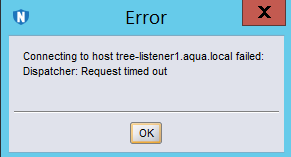
The daemon.raw log on the NetWorker server contains these errors:

 03/16/2020 12:41:44 PM   nwservername nsrdisp_nwbg RPC critical Check whether the firewall is blocking.
 03/16/2020 12:41:47 PM   nwservername nsrexecd RPC error RPC client handle: No route to host.
 03/16/2020 12:41:47 PM   nwservername nsrexecd RPC error Unable to create the connection with 'Client_Name' address 'Client_IP_Address' at port number 7938.
Cause
此問題的根本原因是 NetWorker 伺服器試圖連線至 SQL Server AlwaysOn 可用性群組 (AAG) 偵聽器 (叢集名稱物件) 的非作用中 IP 位址。
此連線嘗試的逾時時間比精靈的 NetWorker 逾時時間長。
此連線嘗試的逾時時間比精靈的 NetWorker 逾時時間長。
Resolution
若要解決此問題,請修改 NetWorker 伺服器上的 TCP 組態。
- 將 tcp_sync_retries 參數修改為較低的值,以加快與 SQL Server AAG 非活動 IP 的連接嘗試完全失敗所需的時間。
Article Properties
Article Number: 000067809
Article Type: Solution
Last Modified: 11 Feb 2025
Version: 3
Find answers to your questions from other Dell users
Support Services
Check if your device is covered by Support Services.