Het terugzetten van Avamar VM-image mislukt voordat er voortgangsbytes worden weergegeven
Summary: Avamar VM-imageherstel mislukt voordat er voortgangsbytes worden weergegeven omdat proxy niet communiceert met Data Domain om VM-metadata op te halen
This article applies to
This article does not apply to
This article is not tied to any specific product.
Not all product versions are identified in this article.
Symptoms
N.v.t.
- VM-imageherstel mislukt voordat voortgangsbytes worden weergegeven, aangezien we de volgende foutberichten kunnen zien in de activiteitenlogboeken:
avvcbimage Info <12181>: Avtar metadata restore session initiated avvcbimage Info <10684>: Setting ctl message version to 3 (from 1) avvcbimage Info <16136>: Setting ctl max message size to 268435456 avvcbimage Info <6688>: Process 8885 (/usr/local/avamarclient/bin/avtar) finished (code 158: cannot establish connection with server (possible network or DNS failure)) avvcbimage Warning <6690>: CTL workorder "MOD-########99" non-zero exit status 'code 158: cannot establish connection with server (possible network or DNS failure)' avvcbimage Error <0000>: [IMG0011] restore metadata Avtar exited with 'code 158: cannot establish connection with server (possible network or DNS failure)'avvcbimage FATAL <17824>: GetDiskAttributed Failed avvcbimage Info <18664>: Login(https://<Vcenter_FQDN>:443/sdk) Datacenter: 'xxxxert' avvcbimage Info <19728>: - connected to 'VirtualCenter' - version: '<vcenter_version>', apiVersion:'6.7.3' avvcbimage Info <42146>: Login by loginWS test is OK. avvcbimage Info <42225>: (CURL) Logging into datacenter path of 'folder?dcPath=xxxxert', xxxxert => xxxxert avvcbimage Info <42226>: (Legacy) Logging into datacenter path of 'folder?dcPath=xxxxert', xxxxert => xxxxert avvcbimage Info <41153>: Using CURL Method avvcbimage Info <41154>: Re-using vCS Session Cookie avvcbimage Info <41153>: Using CURL Method avvcbimage Info <41154>: Re-using vCS Session Cookie avvcbimage Info <17770>: DataStore Storage Info: DataStore:'<Datastore_Name>': Pre Free Space(KB)=4340662272, Post Free Space(KB) range=##### to ##### Disk '####': Disk Size(KB)=#####, restoreThisDisk=1, thin=0 Disk '####': Disk Size(KB)=#####, restoreThisDisk=1, thin=0 Disk '####': Disk Size(KB)=#####, restoreThisDisk=1, thin=0 Disk '####': Disk Size(KB)=#####, restoreThisDisk=1, thin=0 avvcbimage Info <17825>: A VM create has been requested. avvcbimage Info <18664>: Login(https://<Vcenter_FQDN>:443/sdk) Datacenter: 'xxxxert' avvcbimage Info <19728>: - connected to 'VirtualCenter' - version: '<vcenter_version>', apiVersion:'6.7.3' avvcbimage Info <42146>: Login by loginWS test is OK. avvcbimage Info <42213>: checking datastore type for special processing, checking for type vsan, actual type = VMFS avvcbimage Info <42213>: checking datastore type for special processing, checking for type VVOL, actual type = VMFS avvcbimage Error <17771>: Invalid request to create a VM. avvcbimage Error <0000>: [IMG2012] VM creation failed during restore.
- De bovenstaande fouten geven aan dat proxy heeft geprobeerd de VM-metadata op te halen uit Data Domain, maar er niet mee kon communiceren.
- Dit zorgde ervoor dat het proxyverzoek dat naar vCenter werd verzonden ongeldig was, waardoor de stap voor het maken van de VM is mislukt.
Cause
- Tijdens het starten van het herstel wordt de versleutelingsmodus op Data Domain op de waarde Default gehouden, zelfs als de versleutelingssterkte is ingesteld op High terwijl er een back-up wordt gemaakt op zowel Avamar als Data Domain.
Resolution
- U kunt dit probleem oplossen door de onderstaande stappen uit te voeren bij het starten van het herstel:
1-Zorg dat de versleutelingssterkte op Avamar is ingesteld op High zoals hieronder is aangegeven:
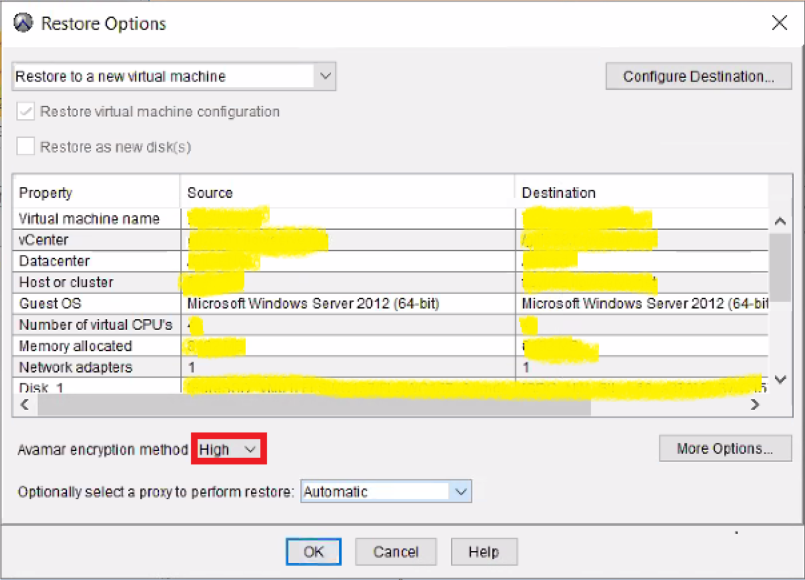
2-Klik vervolgens op "More Options" om de versleuteling op Data Domain in te stellen op High zoals hieronder is aangegeven:
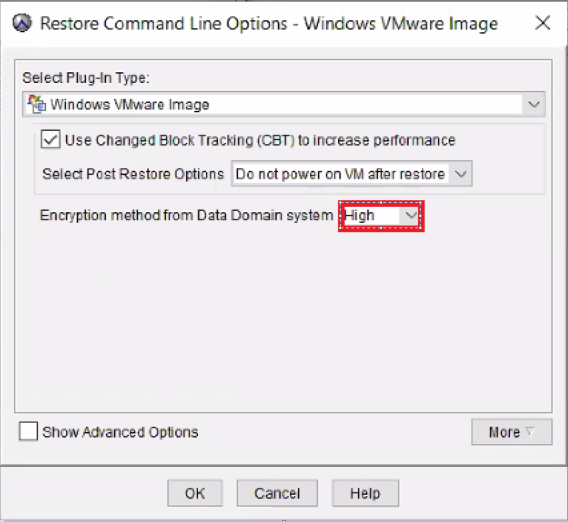
- Het imageherstel zal goed verlopen.
Affected Products
AvamarProducts
Avamar, Avamar Client for VMwareArticle Properties
Article Number: 000069283
Article Type: Solution
Last Modified: 06 Nov 2025
Version: 3
Find answers to your questions from other Dell users
Support Services
Check if your device is covered by Support Services.