NetWorker: I backup hanno esito negativo con: "Il client non è configurato correttamente sul server NetWorker"
Summary: Un backup basato su client NetWorker ha esito negativo con l'errore "client CLIENT_NAME; non è configurato correttamente sul server NetWorker'.
This article applies to
This article does not apply to
This article is not tied to any specific product.
Not all product versions are identified in this article.
Symptoms
I backup hanno esito negativo con i seguenti errori:
Error: 'client (Client_name); is not properly configured on the NetWorker Server'
Error: 'Cannot start session with server (ServerName): client `(Client Name)' is not properly configured on the NetWorker Server'
Cause
Cause più probabili:
- Configurazione TCP/IP errata sul client.
- Mancata corrispondenza del nome client e degli alias nella configurazione della risorsa client.
- L'intero nome alias del client non viene aggiornato nell'elenco degli alias del computer client.
Resolution
Controllo 1:
Utilizzare
Controllare il file hosts sul server NetWorker e sul client per assicurarsi che non vengano immessi nomi in conflitto per il server o il client NetWorker.
nslookup CLIEN_NAME dal server NetWorker. Sostituire CLIENT_NAME con il nome del client NetWorker così come è configurato in NetWorker. La configurazione del client può essere esaminata da NetWorker Management Console (NMC) o NetWorker Web User Interface (NWUI) in Protection-Clients>.
Controllare il file hosts sul server NetWorker e sul client per assicurarsi che non vengano immessi nomi in conflitto per il server o il client NetWorker.
Linux: /etc/hosts
Windows: C:\Windows\System32\drivers\etc\hosts
NetWorker: Best practice per la risoluzione dei problemi relativi alla risoluzione dei nomi
Se si verificano problemi DNS (Domain Name System) o conflitti di file host su entrambi i sistemi. Correggerli di conseguenza.
Controllo 2:
Verificare che il server NetWorker sia in grado di connettersi al client NetWorker e vedere le porte del client:
nsrrpcinfo -p CLIENT_NAME
root@lnx-nwserv:~# nsrrpcinfo -p win-client01.prod.lan
PROGRAM VERSION PROTOCOL PORT SERVICE
100000  2       tcp      7938 nsrportmapper  Port Mapper
100000  2       udp      7938 nsrportmapper  Port Mapper
390436  1       tcp      9896 nsrexecd       GSS Authentication
390435  1       tcp      7989 nsrexecd       Resource Mirror
390440  1       tcp      8305 nsrexecd_nsrfa Remote File Access
390113  1       tcp      7937 nsrexecd       Remote Execution
Dal client NetWorker, verificare che sia possibile connettersi al server NetWorker.
nsradmin -p nsrexecd -s NSR_SERVERNAME
Dove NSR_SERVERNAME è il nome del server NetWorker come appare in NetWorker Management Console (NMC) o NetWorker Web User Interface (NWUI).
Se il client NetWorker dispone del pacchetto client esteso, è anche possibile usare nsrrpcinfo dal client al server. Se il software del client esteso non è installato, non è possibile utilizzare nsrrpcinfo su un client.
Linux: rpm -qa | grep lgtoxtdclnt
Windows: In Programmi e funzionalità, verificare se NetWorker Extended Client è presente nell'elenco oppure usare il comando:
wmic product where "Name = 'NetWorker Extended Client'" get name, IdentifyingNumber, PackageName
nsrrpcinfo -p NSRE_SERVERNAME
L'intervallo predefinito di porte del servizio NetWorker è 7937-9936.
Processi e porte di NetWorker
NOTA: Se il client o il server non sono in grado di comunicare tra loro tramite le porte dei servizi NetWorker, controllare se nei firewall del sistema operativo sono presenti regole che bloccano questa comunicazione. Se non ci sono firewall del sistema operativo che bloccano questa comunicazione, verificare con l'amministratore di rete eventuali firewall di rete che potrebbero bloccare queste porte.
Controllo 3:
Il client può essere configurato in NetWorker con un nome, ma rispondere con un altro.
1. Confermare il nome del client così come viene visualizzato sul server NetWorker da NetWorker Management Console (NMC) o NetWorker Web User Interface (NWUI) in Protection-Clients>.
2. Sul server NetWorker eseguire:
nsradmin -p nsrexecd -s CLIENT_NAME
3. Dalla sezione nsradmin prompt immettere:
show name
4. Inserire:
print type: nsrla
Esempio:
root@lnx-nwserv:~# nsradmin -p nsrexecd -s win-client01.prod.lan
NetWorker administration program.
Use the "help" command for help, "visual" for full-screen mode.
nsradmin> show name
nsradmin> print type: nsrla
                        name: win-client01.amer.lan;
nsradmin> quit
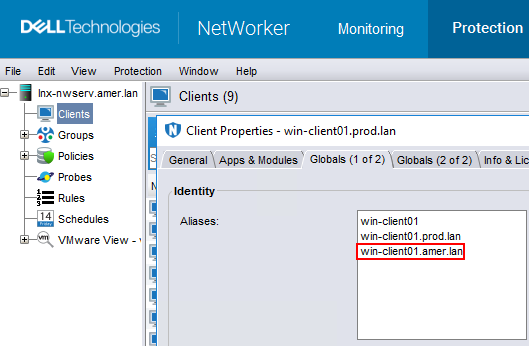
Il client è configurato in NetWorker con un nome, ma il processo nsrexecd del client risponde con un nome diverso.
5. Aggiornare il campo alias del client in modo da includere il nome visualizzato nella voce nsrla del client:
5. Aggiornare il campo alias del client in modo da includere il nome visualizzato nella voce nsrla del client:
Affected Products
NetWorkerProducts
NetWorkerArticle Properties
Article Number: 000072315
Article Type: Solution
Last Modified: 22 Oct 2025
Version: 5
Find answers to your questions from other Dell users
Support Services
Check if your device is covered by Support Services.