Isilon node fails to boot with mount_efs: isi_drive_d not responding
Summary: Isilon node fails to boot with mount_efs: isi_drive_d not responding message.
This article applies to
This article does not apply to
This article is not tied to any specific product.
Not all product versions are identified in this article.
Symptoms
Isilon node fails to mount Intelligent File System (IFS) during boot with the following messages:
mount_efs: isi_drive_d not responding
Aborting boot.
IFS failed to mount. Aborting boot.
Please contact EMC Customer Support:
United States: 1 800 782 4362 (1 800 SVC 4EMC)
Canada: 1 800 543 4782 (1 800 543 4SVC)
Command Options:
1) Enter recovery shell
2) Continue booting
3) Reboot
option>
Cause
Under certain circumstances, enabling or disabling Automatic Replacement Recognition as shown below may generate an invalid isi_drive_d.xml file.
.
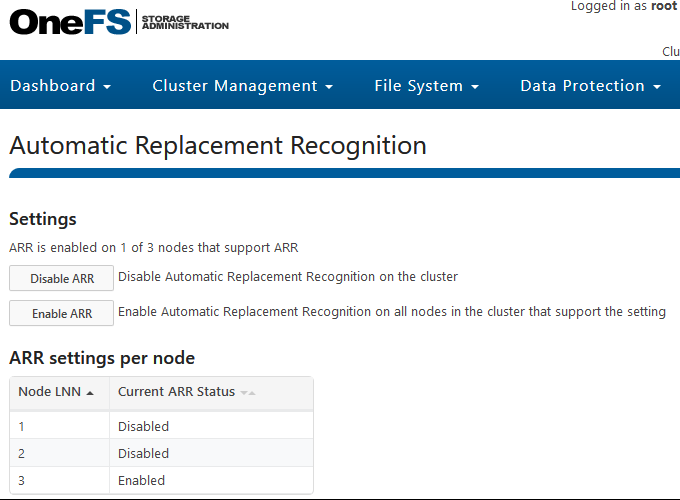
Resolution
- From a console connection to the node, choose 1 to Enter recovery Shell and the click Enter at the "Enter full pathname of shell or RETURN for /bin/sh:" prompt.
- Examine the file /etc/mcp/sys/isi_drive_d.xml using the following command:
# head -6 /etc/mcp/sys/isi_drive_d.xml
<?xml version="1.0" encoding="utf-8"?> <isi_drive_d_config> <port> <low>0</low> <high>0</high> </port>
If the low and high value are 0 as shown above, then this issue impacts the node.
If the low value is 290 and the high value is 292, then this issue does not impact the node.
3. On an impacted node rename /etc/mcp/sys/isi_drive_d.xml, restart isi_drive_d and reboot the node as shown below:
# mv /etc/mcp/sys/isi_drive_d.xml  /etc/mcp/sys/isi_drive_d.xml.bak

# reboot
4. Once the node boots, login and apply the fix to all nodes of the cluster using the following commands:
# isi_for_array -s 'mv /etc/mcp/sys/isi_drive_d.xml /etc/mcp/sys/isi_drive_d.xml.bak'
# isi_for_array -s 'pkill isi_drive_d'
The above changes take effect immediately and do not require online nodes to be restarted.
5. Confirm isi_drive_d.xml is valid and identical on all cluster nodes using the following commands:
# head -6 /etc/mcp/sys/isi_drive_d.xml
<?xml version="1.0" encoding="utf-8"?>
<isi_drive_d_config>
<port>
<low>290</low>
<high>292</high>
</port>
The valid configuration has a low value of 290 and a high value of 292 as shown above.
# isi_for_array -s 'md5 /etc/mcp/sys/isi_drive_d.xml'
The md5 checksum is identical on all cluster nodes.
If steps 4 and 5 are not completed, the other cluster nodes will fail to mount IFS on the next boot.
Affected Products
IsilonProducts
IsilonArticle Properties
Article Number: 000081182
Article Type: Solution
Last Modified: 18 Apr 2026
Version: 5
Find answers to your questions from other Dell users
Support Services
Check if your device is covered by Support Services.