PowerVault: Unload Tape using ITDT DCR or CLI
Summary: PowerVault: Unload Tape using ITDT DCR or CLI
This article applies to
This article does not apply to
This article is not tied to any specific product.
Not all product versions are identified in this article.
Instructions
This procedure should be used when we have a stuck tape scenario. It could solve issues that SCSI commands are blocked, if we don't have a mechanical problem with the head or another piece of Tape Backup Unit.
0. All requirements are the same for both versions of ITDT:
Table of Contents
See "Fast install guide" session on the bottom of this article to get instructions to run ITDT CLI;
Run needed version, according to your Operation System.
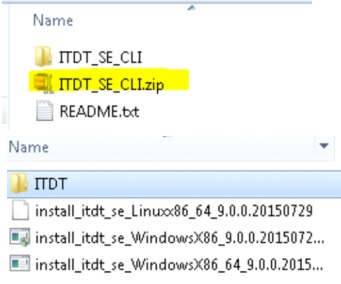
Table of Contents
Table of Contents
- Requirements
- Download Links
- ITDT DCR (GUI)
- ITDT Older versions
- ITDT CLI
- Fast install guide - ITDT CLI
0. All requirements are the same for both versions of ITDT:
- ITDT-DCR or Standard Edition CLI (If you don't have it, please download and install the application);
- Stop all Backup application services;
1. Download links
ITDT-DCR (GUI): https://downloads.dell.com/FOLDER02412201M/3/TL2000_TL4000_ZPE.exe
ITDT-SE (CLI): https://downloads.dell.com/FOLDER03379935M/4/ITDTutility_ZPE.exe
Table of Contents
2. ITDT DCR
- Run ITDT-DCR (GUI) as Administrator;
- Select Diagnostic/Maintenance option;
- Go to "Control Center" and run "Scan";
- After detecting the drive(s), select "Tapeutil";
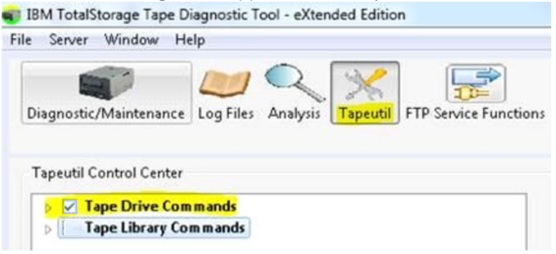
- Expand "Tape Drive Commands", locate and select the option "Unload";

- Go to "Execute" to confirm the operation.

Table of Contents
3. ITDT older versions
For older versions of the ITDT, follow the steps below:- Open ITDT-DCR (GUI);
- Select Diagnostic/Maintenance option;
- Go to "Control Center" and run "Scan";
- Select the drive with the tape stucked;
- Click on Test > Stuck Tape / Eject Test.

4. ITDT-SE CLI
See "Fast install guide" session on the bottom of this article to get instructions to run ITDT CLI;
- Open the ITDT-SE CLI;

- [S] Run scan for tape drives;
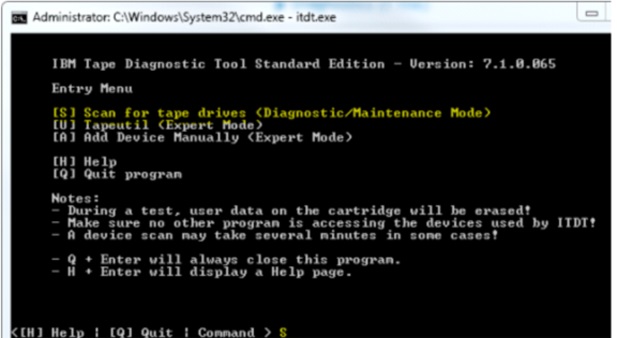
- [M] Open "Main Menu";
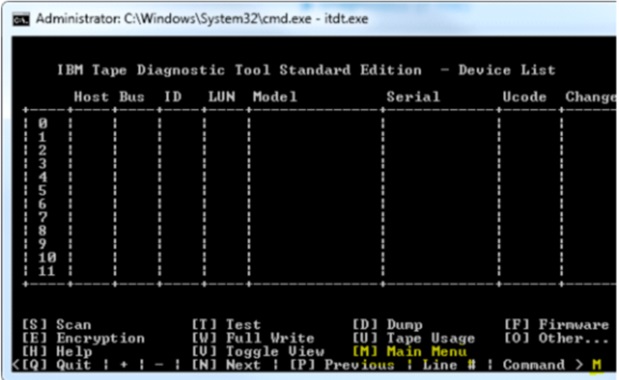
- [U] Open "Tapeutil" (Expert Mode);

- [30] Run "Unload Tape".

- For more information about these applications, search for ITDT User's guide on vendor’s web site.
Table of Contents
5. Fast Install guide - ITDT CLI:
Extract the package "ITDTutility_ZPE" and the installer "install_itdt_se" in "ITDT_SE_CLI".Run needed version, according to your Operation System.
Table of Contents
Affected Products
PowerVaultArticle Properties
Article Number: 000117533
Article Type: How To
Last Modified: 20 Oct 2025
Version: 5
Find answers to your questions from other Dell users
Support Services
Check if your device is covered by Support Services.