Sådan slår du lyden til på en Chromebook
Summary: Denne artikel indeholder oplysninger om, hvordan du slår lyden til på en Chromebook.
This article applies to
This article does not apply to
This article is not tied to any specific product.
Not all product versions are identified in this article.
Instructions
Til/fra-lyd
Processen med at slå lyden til på Chromebooks adskiller sig fra andre bærbare computere.
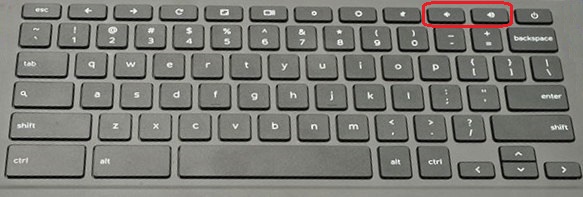
Chromebook-tastaturer har en dedikeret mute-tast på tastaturet, men har ikke en mute-tast. Den manglende nøgle er designet.
For at slå lyden til skal du trykke på lydstyrke op eller lydstyrke ned-tasten.
Affected Products
ChromebookArticle Properties
Article Number: 000117811
Article Type: How To
Last Modified: 02 Jun 2025
Version: 6
Find answers to your questions from other Dell users
Support Services
Check if your device is covered by Support Services.