Windows Server: 사용하지 않는 Windows iSCSI 세션 제거
Summary: 타겟당 iSCSI 세션이 여러 개인 경우 Windows에서 사용되지 않는 iSCSI 연결을 안전하게 제거하는 방법에 대한 정보입니다.
This article applies to
This article does not apply to
This article is not tied to any specific product.
Not all product versions are identified in this article.
Instructions
세션을 안전하게 제거하려면 세션에 연결된 디바이스가 없어야 합니다. 연결된 디바이스가 있는 경우 해당 리소스의 연결을 끊고 세션을 진행한 다음 디바이스를 다시 연결하기 위해 해당 리소스의 중단이 필요합니다.
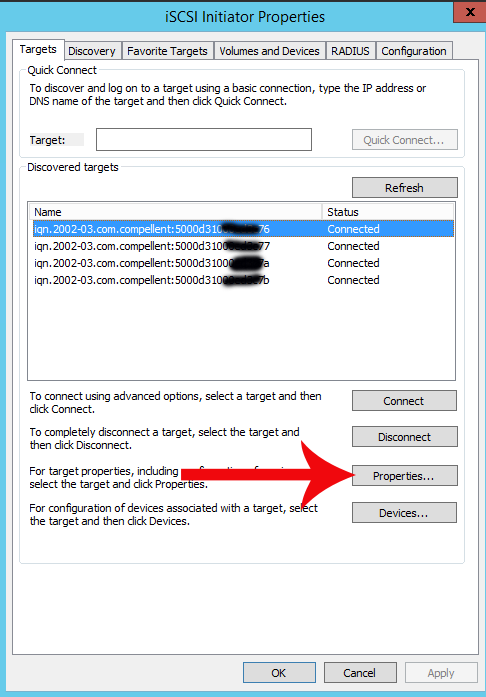
- iSCSI 이니시에이터를 열고 타겟을 선택합니다.
- 속성 열기
- 세션을 선택하고 디바이스 버튼을 선택합니다.
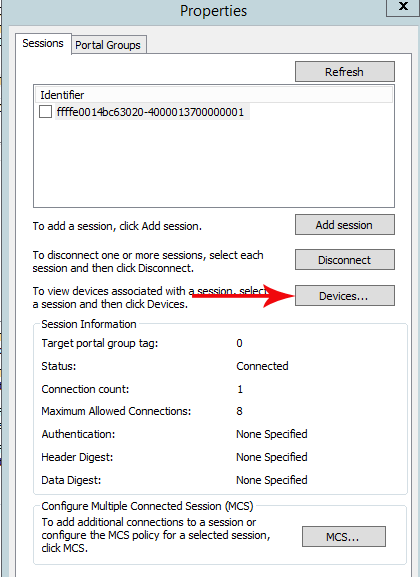
- 제거할 세션에 대해 나열된 디바이스가 없는지 확인합니다.
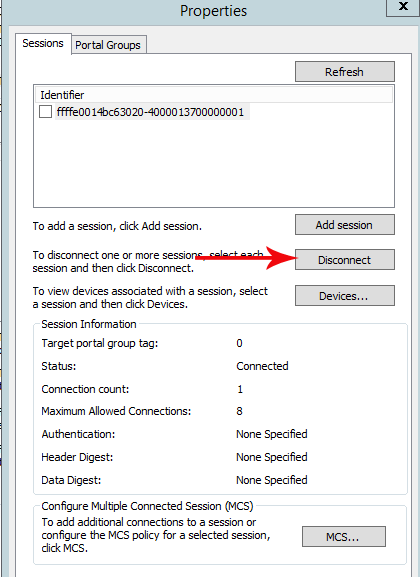
- 디바이스가 없는 경우 연결 해제 옵션을 선택합니다.
- 연결을 위해 커넥터당 하나의 세션을 유지합니다.
경고: 활성 디바이스가 있는 세션의 연결을 해제하지 마십시오. 세션에 디바이스가 없는 경우에만 연결을 끊습니다.
Additional Information
iSCSI 타겟의 연결을 해제하고 제거하는 명령줄 단계는 아래 링크를 참조하십시오.

Affected Products
Microsoft Windows Server 2016, Microsoft Windows Server 2019, Microsoft Windows Server 2022, Microsoft Windows Server 2025Products
Modular Infrastructure, Rack Servers, Tower ServersArticle Properties
Article Number: 000120974
Article Type: How To
Last Modified: 24 Jan 2025
Version: 4
Find answers to your questions from other Dell users
Support Services
Check if your device is covered by Support Services.