Så här fastställer du det fabriksinstallerade operativsystemet för ditt Dell-system
Summary: Hitta det fabriksinstallerade operativsystemet på Dell-datorn på Dells supportwebbplats.
This article applies to
This article does not apply to
This article is not tied to any specific product.
Not all product versions are identified in this article.
Instructions
Den här artikeln innehåller information om hur du fastställer det fabriksinstallerade operativsystemet för ditt Dell-system.
Fabriksinstallerat operativsystem.
Dell tillhandahåller teknisk support för det fabriksinstallerade operativsystemet enligt serviceavtalet för systemet.
Du kan ta reda på vilket fabriksinstallerat operativsystem som är installerat genom att gå till Dells supportwebbplats, ange service id-numret för ditt system och klicka på knappen Skicka (bild 1).
Figur 1: Ange Service Tag-numret för ditt Dell-system
Klicka sedan på länken System Configuration och klicka på Components på fliken Original Configuration och bläddra nedåt för att se raden med operativsystemet (bild 2).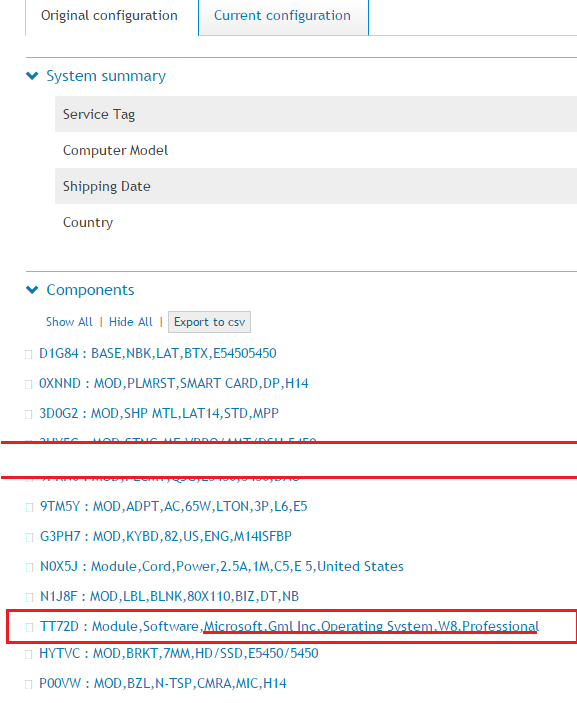
Figur 2: Leta reda på raden Operativsystem under listan med komponenter
Om du behöver mer hjälp med din Dell-produkt kontaktar du Dells tekniska support.
Affected Products
Alienware, Dell All-in-One, Dell Pro All-in-One, Dell Pro Max Micro, Dell Pro Max Slim, Dell Pro Max Tower, Dell Pro Micro, Dell Pro Slim, Dell Pro Tower, Dell Slim, Dell Tower, Inspiron, Legacy Desktop Models, OptiPlex, Vostro, XPS, G Series
, G Series, Alienware, Dell Plus, Dell Pro, Dell Pro Max, Dell Pro Plus, Dell Pro Premium, Inspiron, Latitude, Dell Pro Rugged, Vostro, XPS, Legacy Laptop Models, Fixed Workstations, Mobile Workstations, Dell Pro Max Micro XE FCM2250, Dell Pro Max Slim XE FCS1250, Dell Pro Max Tower T2 XE FCT2250, Dell Pro Micro Plus XE QBM1250, Dell Pro Slim Plus XE5 QBS1250, Dell Pro Tower Plus XE5 QBT1250
...
Article Properties
Article Number: 000122232
Article Type: How To
Last Modified: 21 Jul 2025
Version: 5
Find answers to your questions from other Dell users
Support Services
Check if your device is covered by Support Services.