PowerEdge: Jak zainstalować narzędzie Kopia zapasowa systemu Windows Server przy użyciu programu PowerShell
Summary: Jak zainstalować narzędzie Kopia zapasowa systemu Windows Server przy użyciu programu PowerShell dla systemu Windows Server. Wykonaj poniższe czynności, aby zainstalować i efektywnie zarządzać kopiami zapasowymi serwera. ...
This article applies to
This article does not apply to
This article is not tied to any specific product.
Not all product versions are identified in this article.
Instructions
- Aby uruchomić program Windows PowerShell, wpisz w oknie wiersza polecenia
Start PowerShell - Aby zainstalować typ kopii zapasowej systemu Windows Server
Install-WindowsFeature Windows-Server-Backup
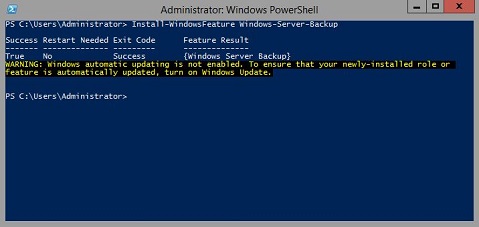
Informacje dodatkowe:
Kopia zapasowa systemu Windows Serverhttps://learn.microsoft.com/en-us/previous-versions/windows/it-pro/windows-server-2012-r2-and-2012/jj614621(v=ws.11)

Kopia zapasowa systemu Windows Server Polecenia cmdlet programu Windows PowerShellhttps://learn.microsoft.com/en-us/powershell/module/windowsserverbackup/?view=windowsserver2022-ps
Affected Products
Microsoft Windows 2012 Server, Microsoft Windows 2012 Server R2Products
C Series, HS Series, Modular Infrastructure, Rack Servers, Tower Servers, XE Servers, XR Servers, OEM Server Solutions, Microsoft Windows Server 2016, Microsoft Windows Server 2019, Microsoft Windows Server 2022, Microsoft Windows 2008 Server R2
, Microsoft Windows 2008 Server Service Pack 2, Microsoft Windows 2012 Server, Microsoft Windows 2012 Server R2
...
Article Properties
Article Number: 000122393
Article Type: How To
Last Modified: 05 Sep 2025
Version: 9
Find answers to your questions from other Dell users
Support Services
Check if your device is covered by Support Services.