PowerEdge: Como instalar o Backup do Windows Server usando o PowerShell
Summary: Como instalar o Backup do Windows Server usando o PowerShell para Windows Server. Siga estas etapas para instalar e gerenciar os backups do servidor com eficiência.
This article applies to
This article does not apply to
This article is not tied to any specific product.
Not all product versions are identified in this article.
Instructions
- Para iniciar o Windows PowerShell, digite na janela do prompt de comando
Start PowerShell - Para instalar o Backup do Windows Server , digite:
Install-WindowsFeature Windows-Server-Backup
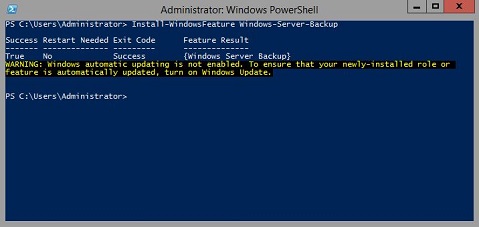
Informações adicionais:
Backup do Windows Serverhttps://learn.microsoft.com/en-us/previous-versions/windows/it-pro/windows-server-2012-r2-and-2012/jj614621(v=ws.11)

Cmdlets do Windows PowerShell de backupdo Windows Server https://learn.microsoft.com/en-us/powershell/module/windowsserverbackup/?view=windowsserver2022-ps
Affected Products
Microsoft Windows 2012 Server, Microsoft Windows 2012 Server R2Products
C Series, HS Series, Modular Infrastructure, Rack Servers, Tower Servers, XE Servers, XR Servers, OEM Server Solutions, Microsoft Windows Server 2016, Microsoft Windows Server 2019, Microsoft Windows Server 2022, Microsoft Windows 2008 Server R2
, Microsoft Windows 2008 Server Service Pack 2, Microsoft Windows 2012 Server, Microsoft Windows 2012 Server R2
...
Article Properties
Article Number: 000122393
Article Type: How To
Last Modified: 05 Sep 2025
Version: 9
Find answers to your questions from other Dell users
Support Services
Check if your device is covered by Support Services.