Precision 3630 Shows Front Fan Failure or ePSA Error 2000-0511 After Board Replacement
Summary: Learn how to resolve a fan issue "Alert! Front fan failure" on Precision 3630 Tower,
This article applies to
This article does not apply to
This article is not tied to any specific product.
Not all product versions are identified in this article.
Symptoms
Dell Precision 3630 Tower may show an alert during boot with the message Alert! Front fan failure. Running a ePSA diagnostic test may fail with error code 2000-0511.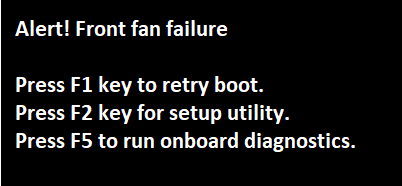
Affected Platforms:
- Precision 3630
Cause
No cause information
Resolution
Press F1 and the computer continues to boot and operate as normal. Updating the latest BIOS version on the computer and resetting the BIOS to factory default settings helps resolve the issue.
Warning: Dell Technologies recommends disconnecting any external devices like external hard disk drives, printers, and scanners before updating the BIOS.
Note: To learn more about updating the BIOS on a Dell computer, see the Dell Knowledge Base article BIOS Update Guide.
Download and install the latest BIOS
- Browse to the Dell Drivers & Downloads page for Precision 3630.
- Select the Operating System.
- Under Category, select BIOS.
- Locate the latest System BIOS.
- Click Download and save the file to your computer.
- Open File Explorer and browse to the location where the downloaded file is saved.
- Double-click the BIOS setup file and follow the on-screen instructions to complete the installation process.
;
Reset BIOS to factory default settings
- Restart the computer, and at the Dell logo screen tap F2 key.
- In the BIOS setup screen, click Restore settings.
- Select Factory settings, and click Ok.
- The BIOS resets to factory settings, and the computer restarts.
Affected Products
Precision 3630 TowerArticle Properties
Article Number: 000123866
Article Type: Solution
Last Modified: 13 Nov 2025
Version: 8
Find answers to your questions from other Dell users
Support Services
Check if your device is covered by Support Services.