Dell Travel Remote Information
Summary: The Dell™ Travel Remote is a remote control that fits in your ExpressCard slot. The Dell Travel Remote does not require any software to function.
This article applies to
This article does not apply to
This article is not tied to any specific product.
Not all product versions are identified in this article.
Symptoms
Dell™ Travel Remote Overview
The Dell™ Travel Remote is a small remote control that you can carry with you. This remote control is designed to be stored in the portable computer's ExpressCard slot and provides simple functionality for enjoying multimedia content. The Dell Travel Remote works with Dell MediaDirect™ and is also compatible with Microsoft® Windows Vista™ Media Center. The Dell Travel Remote does not require any software to function.
 Notes:
- The Dell Travel Remote has no ExpressCard functionality. It is simply designed to be stored in the ExpressCard slot.
- The Infrared (IR) port on Dell portable computers that are compatible with the Dell Travel Remote is designed to only work with the Dell Travel Remote. The IR port on Dell Travel Remote compatible Dell portable computers is receive-only and does not function with any other IR peripheral device.
Dell™ Travel Remote Features
 Figure 1: Dell™ Travel Remote M'08
|
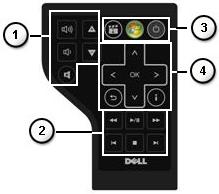 Figure 2: Dell™ Travel Remote M'09
|
|||||||||||||||||||||||


 ) function as MCE OK button (ie Enter/Select), Back (Previous Screen)


Article Properties
Article Number: 000124620
Article Type: Solution
Last Modified: 21 Feb 2021
Version: 3
Find answers to your questions from other Dell users
Support Services
Check if your device is covered by Support Services.