Dell Endpoint Security Suite Enterpriseのアンインストール時にエラー1603が発生する
Summary: エラー1603は、Dell Endpoint Security Suite Enterpriseをアンインストールできないことを示す一般的なエラーです。このエラーの最も一般的な理由の1つは、リモート管理コンソール内でデバイス ポリシーからのシャットダウン防止がオンになっていることです。
This article applies to
This article does not apply to
This article is not tied to any specific product.
Not all product versions are identified in this article.
Symptoms
注:
- 2022年5月をもって、Dell Endpoint Security Suite Enterpriseはメンテナンス終了となりました。この記事は今後、Dellによってアップデートされることはありません。詳細については、「Dell Data Securityの製品ライフサイクル(サポート終了/サポート終了)ポリシー」を参照してください。その他の記事に関する質問がある場合は、担当のセールス チームに連絡するか、またはendpointsecurity@dell.comにお問い合わせください。
- 現在の製品に関する追加情報については、エンドポイント セキュリティページを参照してください。
対象製品:
- Dell Endpoint Security Suite Enterprise
影響を受けるプラットフォーム:
- Windows
Cause
-
Resolution
デバイス ポリシーから[Prevent Shutdown]を無効にするには、次の手順を実行します。
- https://server.domain.com:8443/webui/ でリモート管理コンソールにログインします。
注:
- server.domain.comは、Dell Security Management(Dell Data Protection)サーバの完全修飾ドメイン名(FQDN)を表します。
- 8443はデフォルトのポートですが、環境により異なる場合があります。
- 「Populations(構成)」を展開します。
- [Populations]で、[ Enterprise]、[ Endpoint Groups]、または [Endpoints]のいずれかをクリックします。
注:エンドポイント グループまたはエンドポイントが選択されている場合は、手順4に進む前に追加のグループまたはエンドポイントを指定する必要があります。
![[Populations]](https://supportkb.dell.com/img/ka06P00000093w9QAA/ka06P00000093w9QAA_ja_1.jpeg)
- [Threat Protection]で、[ Advanced Threat Prevention]をクリックします。
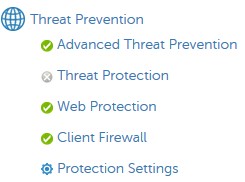
- 詳細設定を表示します。

- [Execution Control]で、[ Prevent Service Shutdown from Device]をオフにします。

- 右上隅にある [ 保存] を選択します。

- 左側のメニューペインで「Management(管理)」を展開し、「Commit(コミット)」を選択します。

- 必要に応じて、変更に [コメント ] を作成し、 [ コミット] を選択します。
- 影響を受けるエンドポイントを再起動します。
- 再起動時に、Dell Endpoint Security Suite Enterpriseのアンインストールを再試行します
サポートに問い合わせるには、「Dell Data Securityのインターナショナル サポート電話番号」を参照してください。
TechDirectにアクセスして、テクニカル サポート リクエストをオンラインで生成します。
さらに詳しい情報やリソースについては、「デル セキュリティ コミュニティー フォーラム」に参加してください。
Additional Information
Videos
Affected Products
Dell Endpoint Security Suite EnterpriseArticle Properties
Article Number: 000124727
Article Type: Solution
Last Modified: 19 Jun 2024
Version: 9
Find answers to your questions from other Dell users
Support Services
Check if your device is covered by Support Services.