Dell Endpoint Security Suite Enterprise 제거 시 오류 1603
Summary: 오류 1603은 Dell Endpoint Security Suite Enterprise를 제거할 수 없다는 일반적인 오류입니다. 이 오류가 발생하는 가장 일반적인 이유 중 하나는 디바이스에서 종료 방지 정책이 원격 관리 콘솔 내에서 켜져 있기 때문입니다.
This article applies to
This article does not apply to
This article is not tied to any specific product.
Not all product versions are identified in this article.
Symptoms
참고:
- 2022년 5월부터 Dell Endpoint Security Suite Enterprise 유지 보수가 종료됩니다. 이 문서는 더 이상 Dell에서 업데이트하지 않습니다. 자세한 내용은 Dell Data Security의 제품 수명주기(지원 종료/EOL(End Of Life)) 정책을 참조하십시오. 다른 문서에 대한 질문이 있는 경우 영업 팀에 문의하거나 endpointsecurity@dell.com으로 문의하십시오.
- 최신 제품에 대한 자세한 내용은 엔드포인트 보안을 참조하십시오.
영향을 받는 제품:
- Dell Endpoint Security Suite Enterprise
해당되는 플랫폼:
- Windows
Cause
해당 사항 없음
Resolution
디바이스에서 종료 방지 정책을 비활성화하려면 다음을 수행합니다.
- https://server.domain.com:8443/webui/ 에서 Remote Management Console에 로그인합니다.
참고:
- Server.domain.com은 Dell 보안 관리(Dell Data Protection) 서버의 정규화된 도메인 이름(FQDN)을 나타냅니다.
- 8443이 기본 포트지만 사용자 환경에서는 다를 수 있습니다.
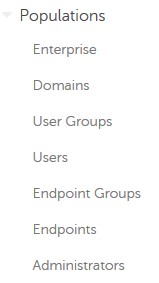
- 채우기(Populations)를 확장합니다.
- Populations에서 Enterprise, Endpoint Groups 또는 Endpoints를 클릭합니다.
참고: 엔드포인트 그룹 또는 엔드포인트를 선택한 경우 4단계를 계속하기 전에 추가 그룹 또는 엔드포인트를 지정해야 합니다.
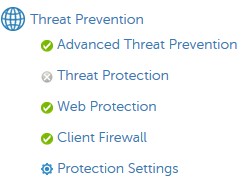
- 위협 방지에서 Advanced Threat Prevention을 클릭합니다.
- 고급 설정을 표시합니다.

- Execution Control(실행 제어)에서 Prevent Service Shutdown from Device(디바이스에서 서비스 종료 방지)의 선택을 취소합니다.

- 오른쪽 위 모서리에서 저장을 선택합니다.

- 왼쪽 메뉴 창에서 관리(Management)를 확장한 다음 적용(Commit)을 선택합니다.
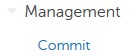
- 필요에 따라 변경 내용에 대한 주석 을 작성한 다음 커밋을 선택합니다.
- 영향을 받는 엔드포인트를 재부팅합니다.
- 재부팅 시 Dell Endpoint Security Suite Enterprise를 다시 제거해 보십시오.
지원 부서에 문의하려면 Dell Data Security 국제 지원 전화번호를 참조하십시오.
온라인으로 기술 지원 요청을 생성하려면 TechDirect로 이동하십시오.
추가 정보 및 리소스를 보려면 Dell 보안 커뮤니티 포럼에 참여하십시오.
Additional Information
Videos
Affected Products
Dell Endpoint Security Suite EnterpriseArticle Properties
Article Number: 000124727
Article Type: Solution
Last Modified: 19 Jun 2024
Version: 9
Find answers to your questions from other Dell users
Support Services
Check if your device is covered by Support Services.