Error 1603 When Uninstalling Dell Endpoint Security Suite Enterprise
Summary: Error 1603 is a generic error that states Dell Endpoint Security Suite Enterprise is unable to uninstall. One of the most common reasons for this error is the Prevent Shutdown from Device policy is turned on within the Remote Management Console. ...
This article applies to
This article does not apply to
This article is not tied to any specific product.
Not all product versions are identified in this article.
Symptoms
Note:
- As of May 2022, Dell Endpoint Security Suite Enterprise has reached End of Maintenance. This article is no longer updated by Dell. For more information, reference Product Life Cycle (End of Support / End of Life) Policy for Dell Data Security. If you have any questions on alternative articles, either reach out to your sales team or contact endpointsecurity@dell.com.
- Reference Endpoint Security for additional information about current products.
Affected Products:
- Dell Endpoint Security Suite Enterprise
Affected Platforms:
- Windows
Cause
Not Applicable
Resolution
To disable the Prevent Shutdown from Device policy:
- Log in to the Remote Management Console at https://server.domain.com:8443/webui/.
Note:
- Server.domain.com represents the fully qualified domain name (FQDN) of the Dell Security Management (Dell Data Protection) server.
- 8443 is the default port, but may differ in your environment.
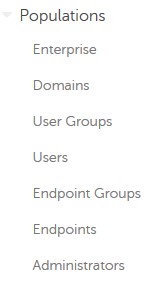
- Expand Populations.
- Under Populations, click either Enterprise, Endpoint Groups, or Endpoints.
Note: If Endpoint Groups or Endpoints are selected, additional groups or endpoints must be specified before continuing to step 4.
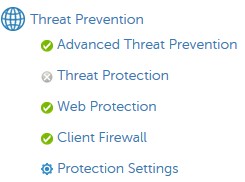
- Under Threat Protection, click Advanced Threat Prevention.
- Show advanced settings.

- Under Execution Control, clear Prevent Service Shutdown from Device.

- In the upper right corner, select Save.

- In the left menu pane, expand Management and then select Commit.

- Optionally, make a Comment on the change and then select Commit.
- Reboot the affected endpoints.
- On reboot, retry uninstalling Dell Endpoint Security Suite Enterprise
To contact support, reference Dell Data Security International Support Phone Numbers.
Go to TechDirect to generate a technical support request online.
For additional insights and resources, join the Dell Security Community Forum.
Affected Products
Dell Endpoint Security Suite EnterpriseArticle Properties
Article Number: 000124727
Article Type: Solution
Last Modified: 19 Apr 2026
Version: 10
Find answers to your questions from other Dell users
Support Services
Check if your device is covered by Support Services.