卸载 Dell Endpoint Security Suite Enterprise 时出现错误 1603
Summary: 错误 1603 是一个通用错误,指出 Dell Endpoint Security Suite Enterprise 无法卸载。此错误的常见原因之一是在远程管理控制台中打开了“防止从设备关机”策略。
This article applies to
This article does not apply to
This article is not tied to any specific product.
Not all product versions are identified in this article.
Symptoms
提醒:
- 从 2022 年 5 月起,Dell Endpoint Security Suite Enterprise 停止维护。戴尔不再更新本文。有关详细信息,请参阅 Dell Data Security 产品生命周期(结束支持/停售)政策。如果您对其他文章有任何疑问,请联系您的销售团队或联系 endpointsecurity@dell.com。
- 请参阅端点安全性,了解有关当前产品的其他信息。
受影响的产品:
- Dell Endpoint Security Suite Enterprise
受影响的平台:
- Windows
Cause
不适用
Resolution
要禁用“防止从设备关机”策略,请执行以下操作:
- 通过 https://server.domain.com:8443/webui/ 登录到远程管理控制台。
提醒:
- Server.domain.com代表Dell Security Management (Dell Data Protection)服务器的完全限定域名(FQDN)。
- 8443是默认端口,但在您的环境可能有所不同。
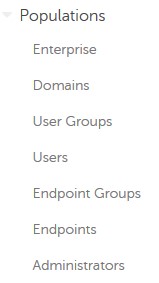
- 展开Populations(安装)。
- 在 Populations下,单击 Enterprise、 Endpoint Groups或 Endpoints。
提醒:如果选择了 Endpoint Groups 或 Endpoints ,则必须先指定其他组或端点,然后才能继续执行步骤 4。
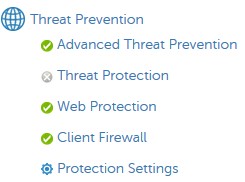
- 在“威胁防护”下,单击“ 高级威胁防护”。
- 显示 高级设置。

- 在执行控制下,清除 防止从设备关闭服务。

- 在右上角,选择 “保存”。

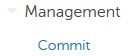
- 在左侧菜单窗格中,展开Management(管理),然后选择Commit(提交)。
- (可选)对更改进行 批注 ,然后选择 Commit。
- 重新启动受影响的端点。
- 重新启动时,重试卸载 Dell Endpoint Security Suite Enterprise
要联系支持部门,请参阅 Dell Data Security 国际支持电话号码。
转至 TechDirect,在线生成技术支持请求。
要获得更多见解和资源,请加入戴尔安全社区论坛。
Affected Products
Dell Endpoint Security Suite EnterpriseArticle Properties
Article Number: 000124727
Article Type: Solution
Last Modified: 19 Jun 2024
Version: 9
Find answers to your questions from other Dell users
Support Services
Check if your device is covered by Support Services.