Dell Data Protection Encryptionのメッセージ「Encryption Administrator Password」が表示される
Summary: Dell Encryption(旧Dell Data Protection |Encryption)がインストールされています。
This article applies to
This article does not apply to
This article is not tied to any specific product.
Not all product versions are identified in this article.
Symptoms
対象製品:
- Dell Encryption
- Dell Data Protection | Encryption
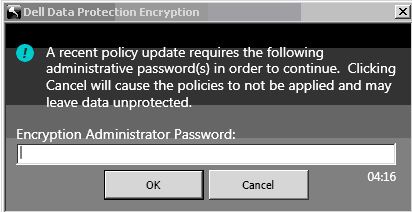
図1: (英語のみ)暗号化管理者パスワード
この問題は、クライアント ユーザーの追加など、ポリシー、パスワード、またはクライアント ユーザーの変更を変更すると発生します。UI内のKey Backupアイコンの横に、Key Backupが必要であることを示す感嘆符付きの黄色い丸が表示されます。
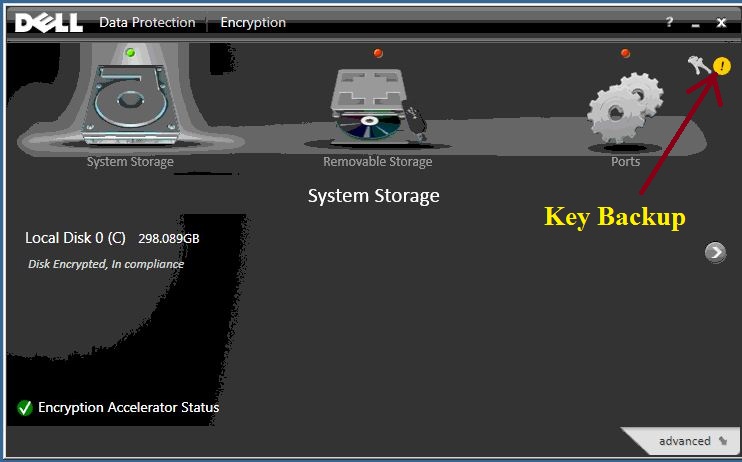
図2:(英語のみ)デルのデータ保護 |暗号化ステータス
Cause
-
Resolution
永続的なメッセージが表示されないようにするには、Key Backupアイコンをダブルクリックし、画面の指示に従って完了します。
サポートに問い合わせるには、「Dell Data Securityのインターナショナル サポート電話番号」を参照してください。
TechDirectにアクセスして、テクニカル サポート リクエストをオンラインで生成します。
さらに詳しい情報やリソースについては、「デル セキュリティ コミュニティー フォーラム」に参加してください。
Affected Products
Dell EncryptionArticle Properties
Article Number: 000124865
Article Type: Solution
Last Modified: 05 Mar 2024
Version: 8
Find answers to your questions from other Dell users
Support Services
Check if your device is covered by Support Services.