無法使用自我簽署憑證在 Dell Security Management Server Enterprise 上啟動代理程式
Summary: 在 Dell Security Management Server Enterprise 中使用自我簽署憑證時 (先前稱為 Dell Data Protection |Enterprise Edition 伺服器無法啟動代理程式。
This article applies to
This article does not apply to
This article is not tied to any specific product.
Not all product versions are identified in this article.
Symptoms
受影響的產品:
- Dell Security Management Server
- Dell Data Protection | Enterprise Edition
受影響的版本:
- V9.5 - V9.8
如果在安裝 Dell Security Management Server (先前稱為 Dell Data Protection | Enterprise Edition Server) v9.5 至 v9.8.x 時選擇自我簽署憑證,代理程式註冊 (Self-Encrypting Drive Management、BitLocker Manager、Advanced Threat Protection 和 Threat Protection) 可能會因為安裝期間未正確設定 Dell Management (DM) 憑證而失敗。代理程式和原則簽署需要安全的 SSL 或 TLS 以進行通訊。Dell Management (DM) 憑證用於促進此通訊的安全。在 Dell Security Management Server v9.5 至 9.8.x 中,DM 憑證可能設定不正確。
Cause
不適用
Resolution
注意:此問題已在 9.9.2 中解決。
若要解決此問題:
- 登入受影響的 Dell Security Management Server。
- 在 Windows「開始」功能表上按右鍵,然後選取執行。
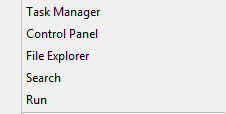
- 在「執行」UI 中,輸入 services.msc,然後按一下確定。

- 以滑鼠右鍵按一下 Dell Core Server,然後選取停止。

- 在 Window「搜尋」功能表中輸入並選取伺服器組態工具。

- 前往 操作>設定憑證。
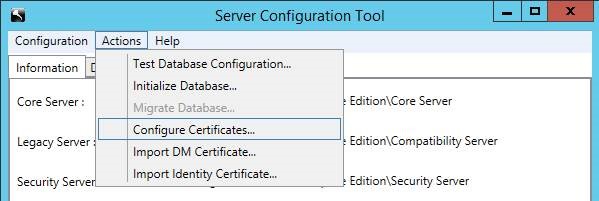
- 在「配置憑證」中,按下下一步。

- 選取快速,然後按一下下一步。

- 按下是以使用目前的憑證。
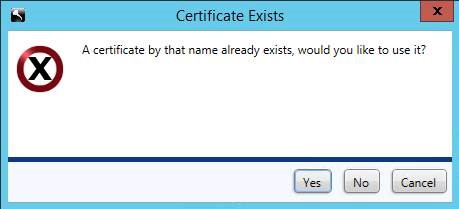 注意:只有在具有自我簽署憑證時,才會出現此提示。
 - 按一下完成以關閉憑證設定。

- 在 Windows「開始」功能表上按右鍵,然後選取執行。

- 在執行 UI 中輸入
mmc然後按下確認。

- 在受管理遷移公用程式 (MMC) 使用者介面 (UI) 中選取檔案,然後選取新增/移除嵌入式管理單元。

- 在嵌入式管理單元 UI 中,選取憑證,然後按下新增。

- 選取電腦帳戶,然後按下下一步。

- 選取本機電腦,然後按下完成。

- 在嵌入式管理單元 UI 中按下確定。
- 在 MMC 中,展開 憑證 (本機電腦)>個人>憑證

- 會列出新建立的憑證。按兩下證書以檢查 到期日期 ,以確保證書與今天的日期 +10 年匹配。


- 以滑鼠右鍵按一下新憑證,然後選取所有 工作>匯出。

- 在「憑證匯出精靈」中,選取下一步。

- 按一下是,匯出私密金鑰,然後按下下一步。

- 保留選取格式的預設選項,然後按下下一步。

- 檢查 密碼 並設定並確認密碼。填入後,按下下一步。

- 瀏覽並選取憑證的匯出位置。選取位置後,按一下下一步。

- 按一下完成以完成憑證匯出。

- 返回「伺服器組態工具」,然後選取 動作>匯入 DM 憑證。
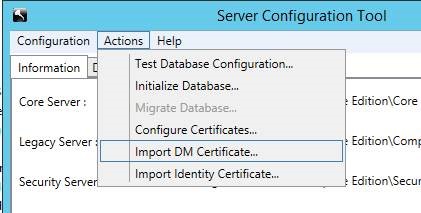
- 選取要匯入的憑證 (步驟 25)。
- 輸入匯出的憑證密碼 (步驟 24),然後按下確定。

- 如果您使用 Windows 認證連線至 SQL,請輸入具有 SQL 權限的服務帳戶資訊,然後按一下下一步。如果您使用的是 SQL 認證,請按一下下一步。
 注意:在範例中,我們使用 Windows 認證。若使用 SQL 認證,則不需要任何資訊。
 - 退出服務組態工具。
- 提示要儲存 時,選取 是。

- 在「服務」UI 中,以滑鼠右鍵按一下 Dell Core Server,然後選取啟動。

- 退出服務 UI。
如要聯絡支援部門,請參閱 Dell Data Security 國際支援電話號碼。
請前往 TechDirect,以線上產生技術支援要求。
如需更多深入見解與資源,請加入 Dell 安全性社群論壇。
Additional Information
Videos
Affected Products
Dell EncryptionArticle Properties
Article Number: 000124931
Article Type: Solution
Last Modified: 23 Jul 2024
Version: 12
Find answers to your questions from other Dell users
Support Services
Check if your device is covered by Support Services.