Comment réinstaller des applications modernes individuelles incluses dans Windows 10
Summary: Cet article fournit des informations sur la réinstallation d’applications modernes individuelles incluses dans Windows 10.
This article applies to
This article does not apply to
This article is not tied to any specific product.
Not all product versions are identified in this article.
Symptoms
Cause
Aucune information sur la cause n’est disponible.
Resolution
Réinstallation d’applications modernes individuelles
Ce guide ne doit être utilisé que pour tenter de résoudre des problèmes liés à des applications individuelles.
Comment réinstaller une application individuelle
- Ouvrez Windows PowerShell en tant qu’administrateur en saisissant Powers dans la zone de recherche de votre barre des tâches. En regard du bouton Démarrer (voir l’image ci-dessous), cliquez avec le bouton droit de la souris ou maintenez appuyé puis sélectionnez Exécuter en tant qu’administrateur dans la liste déroulante.
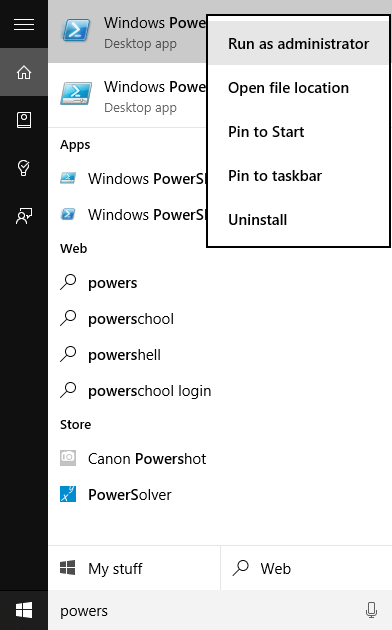
- Saisissez la commande suivante répertoriée dans le tableau ci-dessous sous la colonne « Supprimer la commande PowerShell » pour supprimer l’application native associée.
| Application native | Commande Remove de PowerShell | Nom de l’application dans le Store |
|---|---|---|
| Alarmes et horloges | get-appxpackage *Microsoft.WindowsAlarms* | remove-appxpackage |
Alarmes et horloge Windows  |
| Calculatrice | get-appxpackage *Microsoft.WindowsCalculator* | remove-appxpackage |
Calculatrice Windows |
| Caméra | get-appxpackage *Microsoft.WindowsCamera* | remove-appxpackage |
Caméra Windows |
| Groove Musique | get-appxpackage *Microsoft.ZuneMusic* | remove-appxpackage |
Groove Musique |
| Courrier et calendrier | get-appxpackage *microsoft.windowscommunicationsapps* | remove-appxpackage |
Courrier et calendrier |
| Cartes | get-appxpackage *Microsoft.WindowsMaps* | remove-appxpackage |
Cartes Windows |
| Films et TV | get-appxpackage *Microsoft.ZuneVideo* | remove-appxpackage |
Films et TV |
| OneNote | get-appxpackage *Microsoft.Office.OneNote* | remove-appxpackage |
OneNote |
| Contacts | get-appxpackage *Microsoft.People* | remove-appxpackage |
Contacts Microsoft |
| Photos | get-appxpackage *Microsoft.Windows.Photos* | remove-appxpackage |
Photos Microsoft |
| Enregistreur vocal | get-appxpackage *Microsoft.WindowsSoundRecorder * | remove-appxpackage |
Enregistreur vocal Windows |
| Xbox | get-appxpackage *Microsoft.XboxApp* | remove-appxpackage |
Xbox |

L’application peut être réinstallée à l’aide de l’application Store ou en suivant le lien indiqué dans le tableau ci-dessous. Quittez l’application Store si elle est déjà ouverte avant de réinstaller l’application.
Affected Products
Alienware, Dell All-in-One, Dell Pro All-in-One, Dell Pro Max Micro, Dell Pro Max Slim, Dell Pro Max Tower, Dell Pro Micro, Dell Pro Slim, Dell Pro Tower, Dell Slim, Dell Tower, Inspiron, OptiPlex, Vostro, XPS, G Series, G Series, Alienware
, Dell Laptops, Dell Plus, Dell Pro, Dell Pro Max, Dell Pro Plus, Dell Pro Premium, Inspiron, Latitude, Dell Pro Rugged, Vostro, XPS, Fixed Workstations, Mobile Workstations, Dell Pro Max Micro XE FCM2250, Dell Pro Max Slim XE FCS1250, Dell Pro Max Tower T2 XE FCT2250, Dell Pro Max 16 XE MC16250, Dell Pro Micro Plus XE QBM1250, Dell Pro Slim Plus XE5 QBS1250, Dell Pro Tower Plus XE5 QBT1250
...
Article Properties
Article Number: 000125529
Article Type: Solution
Last Modified: 16 Jul 2025
Version: 7
Find answers to your questions from other Dell users
Support Services
Check if your device is covered by Support Services.