Precision 5540: お使いのPCのビジュアル ガイド
Summary: 次の記事では、Precision 5540 Mobile Workstationのビジュアル ガイドを提供し、ノートパソコンの外部ポートと機能の一覧を示します。
This article applies to
This article does not apply to
This article is not tied to any specific product.
Not all product versions are identified in this article.
Symptoms
Cause
前面図
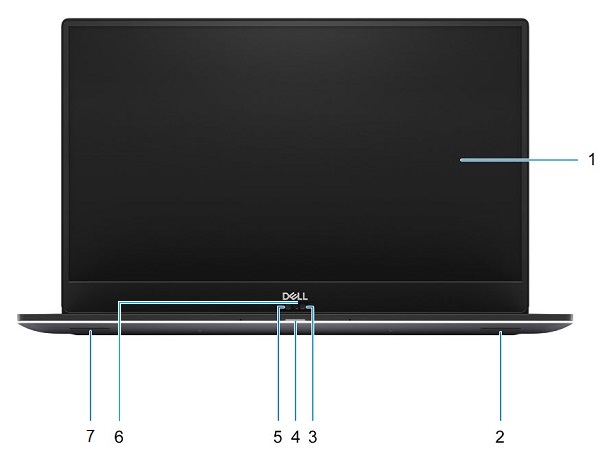
(図1:前面図)
| 1 | モニタ | 2 | 右スピーカー |
| 3 | 赤外線カメラ | 4 | バッテリー/ステータスLED |
| 5 | HDカメラ | 6 | カメラ ステータスLED |
| 7 | 左スピーカー |
上面図

(図2:上面図)
| 1 | LED付き電源ボタンまたは指紋リーダー付き電源ボタン(オプション) | 2 | キーボード |
| 3 | Palmrest | 4 | タッチパッド |
底面図

(図3:底面図)
| 1 | Service Tag | 2 | 法令順守ラベル |
左側面図

(図4:左側面図)
| 1 | 電源コネクター | 2 | USB 3.1 Gen1コネクター(PowerShare付き) |
| 3 | HDMIコネクタ | 4 | Thunderbolt 3 Type-Cコネクタ |
| 5 | ヘッドセットコネクタ |
右側面図

(図5:右側面図)
| 1 | メモリー カード リーダー | 2 | USB 3.1 Gen1コネクター(PowerShare付き) |
| 3 | バッテリー充電ステータスLED | 4 | バッテリー充電ステータス ボタン |
| 5 | Noble Wedgeセキュリティ スロット |
Resolution
ACアダプター図

(図6:130Wアダプター)
| タイプ130Wシリーズ | 説明 |
| 入力電圧 | AC 100 VAC~240 VAC |
| 出力電流 | 6.67 A(連続稼動の場合) |
| 出力電力 | 130 W |
| 出力電圧 | 19.5 VDC |
Additional Information
Affected Products
Precision 5540Article Properties
Article Number: 000125898
Article Type: Solution
Last Modified: 05 May 2025
Version: 9
Find answers to your questions from other Dell users
Support Services
Check if your device is covered by Support Services.