Dell.Client.SecurityFramework.Console.exe Displays an Error after Dell Endpoint Security Suite Enterprise Advanced Threat Protection Upgrade
Summary: The Dell Encryption (formerly Dell Data Protection | Encryption) console displays an error after auto-updates are enabled on the Dell Security Management Server (formerly Dell Data Protection | Enterprise Edition Server). ...
This article applies to
This article does not apply to
This article is not tied to any specific product.
Not all product versions are identified in this article.
Symptoms
Note:
- As of May 2022, Dell Endpoint Security Suite Enterprise has reached End of Maintenance. This article is no longer updated by Dell. For more information, reference the Product Life Cycle (End of Support / End of Life) Policy for Dell Data Security. If you have any questions on alternative articles, either reach out to your sales team or contact endpointsecurity@dell.com.
- As of January 2019, Dell Endpoint Security Suite Pro has reached End of Service and this article is no longer updated by Dell. For more information, reference the Product Life Cycle (End of Support / End of Life) Policy for Dell Data Security.
- Reference Endpoint Security for additional information about current products.
Affected Products:
- Dell Endpoint Security Suite Pro v1.3.0
- Dell Endpoint Security Suite Enterprise v1.1.0
Dell Endpoint Security Suite Enterprise relies on a few components to manage the protection of the product.
The Dell Client Security Framework (DCSF/CSF) is the core of many Dell Data Security Products. This is a platform for various plugins to tie together to allow an administrator to control various protection products for their business or enterprise.
This platform leverages our Dell Endpoint Security Suite Enterprise Advanced Threat Protection products. Dynamic link libraries are used to point the DCSF to other products and allow Dell Data Protection to pass data back and forth.
Cause
A change between 1.1.0 of the Dell Endpoint Security Suite Enterprise product and 1.1.1 introduced a different method of passing data between the CSF and the Advanced Threat Protection applications that Dell Data Protection manages.
With the recent ability to auto-update the Dell Endpoint Security Suite Enterprise application using a switch on the Dell Security Management Server, updating the original 1.1.0's Advanced Threat Protection components may cause an issue where the plugins that connect the ATP application to the Dell CSF may be of the wrong version, causing an error:
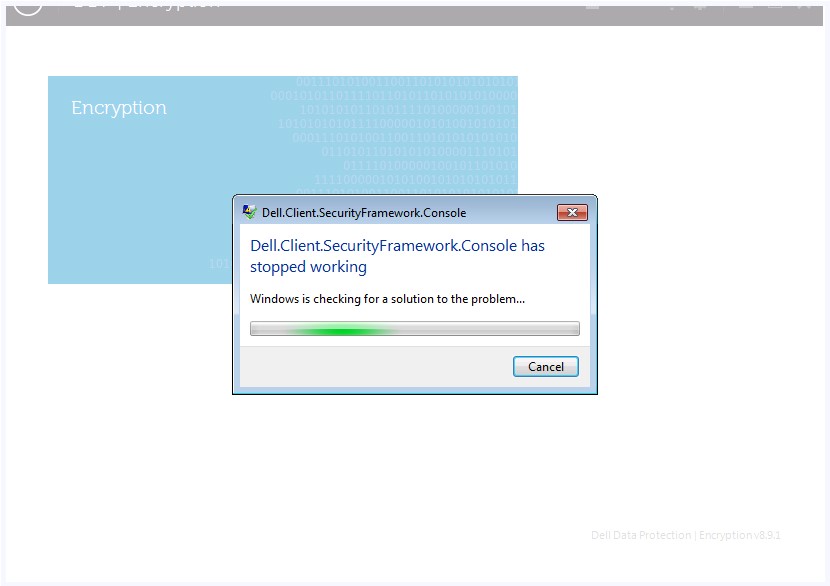
Figure 1: (English Only) Dell.Client.SecurityFramework.Console has stopped working
Resolution
To resolve this, you must update the Dell CSF to 1.1.1 or later, and install the separate Advanced Threat Protection CSF Plugins included with this version. This can be obtained through support or your personal download account that you received using email when purchasing Dell Endpoint Security Suite Enterprise.
The installer that is typically correlated to the CSF is the EMAgent installer. 8.9.1 may exhibit this issue. 8.10.0 or newer no longer exhibits this if you have the 1371 version or newer of the Advanced Threat Protection CSF Plugins.
This issue presents in logs with this failure in the Microsoft Event Viewer Application logs:
Application: Dell.SecurityFramework.Console.exe
Framework Version: v4.0.30319
Description: The process was terminated due to an unhandled exception.
Exception Info: System.TypeLoadException
Stack:
    at Dell.Client.Console.Plugin.AdvancedTpPlugin.Dispose(Boolean)
    at System.ComponentModel.Component.Finalize()
To contact support, reference Dell Data Security International Support Phone Numbers.
Go to TechDirect to generate a technical support request online.
For additional insights and resources, join the Dell Security Community Forum.
Affected Products
Dell Endpoint Security Suite EnterpriseArticle Properties
Article Number: 000126753
Article Type: Solution
Last Modified: 02 Oct 2023
Version: 8
Find answers to your questions from other Dell users
Support Services
Check if your device is covered by Support Services.