PowerVault: ME4, ME5 Restoring Management Access when a Password is Lost
Summary: This article covers the steps to recover access to the PowerVault manager or CLI when the managed level user password has been lost. This procedure requires physical access to the array by the administrator using a serial cable provided with the array. ...
This article applies to
This article does not apply to
This article is not tied to any specific product.
Not all product versions are identified in this article.
Instructions
- Considerations before you begin
- Procedure for PowerVault ME4 G275 controller firmware
- Procedure for PowerVault ME4 G280 controller firmware and PowerVault ME5
Before you begin:
Should a PowerVault system administrator lose the management login password there is no way to recover the original password. The next option is to restore the default user accounts on the PowerVault ME array.
- This procedure does not delete data or configuration information.
- This procedure deletes all user accounts including the manage/admin level account.
- This procedure cannot be implemented using SSH or telnet access to the management port.
- Physical access by the administrator to the PowerVault ME series SAN using the serial cable supplied with the PowerVault ME series is required.
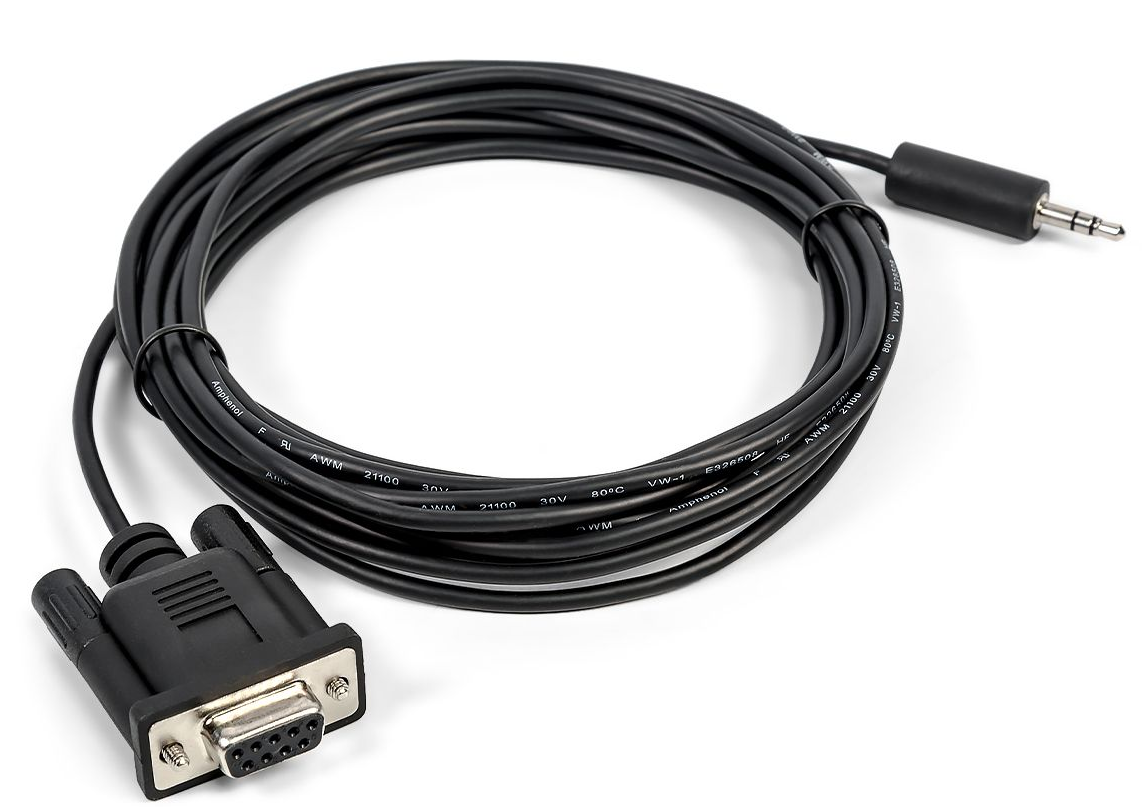
- PowerVault ME4 series arrays are supplied with a serial cable that has a DB9 connector at one end and a 3.5mm audio jack at the other end.
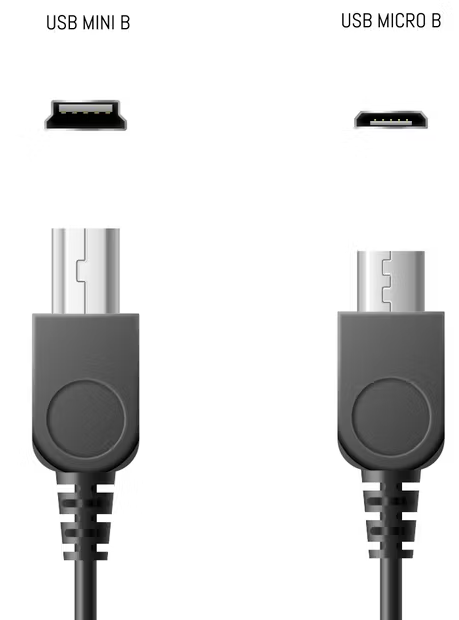
- PowerVault ME4 series arrays can also use a USB A to mini-B (five pin) cable. The USB ports on the controller module emulate a serial connection. This cable is not supplied by Dell.
- PowerVault ME5 series arrays are supplied with a micro-B USB cable serial cable. The USB ports on the controller module emulate a serial connection.
- When using USB serial cable, some Microsoft Windows hosts may require driver support. Download the "Dell ME Series Storage Array USB Utility" from the "Drivers & Downloads" section for your SAN model on Dell Support.
NOTE: This procedure does not clear the configuration or reset the array to factory default. The person carrying out the procedure requires physical access to the array using a serial cable. Each array ships with a serial cable, if the serial cable has been misplaced, the administrator may be able to source a replacement USB cable.
NOTE: A serial cable is shipped with each PowerVault ME array. The serial cable packaging states the following:
- DO NOT DISCARD.
- SUPPORT USE ONLY.
- DO NOT USE UNLESS DIRECTED BY SERVICE PROVIDER.
| Cable description | ME Generation | Dell part number | Windows Driver * | Terminal application serial settings | Comments |
|---|---|---|---|---|---|
| DB9 to 3.5 mm Audio jack cable | ME4 | 4R3WX | N/A | 115200,8,n,1, no flow control | Modern systems may lack the DB9 serial port connector and require a USB to serial adapter. |
| USB A to mini-B (5-pin) USB cable | ME4 | N/A | me-usb-driver-1.0.5.27.zip | 115200,8,n,1, no flow control | This is not supplied by Dell. Interface commonly used with Cameras. |
| USB-A to micro-B USB cable | ME5 | 406GW | me-usb-driver-1.0.5.27.zip | 115200,8,n,1, no flow control | Windows 10 and later OS tend to have inbox USB driver support. |
PowerVault ME firmware loads a USB serial driver which emulates a virtual serial port. When connected to the controller CLI port using USB cable, the host operating system must also load a USB serial driver. Most Windows versions have an inbox driver, if support must be installed, the driver is available on Dell Support under the PowerVault ME Drivers & Downloads.
Serial cable interfaces
 |
 |
PowerVault ME4 series (G275, pre-G280 firmware)
- The administrator needs the serial cable that shipped with the equipment and physical access to the equipment.
- With the serial cable connected, open a connection to the controller using a terminal emulator such as PuTTY. (8,N,1,115200, no flow control.) See PowerVault ME4: How to establish connections to controller serial ports - All Models
- With the session-established, press Enter on the keyboard to begin the session. You must copy or note the controller Serial Number:
System Version: GT275R003-01
OS Version: GPM275R003-01
MC Version: GXM275R007-01
Serial Number: 00C0FF3C0XXX
10.0.0.2 login:
- Login using the username restoreusers, using the Serial Number: Value as the password.
System Version: GT275R003-01
OS Version: GPM275R003-01
MC Version: GXM275R007-01
Serial Number: 00C0FF3C0XXX
10.0.0.2 login: restoreusers
Password: 00C0FF3C0XXX

/home/restore/shell: 2018-08-14 13:19:23: Restoring other controller's users to default
- The management controller (MC) immediately restarts on both controllers and afterwards the password for the default admin user manage becomes "!manage."
- Change the managed password using the CLI or ME Storage Manager (MESM) management user interface.
NOTE: This behavior has changed with G280. A system that is running G280 now deletes ALL user accounts. The next login to the CLI must be done using the "setup" username and an empty password. The PowerVault Manager prompts you to create a new user.
How to use the CLI to change the default users password on G275 firmware releases.
The default users are "manage," "monitor," and "ftp" and cannot be deleted in G275 firmware versions.
| Username | Default Password | Role | Interface Access |
|---|---|---|---|
manage |
!manage |
Monitor Manage | MESM(WBI), CLI, SMI-S, FTP |
monitor |
!monitor |
Monitor | MESM, CLI |
ftp |
!ftp |
Manage | FTP |
Use the command "set user <user name> password <your complex password>" to change the Admin (manage) password and repeat the procedure for the other default users monitor and ftp.
# set user manage password <C0mpl3x!-password>
Success: Command completed successfully. - The settings were changed successfully. (2018-08-14 13:40:46)
PowerVault ME5 & ME4 (G280 firmware) series
- The administrator needs the serial cable that shipped with the array and physical access to the array.
- With the serial cable connected, open a connection to the controller using a terminal emulator such as PuTTY. (8,N,1,115200, no flow control.) See PowerVault ME4: How to establish connections to controller serial ports - All Models
- With the session established, press Enter on the keyboard to begin the session. You must copy or note the controller Serial Number:
- Login as the user restoreusers and use the controller Serial Number: as the password
System Version: GT280R004-01
OS Version: GPM280R001-01
MC Version: GXM280R004-01
Serial Number: 00C0FF3C0XXX

DellEMCF03185A login: restoreusers
Password:  00C0FF3C0XXX
- After logging in with restoreusers, the management controller restarts. This is expected. This process removes ALL previous existing users.
- You must log in with the username setup and there is no password (press Enter).
- You are prompted to configure an administrative user and password. This username does not have to be a manage. A PowerVault administrator could choose "manage," "administrator," "meadmin" or other name.
NOTE: Usernames such as "root" or "admin" are not allowed. If you attempt to use these, a message is displayed "This username is reserved. Retry with another username."
- You must use a complex password, for example,
C0mpl3x!
NOTE: A password is case sensitive and can have from 8 to 32 printable characters. If the password contains only ASCII characters, it must contain at least one uppercase character, one lowercase character, one numeric character, and one nonalphanumeric character. A password can include UTF-8 characters except for the following: a space or " ' , < > \
System Version: GT280R004-01
OS Version: GPM280R001-01
MC Version: GXM280R004-01
Serial Number: 00C0FF3C0XXX

DellEMCF03185A login: setup
Password: <no password press enter to continue>

DELL EMC ME4012
System Name: Uninitialized Name
System Location: Uninitialized Location
Version: GT280R004-01
This system has been factory configured.  You must create a new user to manage this system.  You will be asked to provide a username and password.
Once the password is confirmed, the system will automatically log you in with your new user credentials in order to continue setting up the system.
Would you like to continue? (y) y

Enter username> manage
Enter Password> ********
Confirm password> ********
PowerVault ME5 administrators who use LDAP must reconfigure the LDAP groups using PowerVault manager. See PowerVault ME5: Login Failure Using LDAP With Message "Unable to Authenticate Login, Try Again"
Affected Products
ME Series, Dell EMC PowerVault ME4012, Dell EMC PowerVault ME4024, Dell EMC PowerVault ME4084, Dell EMC PowerVault ME412 Expansion, Dell EMC PowerVault ME424 Expansion, Dell EMC PowerVault ME484, PowerVault ME5012, PowerVault ME5024
, PowerVault ME5084
...
Article Properties
Article Number: 000129194
Article Type: How To
Last Modified: 11 Dec 2025
Version: 9
Find answers to your questions from other Dell users
Support Services
Check if your device is covered by Support Services.