Sådan valideres aktiveringsstatussen for et Dell Encryption-slutpunkt
Summary: Sådan validerer du aktiveringsstatussen for et slutpunkt i Dell Encryption (tidligere Dell Data Protection | Kryptering).
This article applies to
This article does not apply to
This article is not tied to any specific product.
Not all product versions are identified in this article.
Instructions
Berørte produkter:
- Dell Encryption
- Dell Data Protection | Encryption
Påvirkede operativsystemer:
- Windows
Du kan validere aktiveringsstatussen for dit slutpunkt ved at benytte følgende fremgangsmåde.
- Åbn den lokale Dell Encryption-konsol ved at gå til Start Alle programmer Dell Encryption.
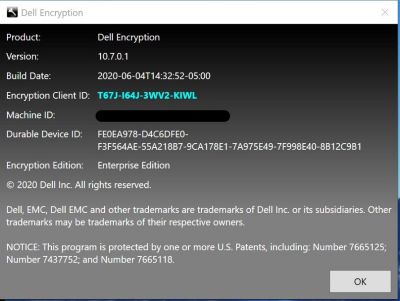
- Når Dell Encryption-programmet er åbent, skal du klikke i øverste højre hjørne. Vælg derefter Om version x.x.x.xxxx
- Herfra kan du se følgende:
- Hvis skjold-id'et er tomt eller rødt, er computeren ikke aktiveret.
- Hvis skjold-id'et er grønt eller blåt, er computeren blevet aktiveret.
For at kontakte support kan du bruge internationale supporttelefonnumre til Dell Data Security.
Gå til TechDirect for at oprette en anmodning om teknisk support online.
Hvis du vil have yderligere indsigt og ressourcer, skal du tilmelde dig Dell Security Community-forummet.
Additional Information
Videos
Affected Products
Dell EncryptionArticle Properties
Article Number: 000129423
Article Type: How To
Last Modified: 24 Apr 2025
Version: 13
Find answers to your questions from other Dell users
Support Services
Check if your device is covered by Support Services.