Dell Encryption -päätepisteen aktivoinnin tilan vahvistaminen
Summary: Päätepisteen aktivoinnin tilan vahvistaminen Dell Encryptionissa (aiemmin Dell Data Protection | Salaus).
This article applies to
This article does not apply to
This article is not tied to any specific product.
Not all product versions are identified in this article.
Instructions
Tuotteet, joita asia koskee:
- Dell Encryption
- Dell Data Protection | Encryption
Käyttöjärjestelmät, joita asia koskee:
- Windows
Voit varmistaa päätepisteen aktivoinnin tilan seuraavasti.
- Avaa paikallinen Dell Encryption -konsoli valitsemalla Käynnistä-valikosta Kaikki ohjelmat ja Dell Encryption.
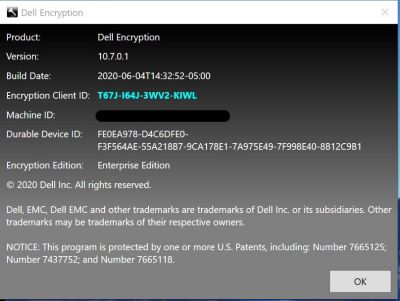
- Kun Dell Encryption -sovellus on auki, napsauta sitä oikeassa yläkulmassa. Valitse About Version x.x.x.xxxx
- Näet seuraavat tiedot:
- Jos Shield ID on tyhjä tai punainen, tietokonetta ei ole aktivoitu.
- Jos Shield ID on vihreä tai sininen, tietokone on aktivoitu.
Jos haluat ottaa yhteyttä tukeen, katso luettelo Dell Data Securityn kansainvälisen tuen puhelinnumeroista.
TechDirectissä voit luoda teknisen tukipyynnön verkossa.
Lisätietoja ja resursseja on Dell Security Community Forum -keskustelufoorumilla.
Additional Information
Videos
Affected Products
Dell EncryptionArticle Properties
Article Number: 000129423
Article Type: How To
Last Modified: 24 Apr 2025
Version: 13
Find answers to your questions from other Dell users
Support Services
Check if your device is covered by Support Services.