Dell Encryption Endpointのアクティベーション ステータスを検証する方法
Summary: Dell Encryption(旧Dell Data Protection | 暗号化)。
This article applies to
This article does not apply to
This article is not tied to any specific product.
Not all product versions are identified in this article.
Instructions
対象製品:
- Dell Encryption
- Dell Data Protection | Encryption
対象オペレーティング システム:
- Windows
次の手順に従って、エンドポイントのライセンス認証状況を検証することができます。
- [Start All Programs Dell Encryption]から、Dell Encryptionのローカル コンソールを開きます。
- Dell Encryptionアプリケーションが開いたら、右上隅をクリックします。次に[About Version x.x.x.xxxx]をクリックします。
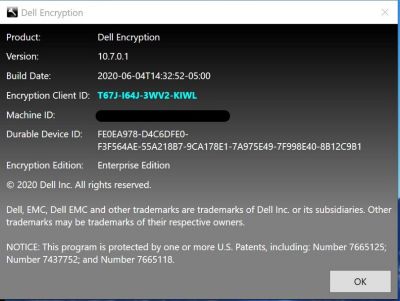
- すると、次のように情報が表示されます。
- Shield IDが空白または赤色の場合は、PCはライセンス認証されていません。
- Shield IDが緑色または青色の場合は、PCはライセンス認証されています。
サポートに問い合わせるには、「Dell Data Securityのインターナショナル サポート電話番号」を参照してください。
TechDirectにアクセスして、テクニカル サポート リクエストをオンラインで生成します。
さらに詳しい情報やリソースについては、「デル セキュリティ コミュニティー フォーラム」に参加してください。
Additional Information
Videos
Affected Products
Dell EncryptionArticle Properties
Article Number: 000129423
Article Type: How To
Last Modified: 24 Apr 2025
Version: 13
Find answers to your questions from other Dell users
Support Services
Check if your device is covered by Support Services.