De activeringsstatus van een Dell Encryption Endpoint valideren
Summary: De activeringsstatus van een eindpunt valideren in Dell Encryption (voorheen Dell Data Protection | Versleuteling).
This article applies to
This article does not apply to
This article is not tied to any specific product.
Not all product versions are identified in this article.
Instructions
Betreffende producten:
- Dell Encryption
- Dell Data Protection | Encryption
Betreffende besturingssystemen:
- Windows
U kunt de activeringsstatus van uw eindpunt valideren door de volgende stappen uit te voeren.
- Open de lokale Dell Encryption console door naar Alle programma's starten Dell Encryption te gaan.
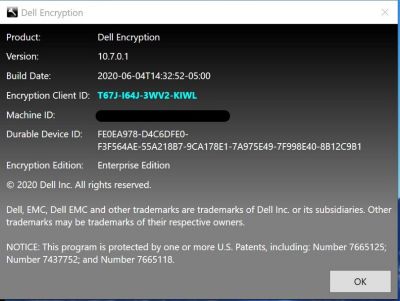
- Zodra de Dell Encryption applicatie is geopend, klikt u op in de rechterbovenhoek. Selecteer vervolgens Over Versie x.x.x.xxxx
- Hier ziet u het volgende:
- Als de Shield-ID leeg of rood is, is de computer niet geactiveerd.
- Als de Shield ID groen of blauw is, is de computer geactiveerd.
Als u contact wilt opnemen met support, raadpleegt u de internationale telefoonnummers voor support van Dell Data Security.
Ga naar TechDirect om online een aanvraag voor technische support te genereren.
Voor meer informatie over inzichten en hulpbronnen kunt u zich aanmelden bij het Dell Security Community Forum.
Additional Information
Videos
Affected Products
Dell EncryptionArticle Properties
Article Number: 000129423
Article Type: How To
Last Modified: 24 Apr 2025
Version: 13
Find answers to your questions from other Dell users
Support Services
Check if your device is covered by Support Services.