Så här validerar du aktiveringsstatusen för en Dell Encryption-slutpunkt
Summary: Så här validerar du aktiveringsstatusen för en slutpunkt i Dell Encryption (tidigare Dell Data Protection | Kryptering).
This article applies to
This article does not apply to
This article is not tied to any specific product.
Not all product versions are identified in this article.
Instructions
Berörda produkter:
- Dell Encryption
- Dell Data Protection | Encryption
Berörda operativsystem:
- Windows
Du kan verifiera aktiveringsstatusen för slutpunkten genom att utföra följande steg.
- Öppna den lokala Dell Encryption-konsolen genom att gå till Start All Programs Dell Encryption.
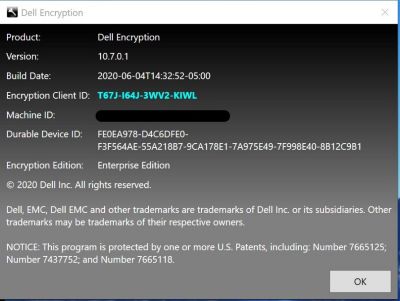
- När Dell Encryption-programmet är öppet klickar du på i det övre högra hörnet. Välj sedan Om version x.x.x.xxxx
- Härifrån ser du följande:
- Om sköld-ID är tomt eller rött har datorn inte aktiverats.
- Om sköld-ID är grönt eller blått har datorn aktiverats.
Om du vill kontakta support, se Dell Data Security telefonnummer till internationell support.
Gå till TechDirect för att skapa en begäran om teknisk support online.
Om du vill ha mer information och resurser kan du gå med i Dell Security Community-forumet.
Additional Information
Videos
Affected Products
Dell EncryptionArticle Properties
Article Number: 000129423
Article Type: How To
Last Modified: 24 Apr 2025
Version: 13
Find answers to your questions from other Dell users
Support Services
Check if your device is covered by Support Services.