如何驗證 Dell Encryption 端點的啟動狀態
Summary: 如何驗證 Dell Encryption 中端點的啟動狀態 (先前稱為 Dell Data Protection | 加密)。
This article applies to
This article does not apply to
This article is not tied to any specific product.
Not all product versions are identified in this article.
Instructions
受影響的產品:
- Dell Encryption
- Dell Data Protection | Encryption
受影響的作業系統:
- Windows
您可以執行下列步驟來驗證端點的啟動狀態。
- 前往「開始」、「所有程式」、「Dell Encryption」,開啟 Dell Encryption 本機主控台。
- Dell Encryption 應用程式開啟後,請按一下右上角。然後選取「關於版本 x.x.x.xxxx」
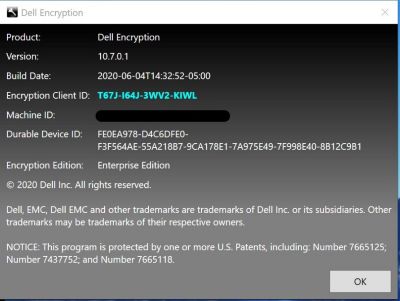
- 從這裡,您會看到下列內容:
- 如果護蓋 ID 為空白或紅色,則電腦尚未啟動。
- 如果護蓋 ID 為綠色或藍色,則電腦已啟動。
如要聯絡支援部門,請參閱 Dell Data Security 國際支援電話號碼。
請前往 TechDirect,以線上產生技術支援要求。
如需更多深入見解與資源,請加入 Dell 安全性社群論壇。
Additional Information
Videos
Affected Products
Dell EncryptionArticle Properties
Article Number: 000129423
Article Type: How To
Last Modified: 24 Apr 2025
Version: 13
Find answers to your questions from other Dell users
Support Services
Check if your device is covered by Support Services.